
Quick Answer: How Should Enterprise Apps Add Task-Specific AI Agents?
Enterprise apps should add task-specific AI agents one workflow at a time, starting with repeated work where the agent can read approved context, use limited tools, draft or execute bounded actions, and prove measurable ROI. The roadmap should define the user job, source systems, integration scope, permission model, human review pattern, rollout gates, and success metric before engineering starts.
The mistake is treating agents as a feature toggle. A task-specific agent changes how users move through the application: the interface becomes more outcome-led, the app needs stronger data context, and every tool action needs permissions, logging, fallback, and measurable business ownership. Teams that skip this product work usually ship a chatbot that cannot complete the workflow or an overpowered agent that creates operational risk.
This guide is for SaaS founders, CIOs, enterprise product leaders, and operations teams deciding where agents belong inside existing applications. Before funding a build, score the candidate workflow with the AI Agent Readiness Assessment and estimate payback with the AI Automation ROI Calculator.
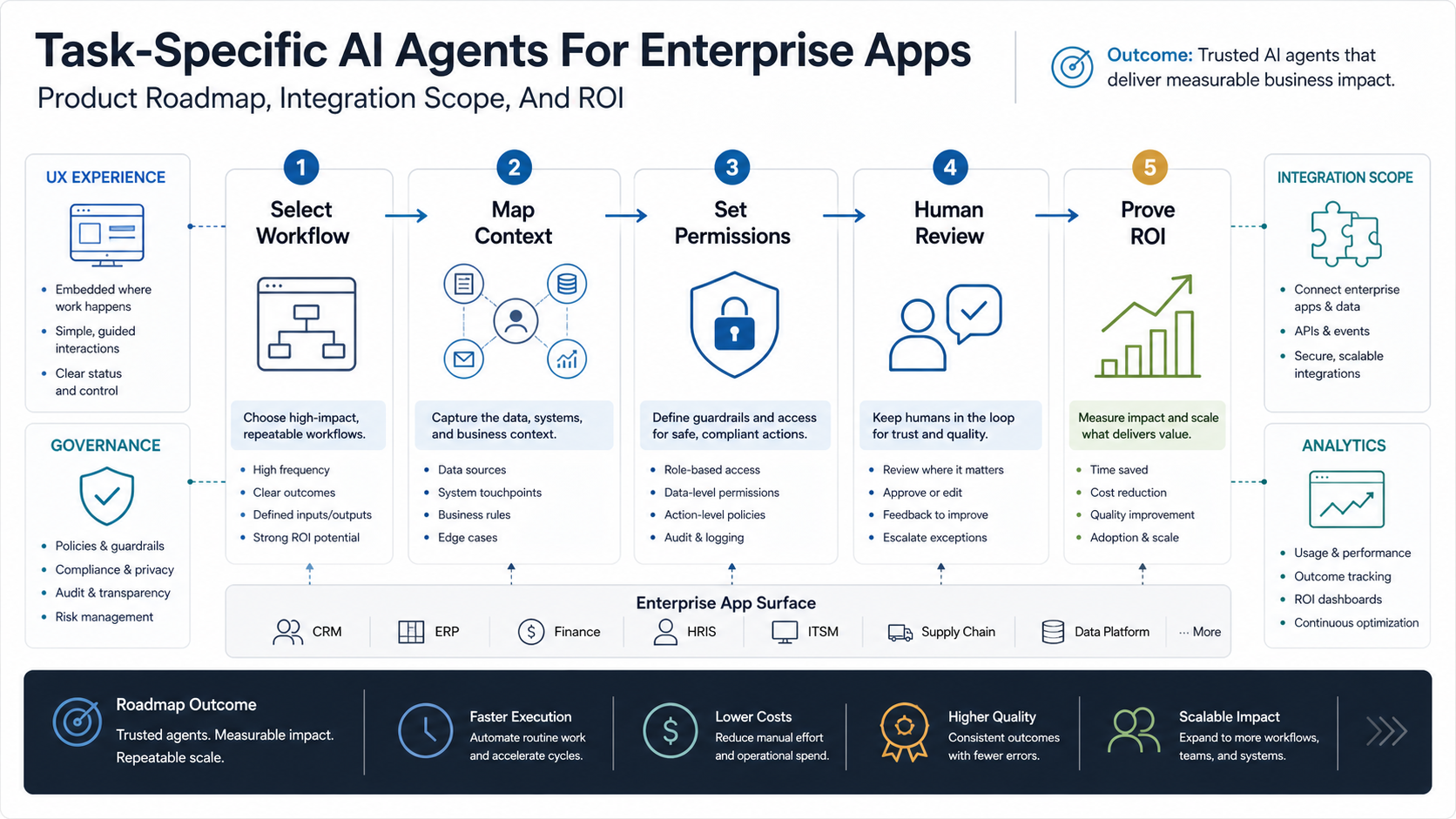
Why Task-Specific Agents Are Different
Gartner predicts that up to 40% of enterprise applications will include integrated task-specific agents by 2026, up from less than 5% in 2025. That shift matters because the agent is no longer a separate assistant beside the product. It becomes part of the product's core workflow, decisioning, permission, UX, and measurement model.
A task-specific agent is not a general workplace assistant. It is designed for a narrow job such as qualifying a support ticket, preparing an invoice exception, reconciling purchase-order data, drafting a renewal plan, routing an onboarding task, or updating a CRM record after a call. The narrower the job, the easier it is to define context, tools, safety limits, and ROI.
Gartner has also warned that many agentic AI projects can fail when costs, business value, or risk controls are unclear. That is the core product lesson: roadmap discipline matters more than model novelty. A credible agent roadmap explains what the agent can do, where it must stop, who reviews it, how evidence is captured, and which business metric justifies the next release.
2026 source-status check: this roadmap remains current against Gartner's task-specific agent adoption forecast, Gartner's agentic AI cancellation-risk warning, Microsoft Learn's July 2026 agent governance guidance, Microsoft Agent 365 control-plane positioning, Copilot Studio governance updates, and current enterprise-agent architecture guidance. The practical implication is unchanged: ship narrow agents with named ownership, identity-aware access, review queues, audit logs, cost controls, and workflow-level ROI evidence before expanding autonomy.
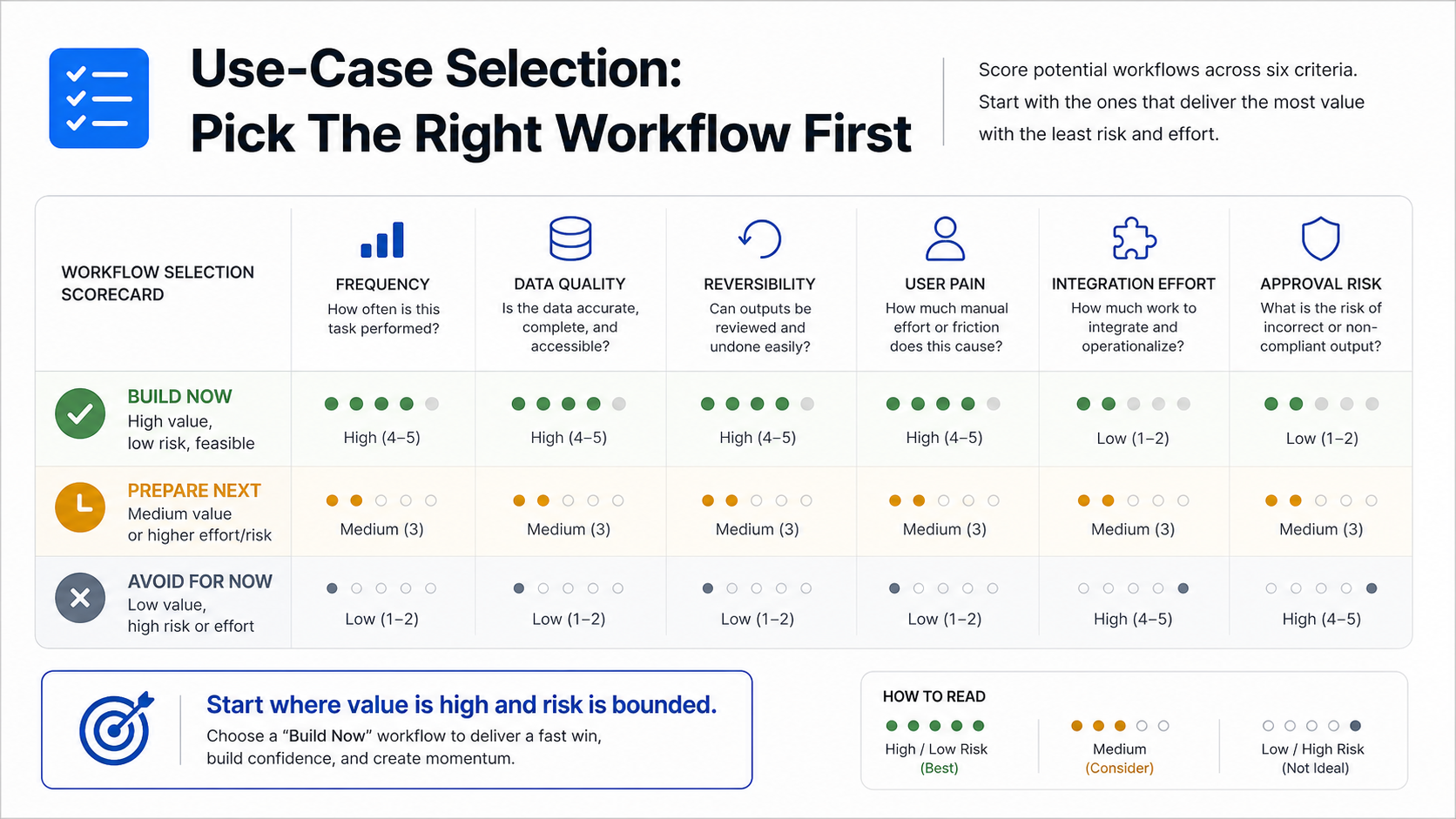
Use-Case Selection: Pick The Right Workflow First
Start with workflows that are frequent, structured enough to evaluate, painful enough to matter, and narrow enough to govern. Good first candidates usually combine high manual effort with a clear source of truth and a reversible action path. If the team cannot name the owner, source systems, exception path, and success metric, the workflow is not ready for an agent build.
| Workflow Candidate | Agent Can Do | Measure ROI With | Delay If |
|---|---|---|---|
| Support Triage | Classify tickets, retrieve account context, draft replies, route escalations | First response time, handling time, reopen rate | Categories and escalation rules are undocumented |
| Sales Operations | Summarize calls, update CRM fields, draft follow-ups, flag deal risks | Rep admin time, data completeness, stage velocity | CRM hygiene is too poor to trust |
| Finance Ops | Match invoices, flag exceptions, draft approval notes, reconcile records | Cycle time, exception touches, error reduction | Write-back has no approval path |
| Customer Onboarding | Create setup tasks, gather missing inputs, coordinate handoffs, draft status updates | Time to launch, handoff quality, customer effort | The onboarding process differs by every account |
| Internal IT | Resolve common requests, provision approved access, route incidents | Ticket deflection, SLA hit rate, access errors | Permission boundaries are unclear |
Use the Workflow Automation Opportunity Finder when the backlog has too many possible candidates. It helps compare repeatability, data access, manual pain, exception volume, and implementation risk before the first sprint.
The Product Roadmap
A practical roadmap has five stages. First, choose the workflow and define the exact outcome. Second, map the data and APIs the agent needs. Third, set permissions and write-back limits. Fourth, launch human review and exception handling. Fifth, measure ROI and decide whether to expand autonomy.
This sequence keeps teams from overbuilding. The first version may only draft, classify, summarize, and recommend. That is useful when it removes search and preparation work while keeping users in control. Later versions can execute low-risk actions after quality, adoption, and incident data prove the workflow is stable.
| Roadmap Gate | Output Before Engineering Continues | What Usually Breaks |
|---|---|---|
| Workflow Definition | Owner, trigger, user role, expected outcome, baseline metric | The team picks a visible pain point but not a repeatable workflow |
| Context Mapping | Data sources, freshness rules, retrieval constraints, missing records | The agent lacks trusted context or sees too much sensitive data |
| Tool Scope | Approved APIs, read/write actions, rate limits, rollback path | Write-back permissions are broader than the workflow requires |
| Review Design | Approval queue, confidence display, escalation path, correction labels | Humans cannot inspect or correct output fast enough |
| ROI Proof | Cost per task, time saved, quality rate, adoption, exception rate | The pilot reports model accuracy but not business value |
Integration Architecture And Scope
Enterprise agents depend on integration quality. Platform guidance from Microsoft, OpenText, and Dataiku all points toward the same pattern: agents need governed access to business systems, data, and tools, not only a prompt wrapped around an LLM. In practice, the app team needs a trigger layer, context layer, reasoning layer, tool layer, control layer, and analytics layer.
The trigger layer starts the job from a ticket, form, event, record update, message, scheduled job, or user command. The context layer retrieves customer, contract, policy, product, operational, or financial data. The reasoning layer plans the next step. The tool layer reads and writes through approved APIs. The control layer enforces permissions, review, audit logs, and rollback. The analytics layer measures adoption, output quality, latency, cost, and business outcome.
Scope the first integration around the workflow's minimum trusted context. A support-triage agent may need ticket history, account tier, product usage, entitlement, and knowledge-base retrieval, but not billing write access. A finance exception agent may need invoice, purchase order, vendor, tax, approval, and ERP status data, but should write only draft recommendations until approvals are proven. This boundary keeps integration work focused and makes security review easier.
For teams building this into a product, AI development services should cover retrieval, orchestration, evaluations, production observability, and business workflow design. Model selection is only one part of the architecture. If the agent must live inside a SaaS platform, customer portal, internal tool, or workflow dashboard, the roadmap also needs custom software development discipline around roles, UX, test coverage, release gates, and maintainability.
Agent Control Plane: Permissions, Review, Audit, And Metrics
Enterprise agents need a control plane because they are delegated actors. Microsoft's current guidance emphasizes ownership, identity, lifecycle management, observability, security, and data governance for agents across the organization. That should translate into product requirements: every task-specific agent needs an owner, inventory record, permission scope, policy gate, review rule, audit trail, and operating metric.
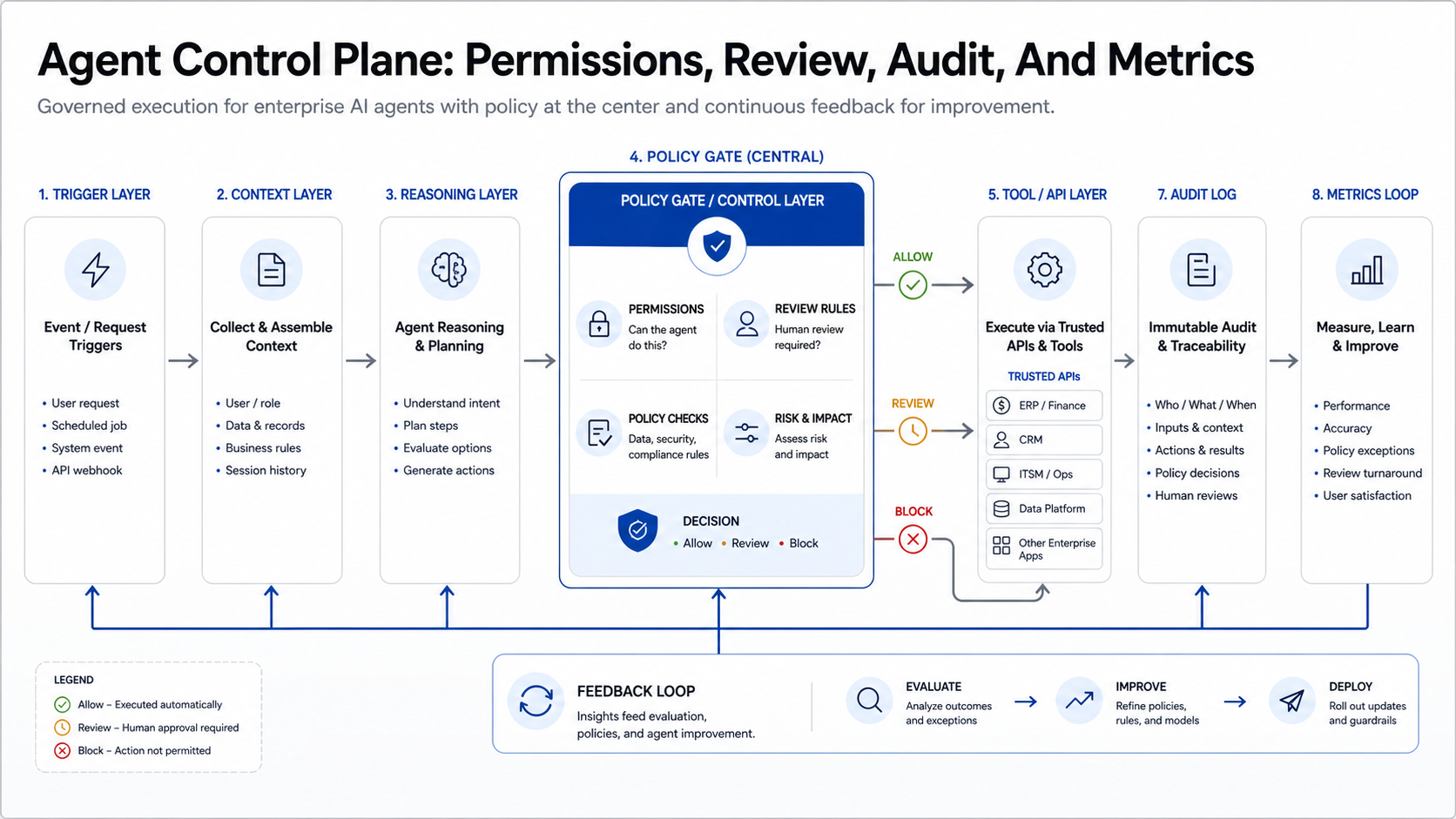
The control plane does not need to be a separate platform on day one. For a first product release, it can be a set of explicit services and tables: agent identity, source allowlist, tool allowlist, action policy, approval workflow, audit event schema, evaluation dataset, and dashboard. The important part is that the agent cannot silently expand its authority as new prompts, tools, or workflows are added.
For deeper governance planning, pair this roadmap with NextPage's enterprise AI agent governance guide and the newer agentic AI governance checklist. Those references help product and security teams align on ownership, human oversight, cost controls, monitoring, rollback, and auditability.
Permission Model: What Can The Agent Read, Draft, And Do?
The permission model should be more granular than a human role. An employee might have broad application access, but an agent should receive only the sources, tools, and actions needed for its specific job. Separate read access, draft access, reversible write access, and high-impact write access.
Palo Alto Networks describes agentic governance as management of delegated authority: what agents can access, what they can perform at runtime, and who is accountable. Those ideas should become product requirements, not after-launch policy notes.
- Give each agent a named identity and business owner.
- Map every tool invocation to a business permission.
- Require approval for actions that delete, spend, grant access, change financial data, or affect customers.
- Log the input, retrieved context, reasoning summary, tool call, output, reviewer, and final action.
- Use rate limits, cost limits, and anomaly alerts.
- Create a rollback path for every write-back.
UX Patterns That Make Agents Useful
Task-specific agents should feel like part of the workflow, not a blank chat window. Good UX patterns include suggested next actions, prefilled drafts, inline evidence, approval queues, confidence indicators, editable summaries, one-click escalation, and "why this recommendation" panels.
The user should know what the agent used, what it plans to do, and what requires review. For high-volume work, the interface should also support batch review, exception queues, and quick correction labels. Those correction labels become evaluation data for the next release.
In SaaS products, the best agent interface often sits inside an existing record page, inbox, queue, dashboard, or admin workflow. A blank assistant window is useful for exploration, but production agents need embedded context, visible evidence, and a clear handoff back to the user's normal work surface.
| UX Pattern | Use It When | What It Prevents |
|---|---|---|
| Inline Draft | The agent prepares a reply, note, summary, or field update | Users copy text between tools without evidence |
| Review Queue | Many recommendations need fast human approval | Approvals hide in chat history or email threads |
| Evidence Panel | The agent relies on policies, contracts, tickets, or records | Users cannot verify why the recommendation was made |
| Exception Path | The workflow has edge cases or low-confidence outputs | The agent guesses when it should escalate |
| Correction Labels | Outputs need continuous evaluation | Feedback stays anecdotal and cannot improve the next release |
ROI Model For Task-Specific Agents
ROI should be measured at the workflow level. Avoid broad claims like "AI improves productivity." Track the task baseline before launch, then measure the difference after the agent is in shadow mode and controlled production. The AI Workflow Automation ROI Guide is a useful companion when the team needs to compare payback, integration cost, and risk controls.
| Metric | What It Proves | Watch-Out |
|---|---|---|
| Minutes Saved Per Task | Operational efficiency | Does not prove quality |
| Cycle Time | Workflow speed | Can hide rework later |
| Human Correction Rate | Output quality and trust | Needs consistent review labels |
| Containment Or Resolution Rate | Agent completion value | Should exclude unsafe completions |
| Adoption Rate | User acceptance | Low adoption may indicate UX or trust gaps |
| Cost Per Resolved Task | Model and operations economics | Must include monitoring and support cost |
For a broader roadmap, connect the agent to existing modernization work. NextPage's enterprise AI agent implementation roadmap shows how workflow audits, pilot scope, and ROI gates turn agent ideas into controlled releases. The same principle applies to any enterprise app: the agent is only as useful as the workflow architecture around it.
A Phased Rollout Plan
| Phase | Output | Gate To Advance |
|---|---|---|
| Discovery | Workflow map, baseline metrics, source systems, risk register | Business owner and measurable outcome confirmed |
| Prototype | Read-only or draft-only agent with test cases | Representative outputs are useful and reviewable |
| Shadow Mode | Agent suggestions compared with human decisions | Error categories are understood and fixable |
| Controlled Launch | Limited users, approval path, monitoring, rollback | Quality, cost, adoption, and safety targets pass |
| Scale | Expanded workflow, more integrations, selective autonomy | Governance and support model can handle volume |
Shadow mode is especially important when the agent will touch customers, money, access rights, regulated records, or operational commitments. Let the agent recommend actions beside human decisions before it gets permission to execute anything. This creates a labeled evaluation set and exposes integration gaps before the workflow has production blast radius.
When To Build Custom Instead Of Waiting For Vendor Features
Use vendor-native agents when the workflow is common, low-risk, and deeply tied to one platform. Build custom when the workflow crosses multiple systems, encodes proprietary operations, needs differentiated UX, or requires a custom permission and approval model. In those cases, AI automation services can turn the agent into a real product workflow instead of an isolated assistant.
A custom build also makes sense when the agent experience is part of the product's competitive value. If customers pay for faster onboarding, cleaner operations, fewer manual handoffs, better compliance evidence, or differentiated workflow intelligence, the agent should follow the product roadmap rather than a vendor's generic release cycle. The tradeoff is ownership: the team must budget for evaluation data, observability, incident response, access reviews, and model or provider changes.
NextPage helps teams scope task-specific agents, design the product UX, connect APIs, build review flows, create evaluation sets, and ship controlled pilots. The right first step is an agent roadmap workshop: one workflow, one business owner, one ROI model, and one approval boundary.