
Scheduling and reminders are the operating layer of a doctor appointment booking app. Search, profiles, payments, and teleconsultation features matter, but the product only feels reliable when patients can find the right slot, receive timely reminders, reschedule without friction, and trust that the clinic calendar stays accurate.
This guide expands the core scheduling and reminder decisions for teams planning a healthcare booking product. For the broader product feature set, pair this workflow with the key features for doctor appointment booking app checklist.
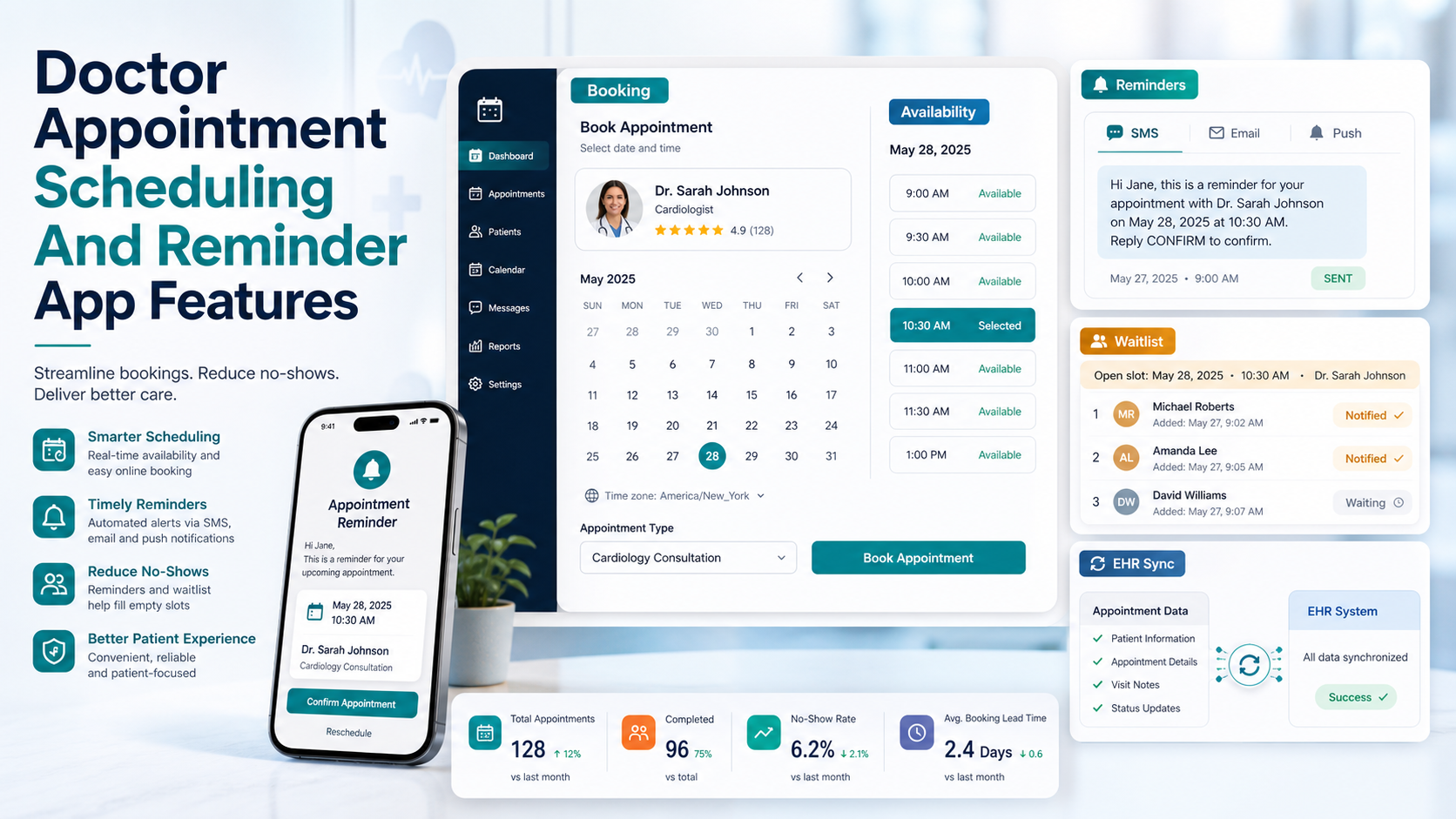
Quick Answer: What Scheduling And Reminder Features Matter Most?
A strong doctor appointment scheduling module should include real-time provider availability, appointment type rules, patient self-booking, calendar sync, automated reminders, easy rescheduling, cancellation windows, waitlist fills, staff notifications, and EHR or practice management integration. The goal is not only to book a slot; it is to protect provider capacity and reduce missed appointments.
Start With A Clean Booking Workflow
The booking flow should help patients move from intent to confirmed appointment without unnecessary calls or staff intervention. A practical workflow includes specialty search, provider selection, location or telehealth choice, appointment type, insurance or payment signals, available slots, intake requirements, and confirmation.
For healthcare teams building this from scratch, the commercial scope should be defined before UI design. A focused doctor appointment booking app development plan can map the scheduling engine, patient app, provider panel, and admin workflows before engineering begins.
Use Real-Time Availability Instead Of Static Slots
Static slots create double-booking risk and force staff to repair conflicts manually. Real-time availability should account for working hours, holidays, provider breaks, appointment duration, service type, clinic location, telehealth capacity, buffer time, and already-confirmed bookings.
The availability engine should also handle rules such as new-patient appointments requiring longer slots, follow-up visits needing less time, and procedures requiring specific rooms or equipment. These rules keep the patient interface simple while protecting clinic operations behind the scenes.
Design Reminder Logic That Reduces No-Shows
Reminder systems work best when they are multi-channel and behavior-aware. Instead of sending one generic reminder, use a sequence such as email 72 hours before, SMS 24 hours before, push notification 4 hours before, and a staff follow-up only when the patient has not confirmed.
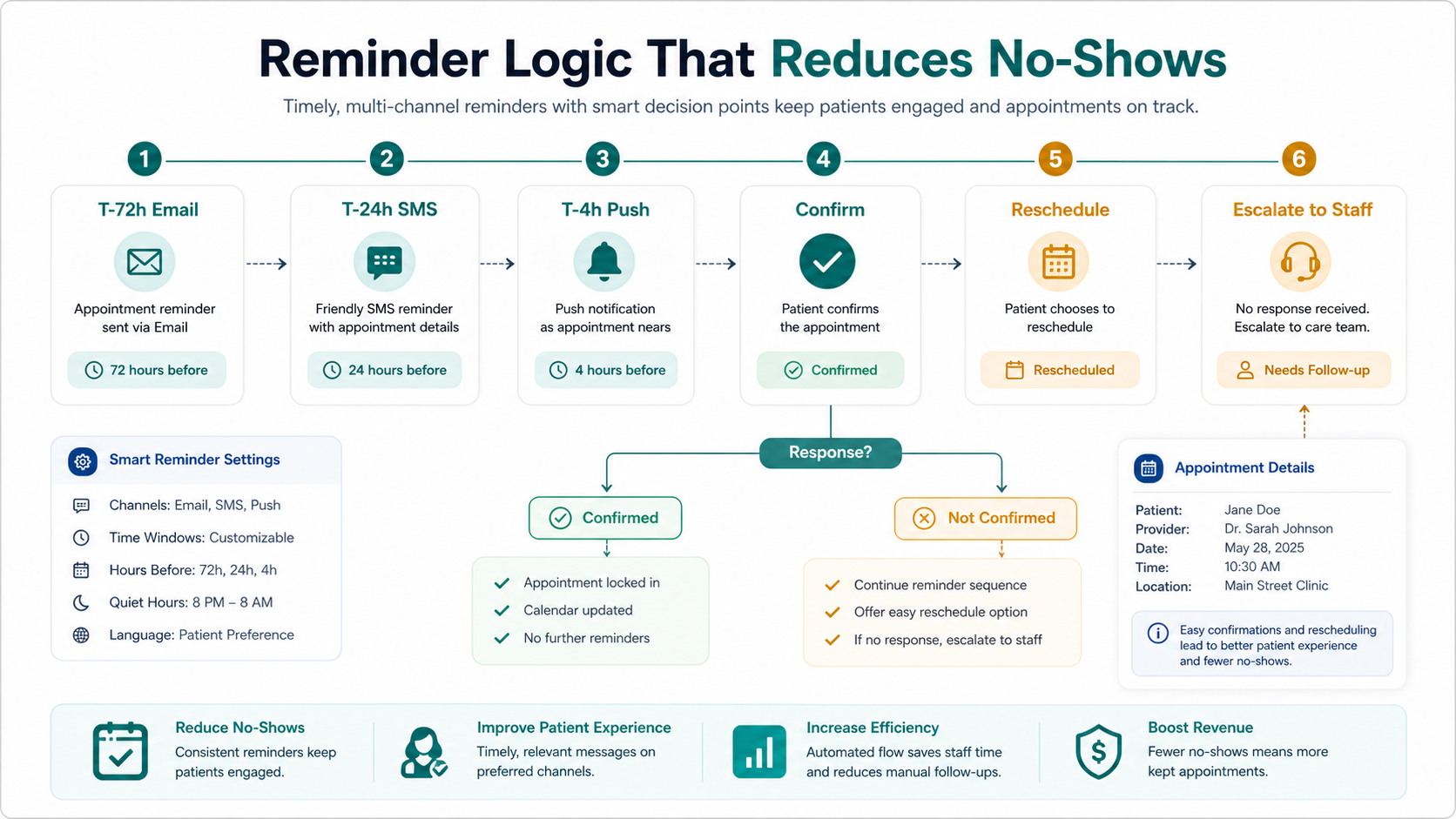
Every reminder should include the appointment date, time, provider, location or video link, preparation instructions, confirmation action, and reschedule path. This reduces uncertainty for patients and prevents the reminder workflow from becoming another administrative task for staff.
Make Rescheduling And Cancellation Safe
Rescheduling should be easy for patients but controlled by business rules. Clinics may need cancellation windows, late-cancellation flags, provider-specific policies, and admin overrides. The app should show clear options before the patient cancels, including the next available slot and whether a fee or staff review applies.
When a patient cancels, the system should immediately release the slot, notify staff when required, update the provider calendar, and offer the opening to waitlisted patients. This turns cancellations into a recovery workflow instead of a lost appointment.
Add Waitlist Management For High-Demand Providers
A waitlist is especially useful for specialists, diagnostics, and high-demand appointment types. Patients should be able to join the waitlist with preferred dates, times, providers, and locations. When a slot opens, the system can notify matched patients in order of priority or first response.
For staff, waitlist controls should show why a patient matched, how long the offer remains open, and whether manual approval is needed. This keeps the experience fair and prevents overbooking.
Support Calendar Sync And EHR Integration
Calendar sync helps patients remember appointments and helps providers manage their day, but the scheduling system should remain the source of truth. External calendars can receive appointment details, while the app controls status changes, reminders, cancellation rules, and clinical data boundaries.
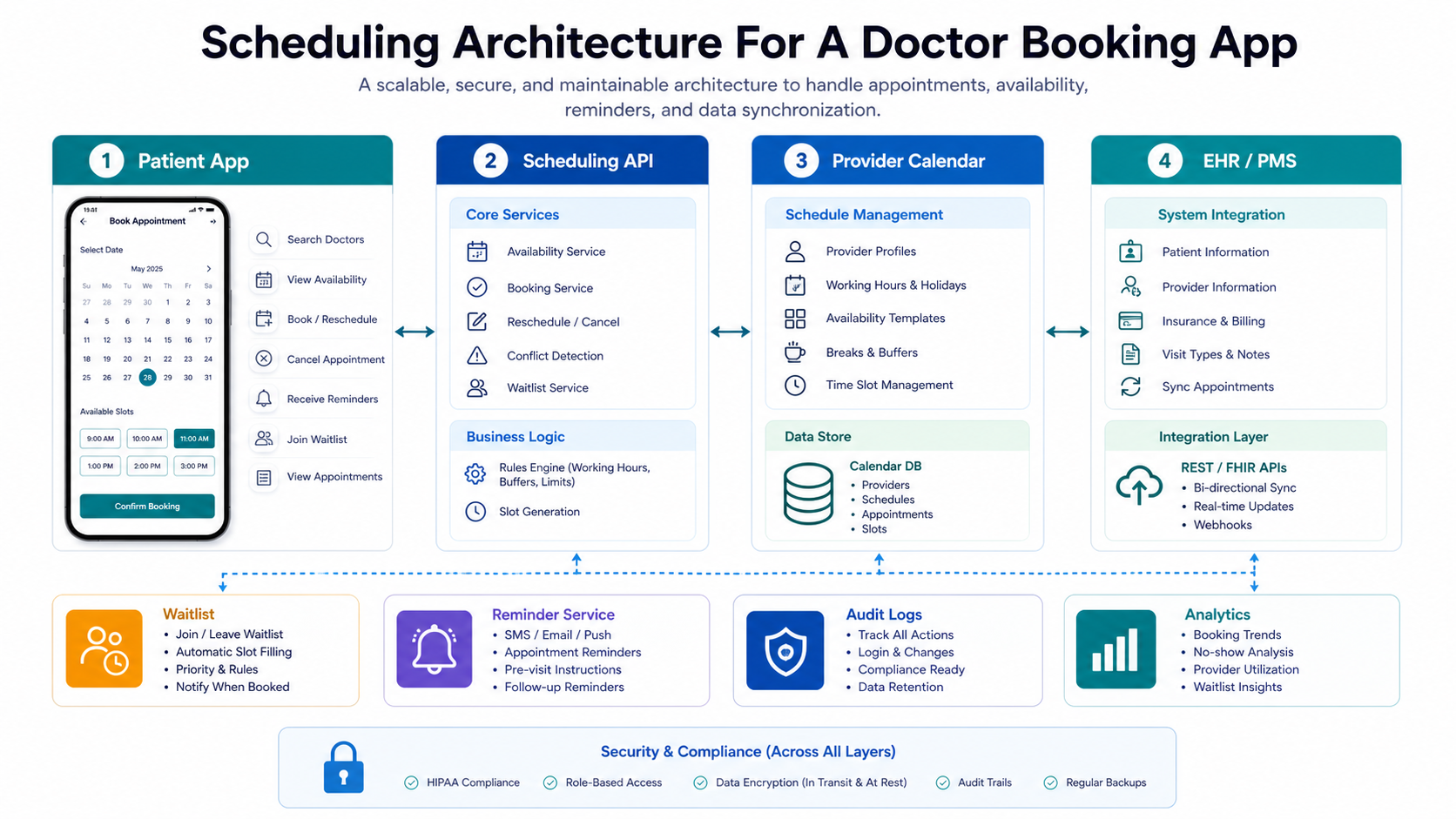
EHR or practice management integration should be designed carefully. At minimum, the scheduling layer may need patient identifiers, provider details, appointment type, visit status, and notes about pre-visit requirements. Keep protected health information limited to what the booking workflow genuinely needs.
Track The Metrics That Show Scheduling Quality
Scheduling performance should be measured after launch. Useful metrics include booking completion rate, no-show rate, cancellation rate, reschedule rate, average booking lead time, provider utilization, waitlist conversion, reminder confirmation rate, and staff intervention volume.
These metrics help product teams see whether reminders are sent at the right time, whether patients understand the flow, and whether providers have too many unused or overbooked slots.
Implementation Checklist
- Define appointment types, durations, buffers, locations, and provider availability rules.
- Build self-booking with clear confirmation and preparation instructions.
- Use automated reminders across email, SMS, and push where consent allows.
- Add rescheduling, cancellation windows, and staff override workflows.
- Use waitlists to recover cancelled or newly opened slots.
- Sync patient-facing calendars without making them the operational source of truth.
- Integrate with EHR or practice management systems only where the booking workflow needs it.
- Monitor no-shows, confirmations, reschedules, and provider utilization after release.
Sum Up
Scheduling and reminders are not minor convenience features. They directly affect clinic capacity, staff workload, patient satisfaction, and revenue leakage from missed appointments. A well-designed doctor appointment booking app should combine real-time availability, thoughtful reminders, safe rescheduling, waitlist recovery, and integration discipline so the booking experience stays reliable for both patients and providers.