Construction Software Development

Custom Construction Software Development For Field-To-Office Operations

Plan and build construction software that connects daily reports, jobsite activity, subcontractor records, corrections, photo evidence, weather, office review, APIs, and reporting without forcing every team into the same rigid workflow.

See how we work
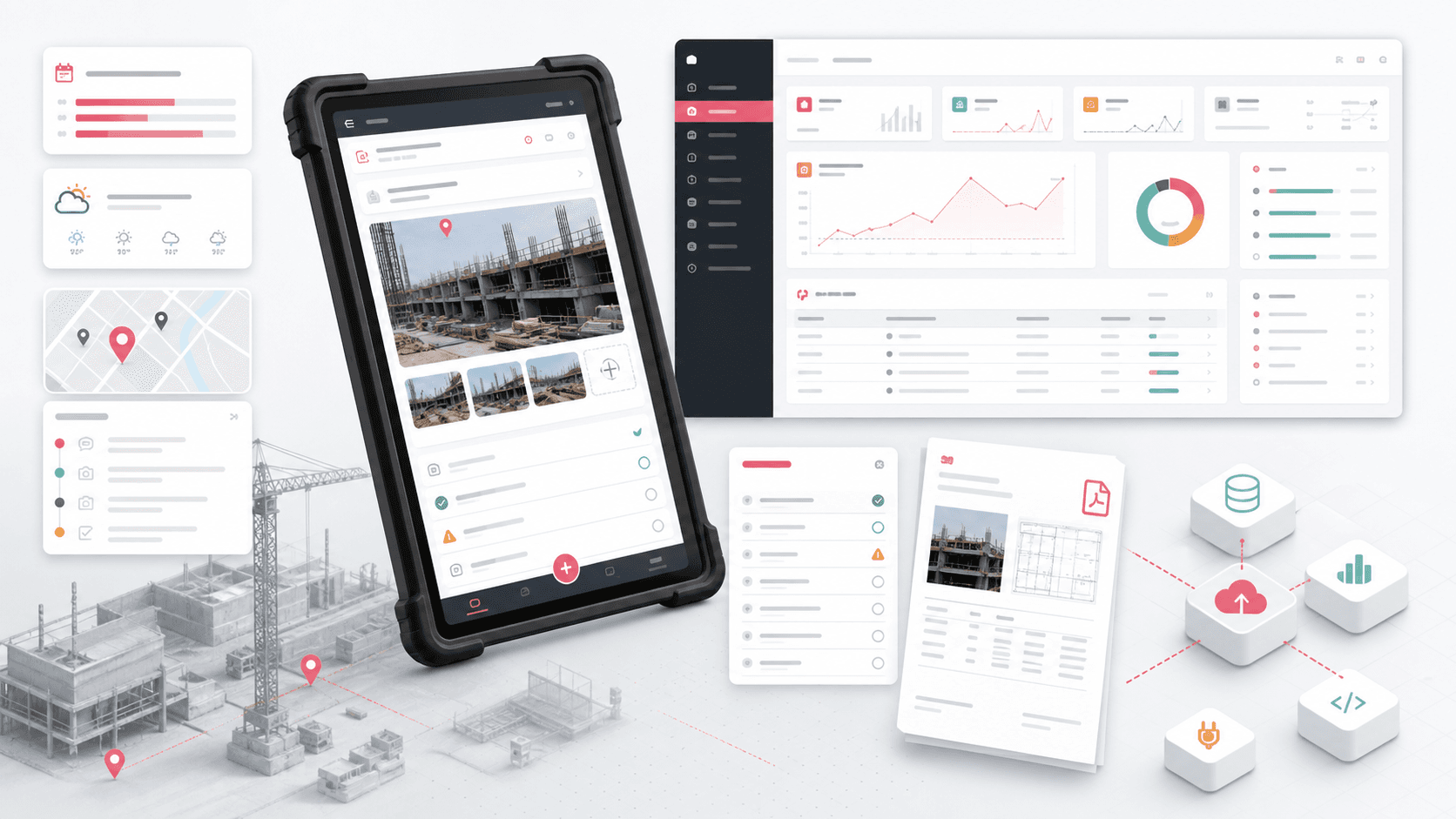
Construction field reporting software connecting a mobile jobsite app, daily logs, corrections, photo evidence, weather, administration, APIs, and PDF reports

Built for

Product, operations, and technology leaders who need a mobile and web system shaped around real jobsite reporting, evidence, review, integration, and rollout constraints.

3 layers
mobile, admin, and API delivery
Field
jobsite-first capture workflows
Evidence
photos, notes, weather, and status
PDF
structured daily report output
  • OpenAI logo
  • Google Gemini badge
  • AWS Partner Advanced Tier Services badge
  • Upwork top-rated developer agency badge
  • HubSpot Solution Partner badge
  • mathaccelmaking math easy for everyone
  • Shopify Partners badge
  • Google Developers logo
  • AWS Partner Services badge
  • Microsoft Partner logo
  • AWS Partner Cloud Operations Services Competency badge
  • Microsoft Azure badge
  • ucodecoding for kids
  • Mixpanel logo
  • AWS Partner Security Services Competency badge
  • IBM Business Partner logo
  • Google Cloud Services badge

A practical first-release plan built around one construction workflow that field and office teams can test together.

Connected mobile capture, browser administration, APIs, files, and reporting with explicit ownership and exception handling.

A phased path to add projects, crews, workflows, integrations, automation, and reporting as usage evidence grows.

Why this matters

Problems we remove before they become expensive

The best outsourcing and software projects work because expectations, ownership, and delivery rituals are clear from the first week.

Daily activity, subcontractor work, site context, photos, and corrections are reconstructed after the shift from messages and paper.

Field teams are asked to use desktop-shaped software that is slow on a phone and fragile when connectivity drops.

Office reviewers receive inconsistent descriptions because projects, locations, activity types, and correction codes are not governed centrally.

Evidence is stored separately from the work record, making review, reporting, and dispute context harder to assemble.

Packaged construction software covers the standard path but cannot represent the organization’s operating model, integrations, or product differentiation.

A broad replacement programme begins before the team has proved one useful field-to-office workflow.

What we build

A focused scope for this service

We shape the scope around the result you need, the systems you already have, and the first release that can create value.

Daily Reports And Jobsite Activity

Capture what happened by project, date, location, activity, completion state, notes, weather, and evidence while the context is still available.

  • Project, date, location, weather, crew, activity, and progress context
  • Structured notes, timestamps, photos, files, and completion or compliance states
  • Reviewable daily folders and report output instead of disconnected updates

Subcontractor And Workforce Records

Give field teams a focused way to record subcontractor activity without turning every daily report into one overloaded form.

  • Company, trade, activity, work area, worker count, and time fields
  • Task status, notes, exceptions, and supporting image evidence
  • Configurable contractor, activity, and location data for consistent reporting

Jobsite Visit Logs And Corrections

Record site visits and corrective work as operational evidence. A visit log is not a physical access-control system, and broader access functions should be scoped separately.

  • Visitor, company, role, reason, location, and arrival or departure context
  • Correction category, description, inspection state, responsible person, and evidence
  • Clear distinction from badges, gates, inductions, turnstiles, and emergency roll calls

Mobile And Offline-Aware Field Work

Design the field experience for cameras, weak connectivity, repeated entry, interruptions, and visible synchronization states rather than treating mobile as a smaller admin screen.

  • Fast project and location selection with saved field context
  • Camera, gallery, voice, file, GPS, weather, and permission workflows where useful
  • Local queues, retries, idempotency, conflict rules, and repair paths when offline support is required

Administration, Taxonomies, And Review

Give office teams control over the reference data and review paths that keep field records comparable across projects and crews.

  • Projects, users, roles, locations, activity trees, and correction codes
  • Imports, samples, search, filters, pagination, and report detail review
  • Role-aware navigation, approvals, audit events, and exception queues

APIs, Integrations, Files, And Reporting

Connect field and office surfaces through contracts that preserve record ownership, media relationships, observability, and reliable exports.

  • Backend APIs for projects, users, roles, work logs, activities, visits, corrections, and files
  • Integration planning for ERP, accounting, scheduling, document, identity, or existing construction systems
  • PDF generation, static media, logging, profiling, API documentation, and support workflows

Technology stack

Tech stack for mobile application development

We choose the mobile stack around product stage, target devices, performance needs, integrations, and long-term maintenance, not a one-size-fits-all template.

Mobile frontend

Native and cross-platform choices for the screens users touch every day.

SW

Swift

Native iOS apps

KT

Kotlin

Native Android apps

RN

React Native

Shared mobile codebases

FL

Flutter

Fast cross-platform UI

Backend and APIs

Server systems that handle accounts, data, workflows, notifications, and integrations.

Node.js

APIs and realtime flows

PY

Python

Automation and data services

REST APIs

Mobile backend contracts

GQL

GraphQL

Flexible product data

Data and cloud services

Storage and cloud choices for product data, sync, analytics, and admin workflows.

PostgreSQL

Relational product data

MySQL

Business systems and CMS data

MongoDB

Document-style data

FB

Firebase

Auth, sync, and analytics

QA and release

Testing and rollout tooling that reduces store-launch and device-fragmentation risk.

Appium

Mobile automation testing

TF

TestFlight

iOS beta releases

Postman

API validation

Device testing

Real viewport coverage

DevOps and monitoring

Release pipelines, observability, and operating signals for post-launch reliability.

Docker

Portable backend services

GitHub Actions

CI/CD workflows

Sentry

Crash and error tracking

Firebase Analytics

Product usage signals

AI and ML features

Practical intelligence for search, recommendations, assistants, and mobile automation.

TensorFlow Lite

On-device ML

ML Kit

Mobile ML features

OpenAI APIs

LLM-powered workflows

LangChain

AI orchestration patterns

Delivery model

How we turn the first call into a working system

We keep discovery practical, ship in visible increments, and make ownership clear so you can scale with confidence.

1

Map The Field-To-Office Workflow

Document roles, daily records, reference data, evidence, exceptions, approvals, reporting, and system ownership before estimating screens.

2

Prototype The Jobsite Moments

Test the highest-frequency mobile capture and office review journeys with realistic devices, connectivity, sample records, and interruptions.

3

Build One Connected Release

Deliver the smallest end-to-end workflow across mobile, web, API, files, reporting, security, observability, and QA.

4

Roll Out And Expand With Evidence

Pilot with a bounded team or project, measure completion and exception quality, then add workflows, sites, integrations, and automation.

Engagement options

Flexible enough for a project, stable enough for a long-term team

Choose the model that fits your current stage. We can start small, add specialists, or run a full product pod.

Construction Workflow Discovery

Best when the operating process is known but the first-release boundary, architecture, integrations, and risk still need to be defined.

  • Stakeholder and workflow sessions
  • Prototype and architecture direction
  • Phased scope and estimate range

Focused Field Reporting MVP

Best when one team is ready to replace a specific paper, spreadsheet, or message-driven field-to-office loop.

  • Mobile field experience
  • Admin review and configuration
  • API, evidence, reporting, QA, and pilot support

Construction Product Delivery Pod

Best when a construction technology product or internal platform needs sustained mobile, web, backend, QA, and product support.

  • Cross-functional product team
  • Integrations and modernization
  • Release, support, and roadmap ownership

Delivery experience

BuildTrail: Construction Reporting Across Mobile, Admin, And API

For an NDA-protected engagement, NextPage connected Android jobsite capture, React administration, ASP.NET Core APIs, local device data, media evidence, imports, and PDF reporting.

Mobile daily reporting

Configurable office operations

API-backed evidence and exports

FAQ

Questions companies usually ask first

Clear answers help you understand how the engagement works before we get on a call.

What Is Included In Construction Software Development?

The service can include discovery, UX, mobile and web apps, backend APIs, project and user administration, daily reports, activity and subcontractor records, jobsite visit logs, corrections, photos and files, weather, imports, PDF output, integrations, security, QA, deployment planning, and support. The first release should include only the workflows needed to prove a useful operating result.

Can NextPage Build Both A Construction Field App And An Admin Dashboard?

Yes. A common pattern is a mobile field app for fast jobsite capture and a browser console for project setup, users, taxonomies, imports, review, search, reporting, and administration. A shared API and data model keep the two surfaces aligned.

Can A Construction Reporting App Work Offline?

Yes, when offline behavior is designed explicitly. The scope may include secure local storage, pending states, upload queues, retries, idempotency, conflict rules, and user-visible repair. Teams should decide which actions can be completed offline and which require server confirmation.

Is A Jobsite Visit Log The Same As Visitor Management Or Access Control?

No. A visit log records who visited, why, where, and when. Visitor management or access control can additionally require pre-registration, identity checks, badges, induction, gate hardware, access permissions, watchlists, evacuation lists, retention policy, and compliance workflows. Those capabilities need separate confirmation and design.

Can You Integrate With Existing Construction, ERP, Accounting, Or Document Systems?

We can design integrations when the target systems provide suitable APIs, webhooks, files, or partner access. Discovery identifies the owner for projects, people, costs, schedules, documents, and report records, then defines retries, conflict handling, monitoring, and reconciliation. Specific integrations are not assumed until access is verified.

Should We Build Custom Software Or Extend An Existing Construction Platform?

Extend an existing platform when its standard records and workflows cover most needs and an integration, portal, or tailored field experience closes the gap. Build custom when the operating model, multi-party permissions, offline workflow, evidence rules, customer product, or differentiation cannot be represented safely through configuration.

How Do You Scope A Construction Software MVP?

Start with one high-value field-to-office loop, a small role set, realistic sample data, known exceptions, the evidence needed for review, and only launch-critical integrations. Prototype the field and office moments together before expanding into a broad module list.

What Proof Does NextPage Have In Construction Field Reporting?

The NDA-safe BuildTrail case study documents a delivered Android field app, React admin console, ASP.NET Core API, local device data, media capture, daily logs, subcontractor records, jobsite visit logs, corrections, weather, imports, and PDF reporting. It describes delivered capability without publishing the client identity or unsupported business metrics.

Next step

Tell us what you want to build. We will map the first practical plan.

Share your goal, current stack, deadline, and team gaps. We typically respond within 24 hours.

Use the project form first

The form captures your goal, budget, timeline, and service context so we can route the lead, prepare properly, and keep follow-up inside the pipeline.