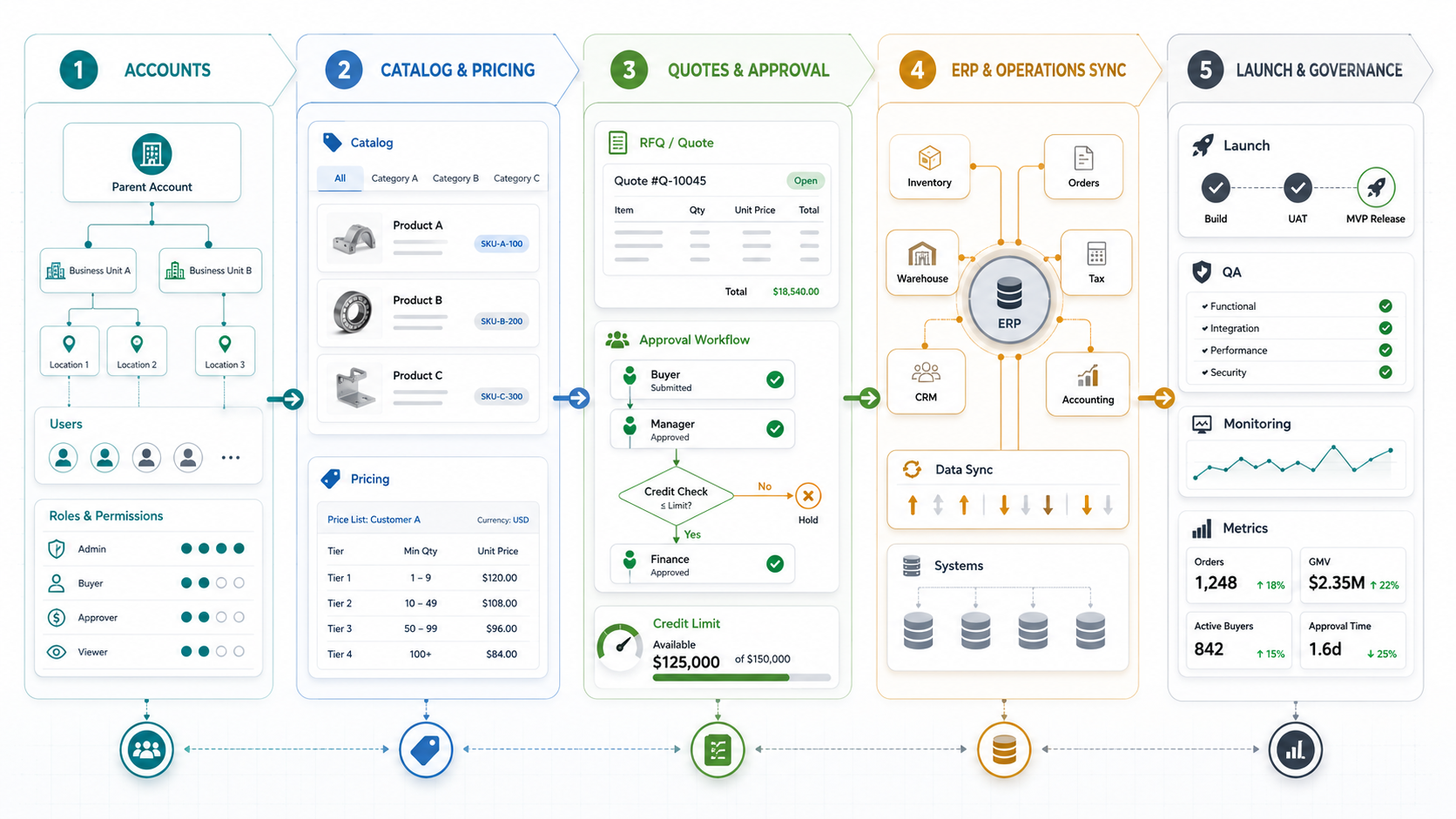

Quick Answer: What Should A B2B eCommerce Portal Roadmap Include?
A B2B eCommerce portal development roadmap should define the buyer account model, customer-specific catalogs, contract pricing, quote and approval workflows, ERP inventory and order sync, admin operations, payment terms, security controls, and rollout phases before design or development starts. The hard work is not only building a storefront. It is translating negotiated B2B selling into reliable software.
For manufacturers, distributors, wholesalers, and industrial suppliers, a B2B portal has to support how business customers already buy: multiple locations, several buyers under one company, role-based permissions, purchase approvals, saved lists, negotiated prices, credit limits, delivery constraints, tax rules, and order status visibility. If those rules are not mapped early, the portal becomes a thin catalog that still depends on manual email, spreadsheets, and phone follow-up.
NextPage approaches custom eCommerce web app development as an operations workflow first: who buys, who approves, what price applies, what inventory is real, what system owns the order, and what evidence proves the release is safe to launch.
Why B2B Portals Are Different From D2C Stores
D2C commerce usually optimizes for product discovery, conversion, payment, shipping, and retention. B2B commerce has those concerns, but the buying process is more account-driven. A single customer may include a parent company, branches, plants, departments, buyers, approvers, finance users, and field operators. Each group may need different catalogs, price lists, payment terms, tax treatment, approval limits, and delivery rules.
Current platform documentation makes this clear. Shopify B2B treats business customers as companies and lets merchants personalize pricing, currency, products, payment and shipping methods, store content, analytics, automations, APIs, and ERP integrations. Adobe Commerce B2B emphasizes company accounts, complex organization structures, purchasing permissions, customer-specific catalogs and pricing, negotiable quotes, purchase order approvals, company credit, quick order, and requisition lists.
The OrangeMantra source page validates market demand for custom B2B and B2C commerce portals, but it stays broad across custom eCommerce, catalog automation, cart optimization, warehouse automation, procurement automation, payment gateways, and integrations. The missing planning layer is the practical B2B operating model. That is where a roadmap should start.
The B2B eCommerce Portal Roadmap
A useful roadmap separates decisions into phases. Teams often try to launch every enterprise workflow in the first release because every department has a real need. That usually creates slow delivery, brittle integrations, and an admin interface nobody can maintain. A better roadmap names the MVP, the release blockers, and the later-phase workflows.
| Roadmap area | Decision to make | Evidence before build |
|---|---|---|
| Buyer account model | Company hierarchy, locations, roles, permissions, and buyer groups. | Account structure examples, role matrix, approval limits, invited-user flow. |
| Catalog and pricing | Shared catalog, customer catalog, contract pricing, volume tiers, promotions, and exclusions. | Price source of truth, sample customer contracts, exception rules, margin controls. |
| Quote and order workflow | RFQ, quote approval, purchase orders, credit limits, saved lists, quick order, reorder. | Workflow map, status model, email/notification triggers, admin ownership. |
| ERP and operations sync | Products, inventory, pricing, customers, orders, invoices, tax, shipping, warehouse, CRM, accounting. | Integration inventory, sync direction, failure handling, reconciliation plan. |
| Launch governance | MVP scope, QA, pilot accounts, analytics, support, training, rollout waves. | Acceptance criteria, test orders, monitoring dashboard, rollback plan. |
Start With The Buyer Account Model
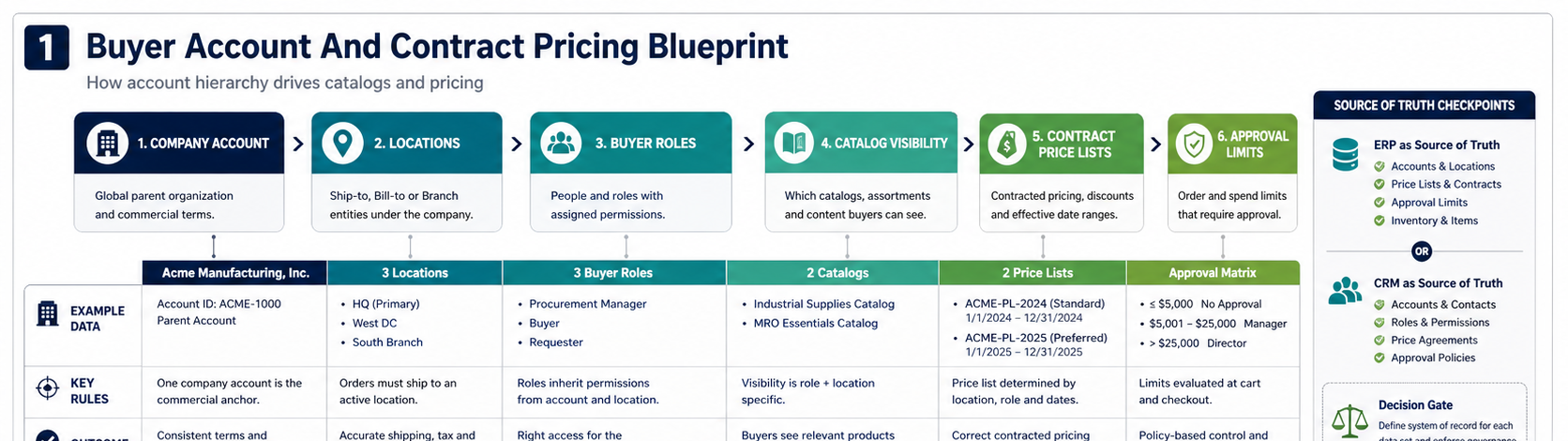
The account model is the backbone of a B2B portal. If it is wrong, every later feature becomes harder: pricing, approvals, addresses, taxes, reporting, support access, and ERP customer mapping.
Start by answering these questions:
- Company hierarchy: do customers buy as one company, multiple locations, regional subsidiaries, or department-level accounts?
- User roles: who can browse, build carts, request quotes, place orders, approve purchases, manage users, view invoices, or access credit information?
- Permissions: should buyers see all catalogs and addresses, or only assigned locations and product groups?
- Onboarding: are users invited by an admin, approved by sales, created through ERP/CRM sync, or self-registered with review?
- Support handoff: which sales rep, account manager, or service team owns each customer account?
This is why many B2B commerce projects overlap with web portal development. The portal is not only a buying surface; it is a secure workspace where customers, sales teams, operations, and finance share account-specific information.
Design Catalogs And Contract Pricing Before Checkout
Contract pricing is where generic eCommerce assumptions break. B2B buyers may have negotiated rates, customer-specific SKUs, regional availability, volume breaks, quote-only items, minimum order quantities, freight rules, and promotional exclusions. Some prices come from ERP. Some are managed by sales. Some are calculated from formulas or customer agreements.
Before the build, decide the pricing source of truth. If the ERP owns final price, the portal may need real-time price calls or scheduled price-list sync. If the portal owns customer catalogs, it needs admin workflows, approvals, audit history, and export paths back to finance or ERP. If sales can override prices in quotes, the quote workflow needs margin guardrails and approval rules.
| Pricing capability | MVP version | Later-phase version |
|---|---|---|
| Customer catalogs | Assigned catalog per company or location. | Multiple catalogs, rules by region, contract, brand, or product line. |
| Contract prices | Imported price lists with simple effective dates. | Tiered pricing, approval workflows, margin alerts, and quote overrides. |
| Availability | Show in-stock or request-quote status. | Warehouse-level availability, allocation, lead time, substitutes, backorder rules. |
| Promotions | Limited discounts controlled by customer group. | Rules by contract, account tier, volume, campaign, and excluded SKUs. |
For many teams, pricing scope is also a budget driver. NextPage's B2B app development cost guide is useful when deciding how roles, integrations, approvals, and security change the build plan.
Map Quote, Purchase Approval, And Order Workflows
B2B buyers do not always check out in one session with a credit card. They may request a quote, send a purchase order, route a cart for internal approval, buy on account, reorder from saved lists, or negotiate price and availability with sales. A portal roadmap should make these paths explicit instead of treating checkout as one generic flow.
Useful workflow questions include:
- Which products can be bought directly, and which require quote review?
- Can buyers upload a CSV, paste SKUs, or reorder from purchase history?
- What approval limits apply by role, department, location, or order value?
- When does a quote become an order, and what system records that conversion?
- Can customers pay by card, ACH, invoice, purchase order, credit line, or offline terms?
- What order status updates should customers see without contacting support?
The portal should reduce manual work, not simply move it to a different screen. If sales still has to retype quotes into ERP, operations still has to correct inventory manually, and customers still call for order status, the first release has missed the core workflow.
Plan ERP, CRM, Warehouse, And Accounting Integrations Early
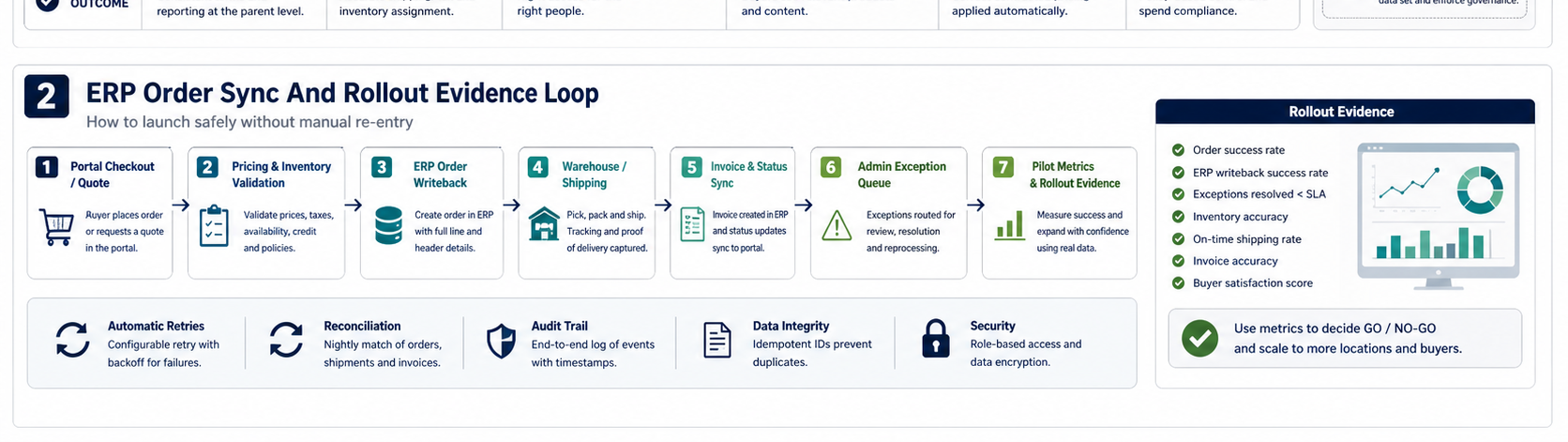
B2B eCommerce portal development usually succeeds or fails at integration boundaries. Product, customer, price, inventory, order, shipment, tax, invoice, and payment data often live in different systems. The roadmap needs to name source-of-truth decisions and failure behavior before development begins.
NextPage's ERP integration cost guide is relevant here because integration scope depends on data objects, sync direction, API quality, frequency, error handling, reconciliation, and reporting needs.
| Data object | Common source of truth | Portal requirement |
|---|---|---|
| Customer accounts | ERP or CRM | Map company, locations, contacts, tax status, terms, sales owner. |
| Products and catalogs | PIM, ERP, commerce admin | Publish clean product data, customer visibility, substitutions, attachments. |
| Prices | ERP, contract system, commerce rules | Serve correct customer price with audit trail and effective dates. |
| Inventory | ERP or WMS | Show available-to-promise, lead time, branch stock, backorder rules. |
| Orders | ERP | Create order records, track status, handle failures and duplicate prevention. |
| Invoices and payments | Accounting or ERP | Display invoices, payment status, credit limits, and statement history. |
Manufacturers and distributors should also consider industry workflows such as inventory reservations, branch transfers, warehouse picking, replenishment, and customer-specific part numbers. Those needs often connect the portal to manufacturing software development and warehouse or inventory systems, not only storefront features.
Do Not Under-Scope Admin Operations
B2B portals need strong admin workflows because sales, operations, customer support, finance, and product teams will maintain the system after launch. Admin work may include approving companies, assigning catalogs, managing buyer roles, reviewing quotes, handling failed sync jobs, updating content, controlling promotions, monitoring customer activity, and resolving order exceptions.
Admin design should include:
- Dashboards for pending quotes, failed orders, stale prices, approval requests, and integration errors.
- Role-based internal access for sales, support, finance, operations, and administrators.
- Audit trails for price changes, user invitations, quote approvals, and order edits.
- Bulk tools for catalog assignment, customer imports, product updates, and price-list refreshes.
- Support views that show customer account context without exposing unnecessary sensitive data.
This is where a portal becomes a business system. NextPage's B2B app development services focus on these role-based workflows, integrations, approvals, dashboards, and secure operational controls.
What Belongs In The MVP?
A realistic first release should prove the high-value ordering workflow for a controlled group of customers. It does not need every product line, every ERP exception, and every approval rule on day one. The MVP should include enough account, pricing, catalog, order, and integration functionality to remove a real manual bottleneck.
| MVP candidate | Why it belongs early | What can wait |
|---|---|---|
| Company accounts and buyer roles | Controls who can buy and what they can see. | Complex subsidiary hierarchy if pilot accounts are simpler. |
| Assigned catalogs and basic contract prices | Prevents public pricing and wrong product visibility. | Advanced promotions and dynamic margin rules. |
| Quick order, saved lists, and reorder | Matches repeat B2B buying behavior. | AI recommendations or complex personalization. |
| ERP order writeback and status sync | Removes duplicate entry and support calls. | Full invoice portal if finance can join phase two. |
| Admin review for quotes and exceptions | Keeps risky edge cases controlled. | Fully automated negotiation rules. |
Use the MVP Scope Builder or Custom Software Cost Estimator to pressure-test the first release. If the scope has many roles, integrations, custom pricing rules, and ERP dependencies, the timeline and QA plan should reflect that complexity.
QA, Pilot Accounts, And Rollout Evidence
B2B portal QA should use realistic customer scenarios, not only screen-by-screen test cases. Build a test set from actual account types, price lists, SKUs, order values, approval rules, shipping locations, tax cases, and ERP responses.
Before launch, verify:
- Each buyer role sees only the right products, locations, prices, documents, and order history.
- Contract prices match ERP or approved price-list exports across sample accounts.
- Quote, purchase approval, and order workflows create the right audit trail.
- Failed ERP, inventory, payment, and tax calls are retried or routed to an admin queue.
- Order confirmation, shipment, invoice, and support notifications reach the right people.
- Analytics show activation, repeat ordering, quote conversion, order errors, support reduction, and adoption by customer account.
Roll out in waves: internal sales testing, friendly customer pilot, limited catalog launch, expanded customer group, then broader account migration. The goal is to prove that the portal reduces friction without creating pricing errors, fulfillment issues, or customer support load.
Next Steps
If you are planning a B2B eCommerce portal, start with the operating model before the interface. Map buyer accounts, contract pricing, quote workflows, approval rules, ERP handoffs, admin ownership, and the pilot release. Then decide whether a platform extension, custom portal, or hybrid approach fits the business.
NextPage can help scope and build the roadmap through eCommerce web app development services, web portal development services, and ERP integration and modernization services. The best first step is a workflow scoping session that turns account rules, pricing logic, and integration risk into a buildable release plan.