
A scalable mobile app architecture is the set of client, data, API, cloud, AI, security, analytics, and release decisions that let an app stay fast, useful offline, secure, and maintainable as users and workflows grow. The best architecture is not simply native, Flutter, React Native, or Kotlin Multiplatform. It is the combination of client layers, local data, sync rules, backend contracts, model placement, observability, and operating controls that fit the product's actual risk.
For 2026 planning, architecture decisions should come before screen estimation. A field-service workflow, consumer marketplace, fintech wallet, healthcare intake app, IoT companion app, and AI assistant do not need the same stack. The right first question is: which work must happen instantly, which data must survive poor connectivity, which actions change systems of record, which AI decisions can run on-device, and which backend services need independent scale?
Use this guide as a decision framework, then pressure-test scope with NextPage's Custom Software Cost Estimator or with a mobile app development company that can connect architecture choices to cost, timeline, and post-launch risk.
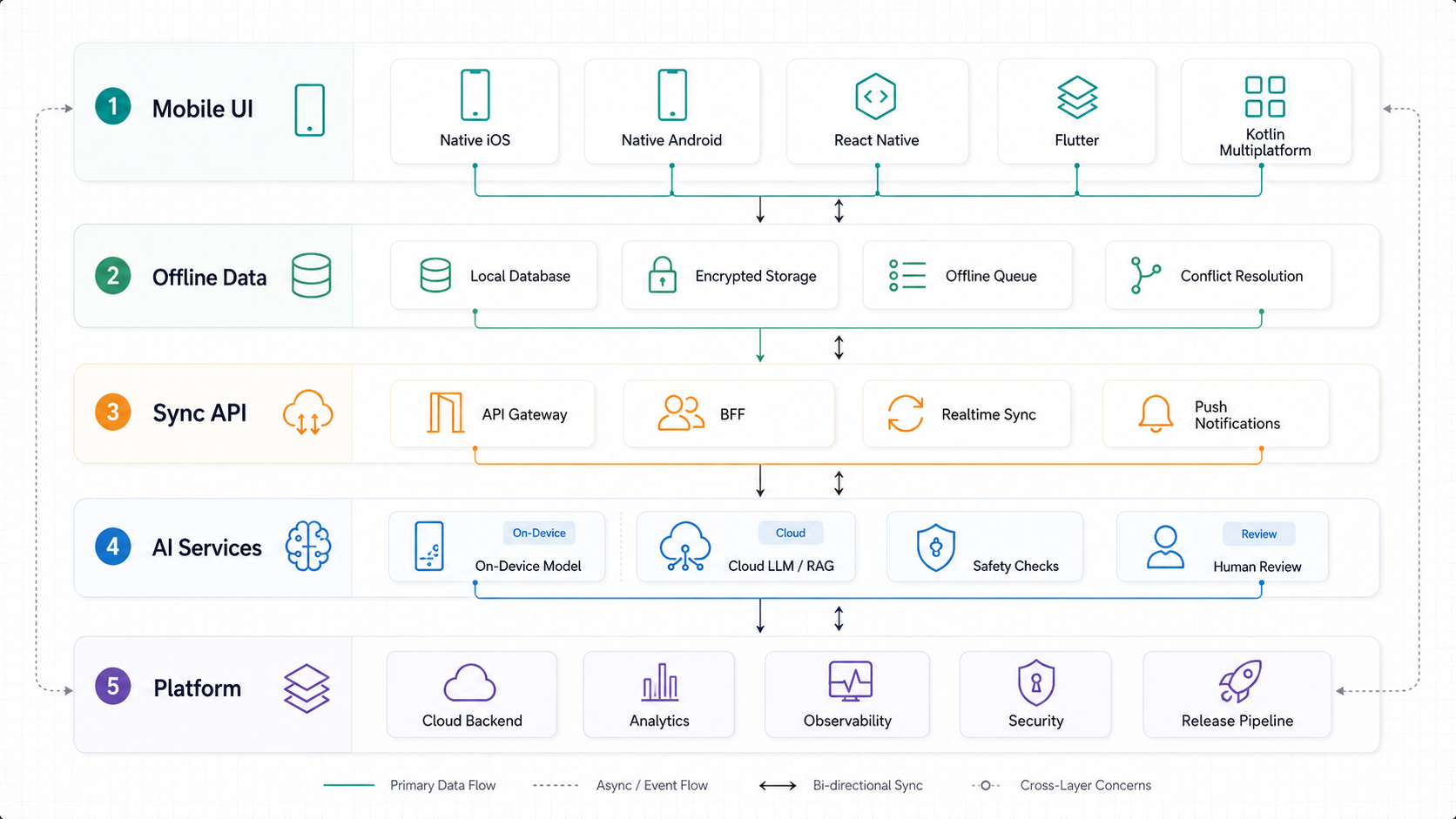
Quick Answer: What Should A Modern Mobile App Architecture Include?
A modern mobile app architecture should include a presentation layer, state management, domain logic, local storage, offline queue or cache strategy, sync rules, API gateway or backend-for-frontend, authentication, authorization, push notifications, analytics, observability, release pipeline, and backend services that match the app's business workflow. AI-native apps also need model placement, data privacy controls, prompt and retrieval boundaries, evaluation workflows, fallback behavior, and cost controls.
| Architecture Area | Decision To Make | Why It Matters |
|---|---|---|
| Client framework | Native, React Native, Flutter, Kotlin Multiplatform, or hybrid. | Controls UX fidelity, hiring, maintenance, performance, and device API access. |
| Local data | Cache-only, offline-first, encrypted storage, or full local workflow. | Determines whether users can work during poor connectivity. |
| Backend/API | Direct API, BFF, modular services, or event-driven backend. | Shapes scalability, integration depth, and release independence. |
| AI placement | On-device, cloud LLM, RAG, rules engine, or human-in-the-loop. | Affects latency, cost, privacy, explainability, and reliability. |
| Security | Threat model, secrets, encryption, MASVS baseline, audit trail. | Reduces data leakage, account takeover, and compliance risk. |
The decision should start with user workflows, not technology preference. A sales enablement app that reads content offline needs a different data model than a ride-hailing app with live location and payments. A mental health app using AI suggestions has a different risk profile than a loyalty app using deterministic coupons.
Mobile App Architecture Layers To Decide Before Screens
Strong architecture separates responsibilities so the app can change without every screen becoming a risky rewrite. The presentation layer renders UI and interaction states. The state layer coordinates view models, stores, or commands. The domain layer owns product rules. The data layer owns repositories, local persistence, and network access. The integration layer owns APIs, push, payments, maps, media, and device capabilities.
Android's current architecture guidance emphasizes clear data-layer repositories and scalable separation for phones, tablets, foldables, ChromeOS, car displays, and XR. Flutter's official architecture guidance similarly frames architecture around organizing an app so it can scale as project requirements and team size grow. Those recommendations matter because mobile products rarely stay as the first MVP: analytics, payments, offline mode, AI, enterprise roles, accessibility, and support operations usually arrive after launch.
For buyer planning, ask for an architecture decision record before accepting a sprint estimate. It should name the chosen framework, state approach, local database, API pattern, AI boundary, observability stack, release gate, security baseline, and known tradeoffs. That record becomes the reference point for scope, vendor handoff, QA, and maintenance.
Native Vs React Native Vs Flutter Vs Kotlin Multiplatform
Framework choice is visible, but it should not dominate the architecture conversation. Native iOS and Android remain strong when the product needs the highest platform fidelity, heavy device APIs, background execution, performance-sensitive UX, strict accessibility polish, or deep OS integration. The tradeoff is duplicate platform work unless the team shares backend, design system, tests, and product logic carefully.
React Native fits teams that want a JavaScript or TypeScript ecosystem, shared UI, faster iteration, and access to native modules when needed. Its New Architecture is the baseline to review on modern projects because it changes native interoperability, rendering, and performance assumptions compared with the older bridge model. Dependency quality, module compatibility, and upgrade discipline should be part of the architecture review.
Flutter is strong when a team wants consistent UI across platforms, predictable rendering, and a single Dart codebase. Flutter's official guidance recommends separation of concerns across UI and data layers instead of mixing screens, state, network calls, and persistence. That distinction is the difference between a clean cross-platform build and a fast prototype that becomes hard to maintain.
Kotlin Multiplatform is useful when shared business logic, data models, validation, networking, or persistence matter more than shared UI. Google now describes Kotlin Multiplatform as production-ready for sharing business logic between Android and iOS. It is a strong fit when teams want native platform interfaces while keeping domain behavior consistent.
Feature-To-Architecture Decision Matrix
The cleanest way to choose architecture is to map product needs to engineering consequences. A simple content app can use server-rendered content, light caching, analytics, and push notifications. A field-service app may need encrypted local data, sync conflict resolution, media upload retry queues, role-based permissions, and admin dashboards. A fintech or healthcare app needs deeper security, auditability, compliance review, and careful offline boundaries.
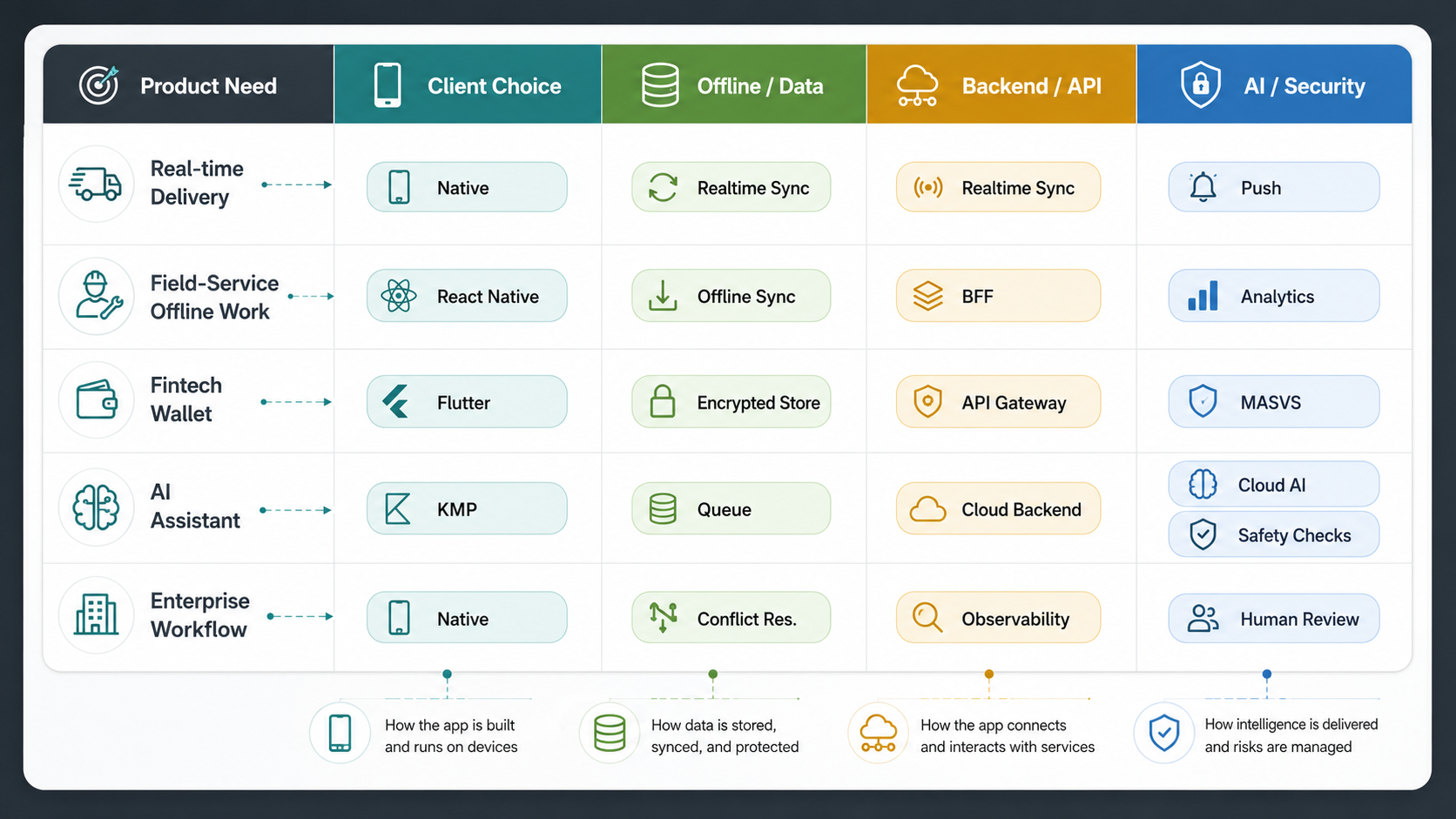
| Product Need | Architecture Implication | Common Mistake |
|---|---|---|
| Works in poor connectivity | Local database, repository pattern, sync queue, conflict rules, retry logic. | Adding cache late after screens already depend directly on live APIs. |
| AI recommendations or assistants | Data boundary, model placement, RAG pipeline, safety checks, analytics, fallback UX. | Calling an LLM from the app without evaluation, privacy, or cost controls. |
| Enterprise users and roles | SSO, RBAC, tenant model, audit logs, device/session policy, admin tools. | Hard-coding roles into screens instead of backend policy. |
| Payments or wallet balance | Secure backend ledger, idempotency, webhook processing, fraud checks, reconciliation. | Trusting client state for money movement. |
| Fast iteration across platforms | Shared design system, reusable domain layer, CI, automated release checks. | Choosing cross-platform UI but maintaining divergent behavior manually. |
Offline-First Is A Data Architecture Decision
Offline-first is not a loading spinner strategy. Android's official offline-first guidance frames network-backed repositories around at least two data sources: a local source and a network source. The same principle applies beyond Android. The app should know what can be read, created, edited, queued, synced, retried, rejected, and reconciled when connectivity returns.
Start with workflow criticality. If users only browse marketing content, cache is usually enough. If they capture inspections, record orders, scan inventory, manage patient visits, or handle field service, offline behavior is core product architecture. The app needs local persistence, operation IDs, sync status, retry and backoff, partial upload handling, conflict resolution, and user-visible recovery states.
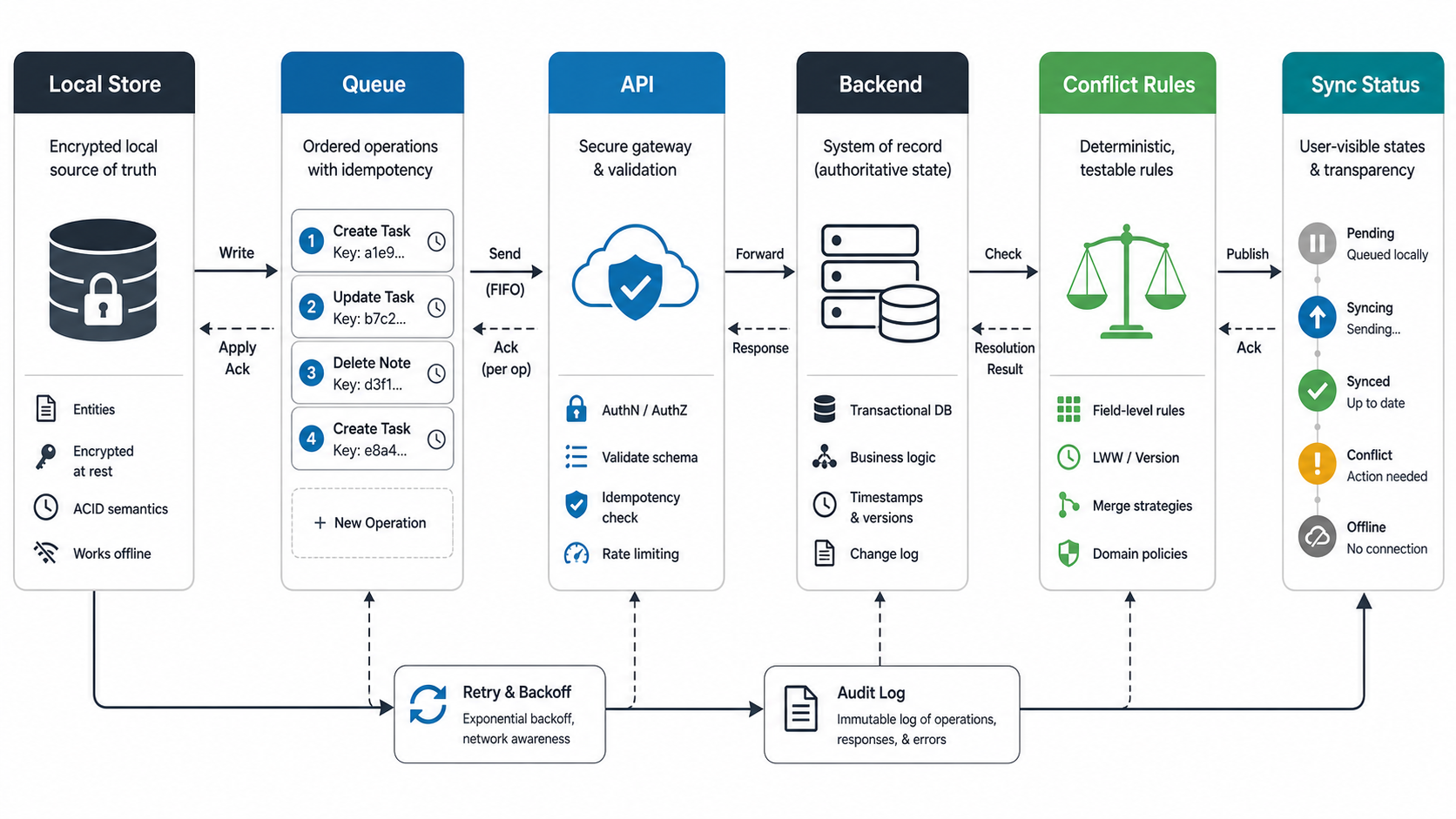
This is where a mobile app becomes part of a broader platform. If offline actions affect CRM, ERP, inventory, logistics, or billing systems, the backend must handle duplicate submissions, stale data, rejected updates, and audit trails. NextPage's enterprise mobile app development services are relevant for internal workflow apps where offline capture, secure sync, and adoption planning are product requirements.
Backend, API, And Cloud Architecture
A scalable mobile app usually needs a backend shaped around mobile workflows, not just a generic API. A backend-for-frontend can simplify mobile payloads, version APIs safely, aggregate services, enforce authorization, and hide backend complexity from the app. For smaller apps, a modular monolith may be enough; for high-scale or integration-heavy products, event queues and service boundaries become more important.
The backend should own identity, authorization, payments, sensitive business rules, subscription state, audit logs, and integration writes. The client can own presentation, local state, input validation, and offline queueing, but it should not be the source of truth for sensitive operations. APIs should be versioned, observable, idempotent where needed, and tested against mobile release lag because not every user updates immediately.
Cloud decisions should follow traffic and risk. Media-heavy apps need storage, CDN, upload workflows, and scanning. Real-time apps need WebSockets or event streams. Analytics-heavy apps need event taxonomy and warehouse readiness. Regulated apps need logging boundaries and data residency review. NextPage's cloud migration services and SaaS development services are relevant when the mobile app is one client in a larger cloud product.
For connected products, the architecture also has to connect the device, app, cloud ingestion, and operations layer. The IoT mobile app development roadmap is a useful supporting guide when BLE, telemetry, or device-to-cloud data affects the mobile architecture.
AI-Native Mobile Architecture
AI-native mobile apps should decide where intelligence lives before implementation. On-device models can reduce latency and protect some data, but they are limited by device capability, model size, update workflow, and evaluation complexity. Cloud LLMs and RAG systems can provide richer reasoning and knowledge access, but they introduce cost, privacy, availability, prompt injection, and response-quality concerns.
Platform capability is moving quickly. Android's Gemini Nano guidance positions on-device generative AI for experiences that work without network access or sending data to the cloud. Apple's Foundation Models framework gives app developers access to Apple Intelligence models designed for on-device and Private Cloud Compute use. These options make AI placement a product architecture decision, not a late API integration task.
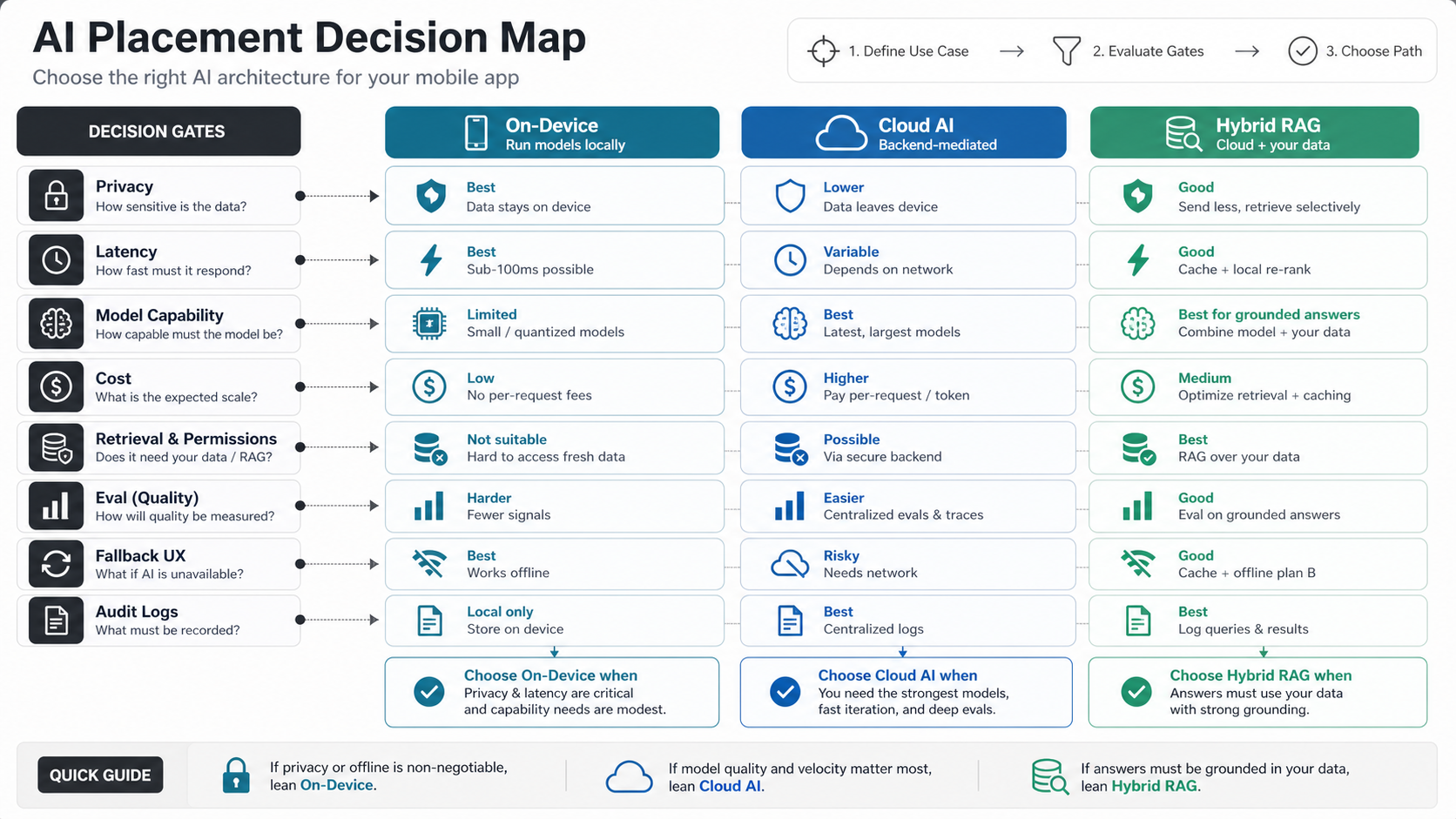
Most useful business apps combine deterministic product logic with AI assistance. AI can summarize field notes, classify tickets, recommend next actions, extract invoice data, or help users search knowledge. The architecture should include grounding data, retrieval boundaries, model versioning, prompt templates, redaction, moderation or safety checks, fallback messages, and analytics that show whether AI output actually helps users complete work.
Do not let AI calls bypass the backend. The backend should mediate sensitive prompts, policy, rate limits, audit logs, retrieval permissions, and billing controls. NextPage's AI development services, machine learning development services, and supporting AI features for mobile apps guide cover the production-AI side of that architecture.
Security, Privacy, And Compliance Baseline
Mobile security starts with a threat model. What sensitive data can be stored locally? Which screens expose personally identifiable information? Which APIs move money or modify business records? Which devices may be rooted, jailbroken, shared, or lost? Which logs, crash reports, analytics events, and AI prompts could leak sensitive data?
OWASP MASVS is the right baseline for structuring mobile security requirements because it gives architects, developers, and testers a common verification standard. A serious architecture should cover secure storage, transport security, authentication, session handling, authorization, input validation, dependency risk, platform interaction, code integrity, and privacy controls. For regulated or high-trust apps, add audit logs, device posture checks, SSO, key rotation, data retention rules, and incident response workflows.
The client should never embed long-lived secrets, trust hidden fields for authorization, or make security decisions that the backend cannot verify. Treat analytics, push notifications, crash reports, and AI telemetry as data flows that need privacy review, not harmless defaults. When release risk is high, use mobile app security hardening services and independent mobile app testing services before exposing sensitive workflows to real users.
Analytics, Observability, And Release Operations
Architecture is not complete until the team can see how the app behaves in production. Product analytics should track activation, retention, conversion, search, key workflows, offline usage, sync failures, AI acceptance, and support friction. Engineering observability should track crashes, ANRs, slow screens, API errors, background task failures, failed uploads, model latency, and release health.
Release operations should include environment separation, feature flags, staged rollout, crash gates, CI checks, automated tests, app store metadata, rollback playbooks, and dependency upgrade policy. Cross-platform apps still need platform-specific QA because OS versions, permissions, devices, and app store review rules can behave differently.
For cost planning, these operations are not optional polish. They decide whether the app can improve safely after launch. NextPage's custom software development approach treats release operations, maintainability, and support workflows as part of the product, not post-launch cleanup. The mobile app development process guide adds a useful planning view for discovery, QA, and launch governance.
A Practical Architecture Roadmap
Phase 1: discovery and decision model. Define users, workflows, data sensitivity, offline needs, AI use cases, integration inventory, security baseline, analytics events, and release constraints. Produce a stack recommendation and risk map before fixed estimation.
Phase 2: architecture prototype. Build a thin vertical slice that proves login, one core workflow, local state, API contract, analytics, and any risky device or AI integration. This prevents expensive surprises after UI work accelerates.
Phase 3: production foundation. Implement the design system, app shell, state management, local persistence, API client, authentication, observability, CI, and release pipeline. Keep domain rules testable and avoid burying business logic in screens.
Phase 4: workflow depth and scaling. Add offline sync, AI services, integrations, admin tools, performance budgets, role policy, and analytics improvements based on real product priorities.
Phase 5: optimization and platform growth. Improve startup time, memory, battery, accessibility, conversion, personalization, AI quality, app store ratings, and backend scale after users validate the core workflow. Use maintenance signals from the mobile app maintenance checklist so architecture work keeps improving after launch.
How NextPage Can Help
NextPage helps teams turn mobile app ideas into architecture-backed build plans: framework selection, backend/API design, offline-first workflows, AI feature architecture, secure data flows, analytics, release operations, and long-term scaling. The goal is not to over-engineer the first release. It is to make the first release honest about the complexity that affects cost, timeline, and product risk.
Start with the Custom Software Cost Estimator if you need a planning range, then use NextPage's mobile app development and enterprise mobile app development teams to convert the architecture into a launch-ready build plan.