
Pharmacy management software development cost usually depends less on the number of screens and more on how safely the system handles prescriptions, inventory, payer billing, compliance records, and integrations. A focused MVP for one pharmacy workflow can start around $45,000-$90,000. A production pharmacy platform with dispensing workflows, inventory controls, billing, reports, user roles, audit logs, and selected integrations often lands around $120,000-$280,000. Multi-location or specialty pharmacy systems with e-prescribing, EPCS readiness, wholesaler connections, payer/PBM workflows, analytics, and deeper interoperability can move beyond $350,000.
Those ranges are planning bands, not fixed quotes. The real estimate comes from five decisions: which pharmacy setting you serve, which prescription and inventory workflows must be automated, which external systems must exchange data, which compliance controls are required, and how much operational reporting leadership needs on day one.
If you are scoping a pharmacy platform now, start with NextPage's Custom Software Cost Estimator. It helps separate launch-critical workflow from later automation before you commit to a custom build. When the first release is still fuzzy, pair it with a pharmacy MVP development plan so compliance, integration, and manual-review boundaries are explicit before engineering starts.
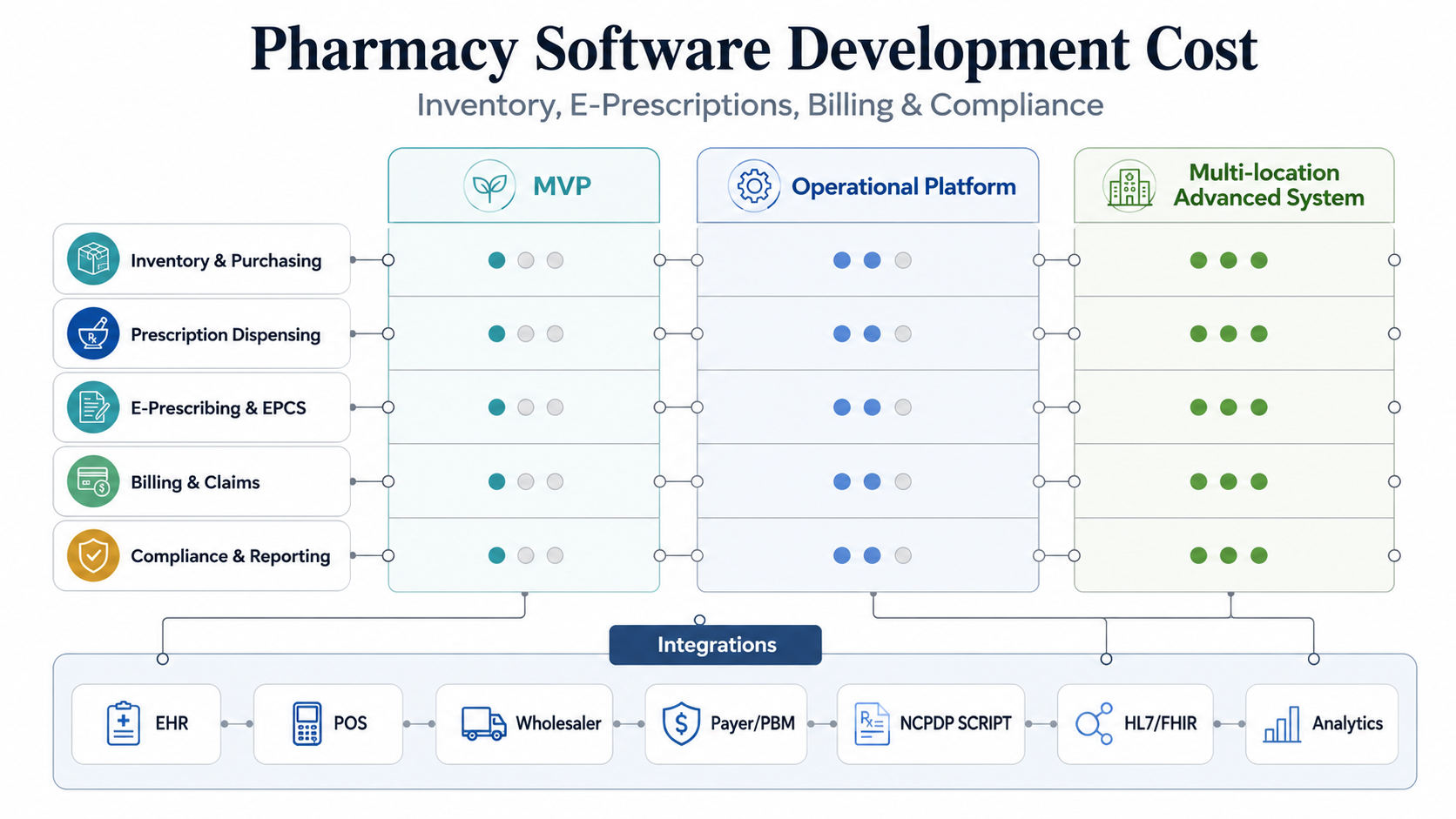
Quick Cost Ranges For Pharmacy Management Software
A pharmacy management system can be a small internal tool, a complete dispensing platform, or a connected healthtech product. Cost changes sharply across those models because the system may need to touch medication data, protected health information, insurance workflows, controlled-substance rules, supplier ordering, and financial reporting.
| Build Type | Planning Budget | Best Fit | Main Risk |
|---|---|---|---|
| Workflow MVP | $45,000-$90,000 | Inventory tracking, purchase orders, basic dispensing queue, patient profile notes, role permissions, and admin reporting for one setting. | Overpromising integration or compliance depth before the operating workflow is proven. |
| Operational Pharmacy Platform | $120,000-$280,000 | Prescription intake, dispensing, stock control, billing exports, staff tasks, audit logs, alerts, dashboards, and one or two core integrations. | Underestimating exception handling across refills, substitutions, denials, stockouts, and manual overrides. |
| Advanced Multi-Location System | $350,000+ | Chain pharmacies, hospital pharmacies, specialty pharmacy, telehealth prescribing support, payer/PBM workflows, wholesaler sync, EPCS readiness, and analytics. | Treating standards, audits, identity, controlled-substance controls, and interoperability as late add-ons. |
For most teams, the correct first budget is not the largest version. It is the smallest release that can safely process a real medication workflow, expose exceptions to staff, and prove whether the business case is strong enough for deeper automation.
What Drives Pharmacy Software Development Cost?
The largest cost drivers are workflow depth, integration depth, security requirements, and operational complexity. A simple inventory app can record stock on hand. A pharmacy platform has to know why stock changed, who changed it, which prescription or purchase order caused it, whether an item is close to expiry, whether a controlled item needs special handling, and whether the financial record matches the fill or claim.
Prescription workflows add another layer. Intake, refill requests, substitutions, allergy checks, drug interaction prompts, medication history, pharmacist review, label generation, delivery or pickup status, and patient messaging all need clear rules. The more the software participates in clinical or regulated workflow, the more the design needs audit trails, permission boundaries, validation, and human review.
Inventory is usually the fastest place to create visible ROI, especially for pharmacies dealing with high-value medication, expiry waste, vendor minimums, multi-location transfers, or slow stock reconciliation. NextPage's inventory management software development cost guide explains the same pattern in a broader operations context: cost follows the business rules behind stock movement, not the table that displays stock counts.
Core Modules To Scope Before Estimating
A reliable estimate starts with modules, but modules should be defined as operating capabilities rather than menu labels. For example, "billing" could mean printing invoices, exporting sales, checking benefits, managing copays, reconciling claims, or connecting to payer workflows. Those are very different builds.
| Module | MVP Scope | Advanced Scope |
|---|---|---|
| Inventory And Purchasing | Product catalog, stock adjustments, low-stock alerts, expiry tracking, purchase orders, supplier records. | Wholesaler sync, lot and batch controls, transfers, forecasts, automated reorder rules, cold-chain checks, and margin analytics. |
| Prescription And Dispensing | Patient profile, prescription queue, refill workflow, pharmacist review status, labels, notes, and pickup or delivery state. | Medication history, drug interaction support, substitution logic, adherence programs, clinical interventions, and specialty pharmacy workflows. |
| E-Prescribing | Import or handoff workflow, prescriber records, medication identifiers, and controlled manual review. | NCPDP SCRIPT support, network certification path, EPCS controls, electronic prior authorization, medication history, and pharmacy benefit data. |
| Billing And Claims | Invoices, copay capture, payment tracking, sales reports, accounting export, and manual exception queues. | Payer/PBM workflows, claim adjudication support, denial queues, reconciliation, prior authorization status, and finance dashboards. |
| Compliance And Reporting | Role permissions, access logs, audit events, backups, data retention, and standard operational reports. | Advanced audit trails, controlled-substance reports, state-specific rules, HIPAA security evidence, incident workflows, and compliance dashboards. |
The right release-one scope usually includes one complete path from intake to inventory update to payment record. If that loop works reliably, the next release can add richer e-prescribing, payer automation, analytics, and multi-location controls.
E-Prescribing, EPCS, And Compliance Planning
E-prescribing is not just a message form. CMS describes e-prescribing as electronically sending accurate, understandable prescriptions from the point of care to a pharmacy, which is why it matters for quality and patient care. For software builders, the hard work is identity, data format, network connection, certification path, workflow status, error handling, and support for pharmacy staff.
In the United States, certified electronic prescribing capabilities are tied to NCPDP SCRIPT versions and evolving certification criteria. CMS and NCPDP materials identify NCPDP SCRIPT standard version 2023011 as the required e-prescribing standard for covered Part D drugs starting January 1, 2028, with related prior authorization and real-time prescription benefit workflows also affecting roadmap planning. That matters because a product roadmap built around old assumptions may under-scope standards migration, partner certification, field mapping, QA evidence, and support training.
Controlled-substance prescribing adds EPCS considerations. Surescripts describes EPCS as adding safety and security layers for controlled medications and notes broad pharmacy enablement. CMS also notes that the federal EPCS program and individual state requirements can both matter. A custom pharmacy product should treat EPCS as a specialist compliance and certification workstream, not a checkbox in the normal prescription module.
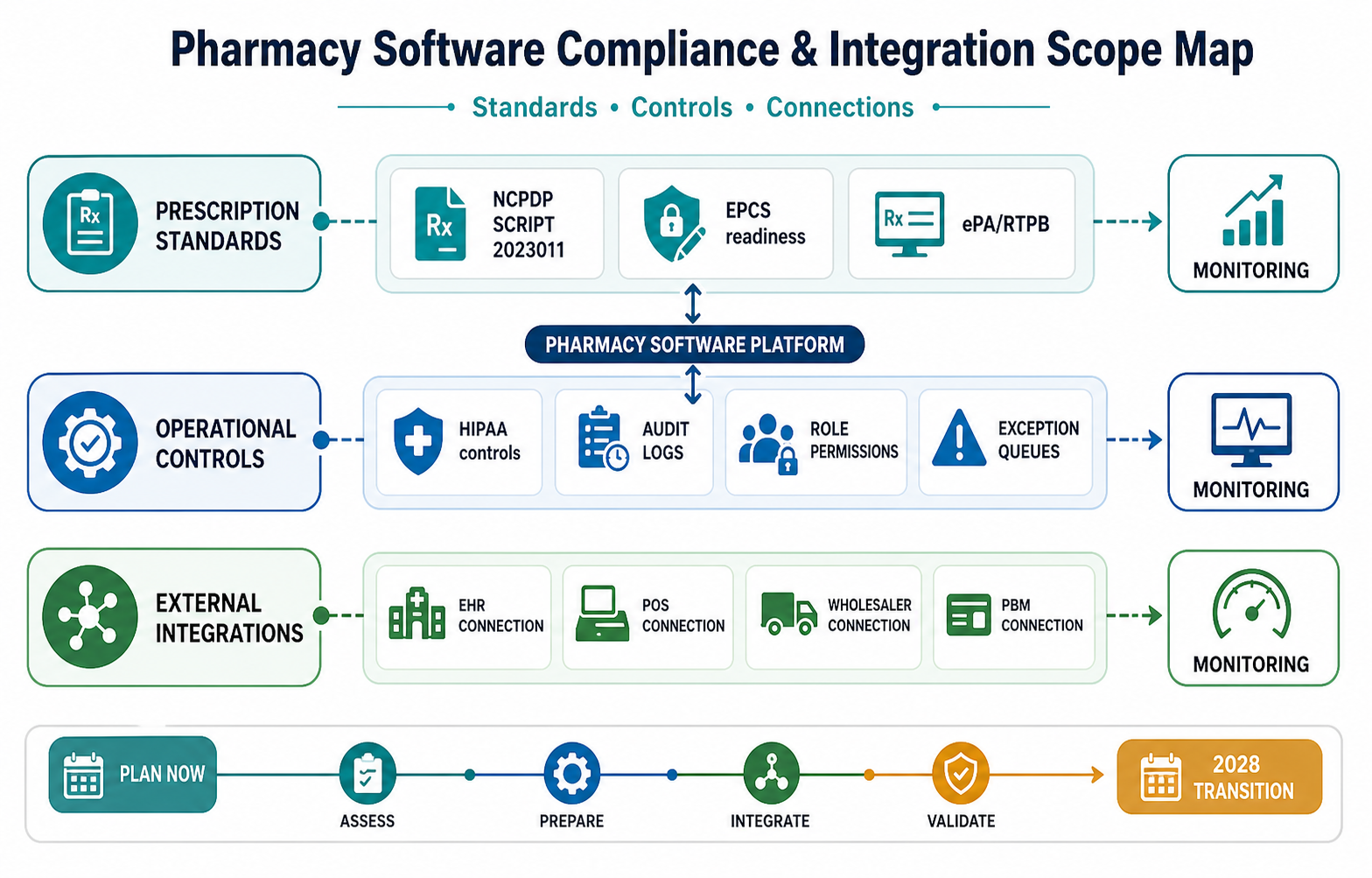
HIPAA-oriented security belongs in the foundation when protected health information is involved. That means access control, authentication, encryption, least-privilege roles, audit logs, vendor agreements where applicable, backup and recovery, incident response, and staff workflow design. NextPage's custom software development teams typically separate these controls into architecture, application, data, operations, and evidence so they can be tested instead of described only in policy documents.
Integrations That Change The Estimate
Pharmacy software becomes more expensive when it must integrate with systems that hold operational truth. Common integration targets include EHR or practice-management systems, POS and accounting tools, wholesaler catalogs, payer/PBM systems, pharmacy benefit data, e-prescribing networks, delivery providers, patient portals, messaging tools, and analytics warehouses.
Each integration should be scored by business value and technical uncertainty. A read-only product catalog import is not the same as a bidirectional prescription workflow. A nightly inventory export is not the same as real-time payer response. A basic patient notification is not the same as a regulated clinical message. The estimate should include sandbox access, field mapping, retries, error queues, audit records, monitoring, vendor certification, and ownership of failures.
For pharmacy operators replacing spreadsheets or legacy desktop tools, a staged web app development approach often works well: build the secure admin and workflow surface first, then connect deeper external systems when the team has proof that staff can run the workflow inside the new product.
MVP Vs Advanced Pharmacy Platform
A pharmacy MVP should not pretend to be a full enterprise pharmacy information system. It should prove the operational loop that creates value. That might be inventory accuracy, refill coordination, multi-location stock visibility, prescription queue control, specialty medication tracking, or billing exception visibility.
| Decision | Keep In MVP When | Move To Later When |
|---|---|---|
| E-prescribing network depth | The product's core value depends on receiving or sending electronic prescriptions. | Initial users can operate with controlled import, manual review, or integration discovery first. |
| Wholesaler integration | Purchasing and stock availability are the main ROI driver. | Manual purchase order workflows can validate the process. |
| Payer/PBM workflow | Billing exceptions, copays, or claim status are central to the business case. | Finance can start with exports and manual reconciliation. |
| Multi-location controls | The first users need transfers, branch reporting, shared catalog, and role segregation. | The first pilot runs in one pharmacy or one operational team. |
| Advanced analytics | Margin, waste, stockout, adherence, or claims metrics drive management decisions. | Basic operational reports are enough to launch safely. |
The mistake is cutting the wrong thing. Do not cut auditability, permissions, backups, or exception visibility to save budget. Cut broad automation, extra dashboards, rarely used workflow variants, and premature integrations until the first operating loop is stable.
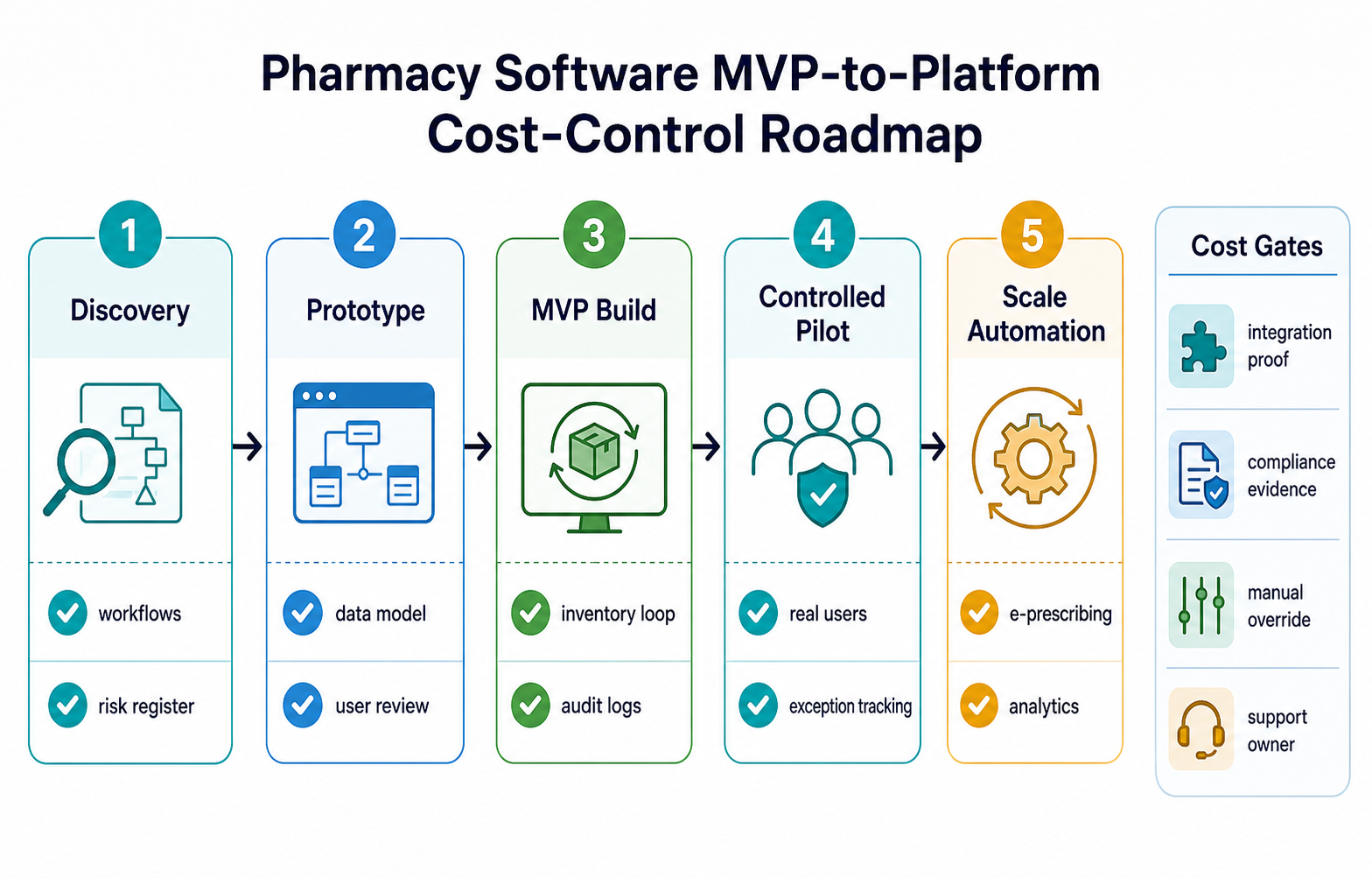
A Practical Implementation Roadmap
Phase 1: workflow discovery. Map prescription, stock, billing, compliance, and reporting workflows. Identify source systems, user roles, medication identifiers, privacy boundaries, regulatory assumptions, and support owners. Produce the release-one scope and risk register.
Phase 2: product architecture and prototype. Design the core data model, role model, audit events, workflow states, exception queues, reporting model, and integration contracts. Validate screens with pharmacists, technicians, managers, billing staff, and administrators before development accelerates.
Phase 3: MVP build. Implement the complete operating loop, including stock changes, prescription queue state, staff tasks, billing records, alerts, audit logs, admin reports, and selected integration handoffs. Include test cases for refills, stockouts, expired items, substitutions, denied payments, and permission boundaries.
Phase 4: controlled rollout. Launch with real users in a limited setting. Monitor cycle time, stock accuracy, staff edits, billing exceptions, security events, and support tickets. Keep rollback and manual override paths visible.
Phase 5: automation and scale. Add deeper e-prescribing, EPCS readiness, wholesaler sync, payer/PBM workflows, analytics, multi-location controls, and advanced patient engagement only after the first release proves operational reliability.
Cost Checklist For Buyers
- Which pharmacy setting is the first release for: retail, hospital, specialty, telepharmacy, mail-order, or clinic-dispensing?
- Which workflow is the first measurable ROI driver: inventory, dispensing, refills, billing, compliance, reporting, or multi-location coordination?
- Which systems are sources of truth for patients, products, prescriptions, claims, purchase orders, and payments?
- Which standards or networks affect the roadmap: NCPDP SCRIPT, HL7/FHIR, EPCS, payer/PBM interfaces, wholesaler feeds, or POS/accounting tools?
- What needs a human review gate before the software updates records or triggers patient-facing communication?
- What evidence will leadership need: audit logs, access reports, expiry reports, margin reports, controlled-substance reports, or incident records?
- What can stay manual for the pilot without creating unsafe workarounds?
How NextPage Helps
NextPage helps healthcare and operations teams scope custom pharmacy software around real workflow, not feature lists. We map the current process, identify the integration and compliance workstreams, design the release-one architecture, build secure web and mobile interfaces, connect critical systems, and launch with measurable operating controls.
A practical first engagement is a scope and estimate review. Bring your pharmacy setting, current tools, target workflow, integration list, compliance concerns, reporting needs, and expected launch users. The output should be a clear MVP boundary, phased roadmap, architecture risks, image of monthly operating value, and a build estimate you can defend.
For broader planning, compare the estimate with NextPage's healthcare software development company checklist and the custom software development service page before you choose between a custom build, a vendor platform, or a hybrid integration layer.