
An enterprise mobile app modernization roadmap should start with the live workflow risk, not with a framework debate. The practical sequence is: audit the current app, decide what to refactor or rebuild, stabilize core APIs, design offline-first workflows, harden security and device policy, rebuild the release and QA gates, then roll out changes in phases that protect field operations.
This matters because enterprise mobile apps are rarely isolated screens. They sit between people, devices, back-office systems, approvals, inventory, CRM, ERP, analytics, support, and compliance evidence. A slow or fragile mobile app can quietly tax every shift, delivery route, inspection, sales visit, warehouse scan, or approval cycle it touches.
Use this roadmap if you already have an internal app, field app, partner app, tablet workflow, or operations app that still works but is becoming expensive to change. If you need help turning the scope into a plan, NextPage's enterprise mobile app development services and mobile app development team can map the app, integrations, devices, and release risk before you commit to a rebuild.
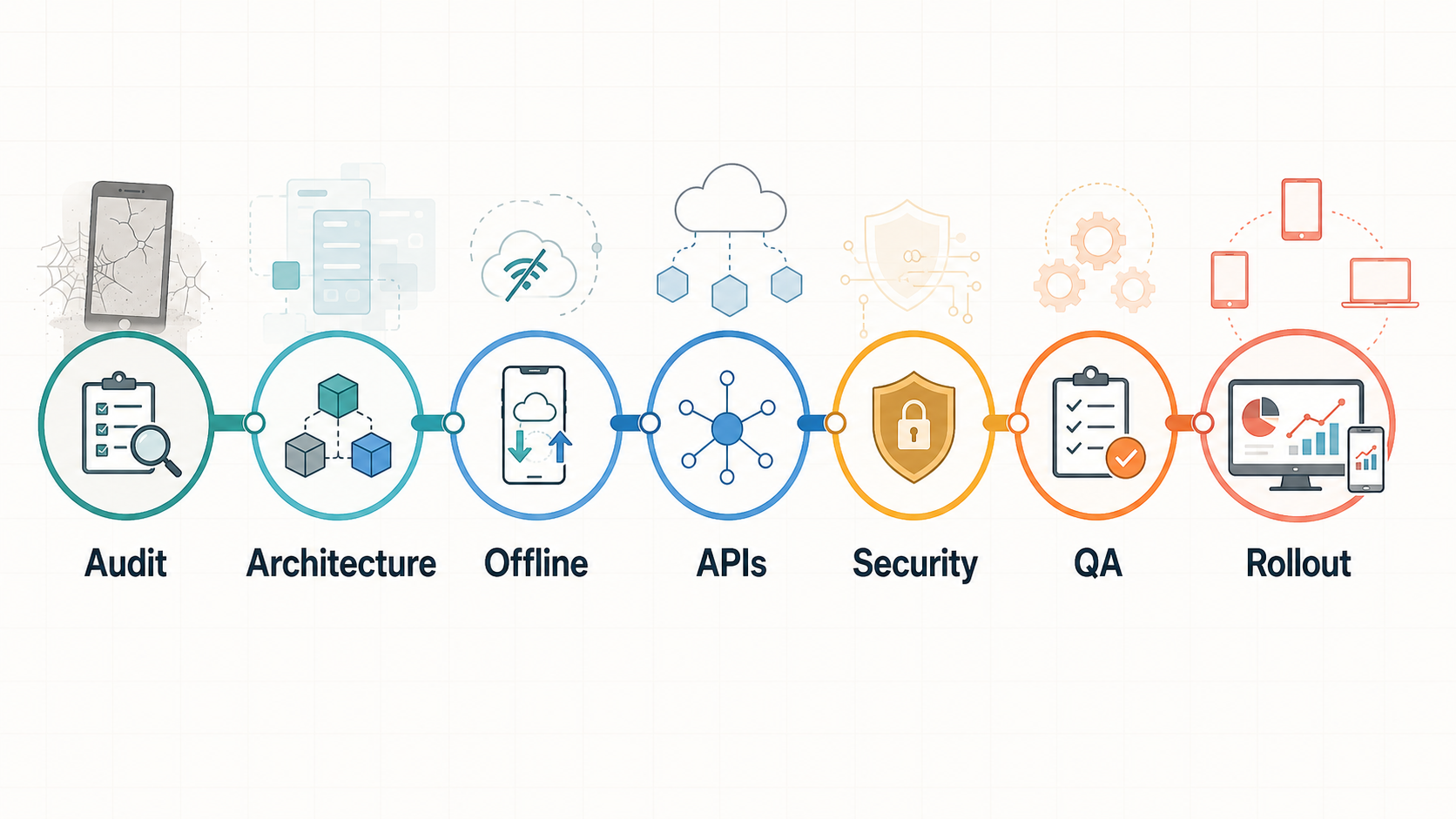
Quick Answer: What Should An Enterprise Mobile App Modernization Roadmap Include?
An enterprise mobile app modernization roadmap should include a workflow audit, user and device inventory, technical debt review, refactor-versus-rebuild decision, API and data contract plan, offline sync model, security baseline, identity and role model, analytics and observability plan, QA automation strategy, phased rollout, support model, and cost estimate. The roadmap should also define which parts of the app must keep running during migration.
| Roadmap Stage | Main Decision | Proof To Collect |
|---|---|---|
| Audit | Which workflows, users, devices, and systems are truly business-critical? | Crash reports, support tickets, analytics, app-store reviews, field feedback, API logs. |
| Architecture | Refactor, rebuild, replatform, or split the app into modules? | Dependency map, code health, backend contracts, release history, integration risk. |
| Offline | Which reads and writes must work without reliable connectivity? | Route maps, site connectivity, sync failures, conflict cases, retry requirements. |
| Security | What data, roles, devices, and sessions need stronger controls? | Threat model, MASVS checklist, secrets review, SSO/RBAC gaps, audit trail gaps. |
| Rollout | How can the business migrate users without stopping operations? | Pilot cohorts, feature flags, training plan, rollback path, support readiness. |
Signs Your Enterprise Mobile App Needs Modernization
The most obvious signs are crashes, slow screens, broken app-store compatibility, aging dependencies, and support complaints. The more expensive signs are quieter: business teams avoid the app, field staff keep parallel spreadsheets, managers no longer trust dashboard data, and developers are afraid to touch core workflows because one change can break a release.
Modernization is also due when the app cannot support current enterprise operating requirements. Examples include SSO, role-based access, device management, offline work, audit logging, API versioning, push notification reliability, accessibility, analytics, or secure integration with ERP, CRM, inventory, logistics, billing, or HR systems.
Do not treat every weak signal as a rebuild mandate. A brittle app may need dependency upgrades, release automation, API contracts, and targeted UX repair. A deeply misaligned app may need a new architecture. The roadmap should separate app polish from structural risk before budget conversations begin.
Step 1: Audit The Current App, Workflow, And Business Risk
Start with the actual operating model. List the app's user groups, devices, locations, network conditions, authentication methods, integrations, data flows, and business actions. Then rank workflows by operational consequence: what happens if this screen is slow, unavailable, wrong, or impossible to use offline?
The audit should include technical evidence and human evidence. Technical evidence covers crash rates, slow API calls, dependency age, OS compatibility, build failures, incident history, and security findings. Human evidence covers field interviews, support tickets, training gaps, skipped steps, duplicate data entry, and workarounds.
Group each finding by business impact, not only by engineering discipline. For example, a scanner crash may belong to revenue capture, inventory accuracy, employee productivity, and customer SLA risk at the same time. That grouping helps stakeholders fund the roadmap around operating outcomes instead of a long list of code complaints.
This is where a general app development guide often becomes too shallow. The source reference covers useful enterprise app features such as user roles, security, analytics, data sharing, cloud storage, third-party integrations, and a normal development process. A modernization roadmap has to go deeper: which of those capabilities already exist, which are broken, which are missing, and which can be fixed without stopping the business?
Step 2: Choose Refactor, Rebuild, Replatform, Or Replace
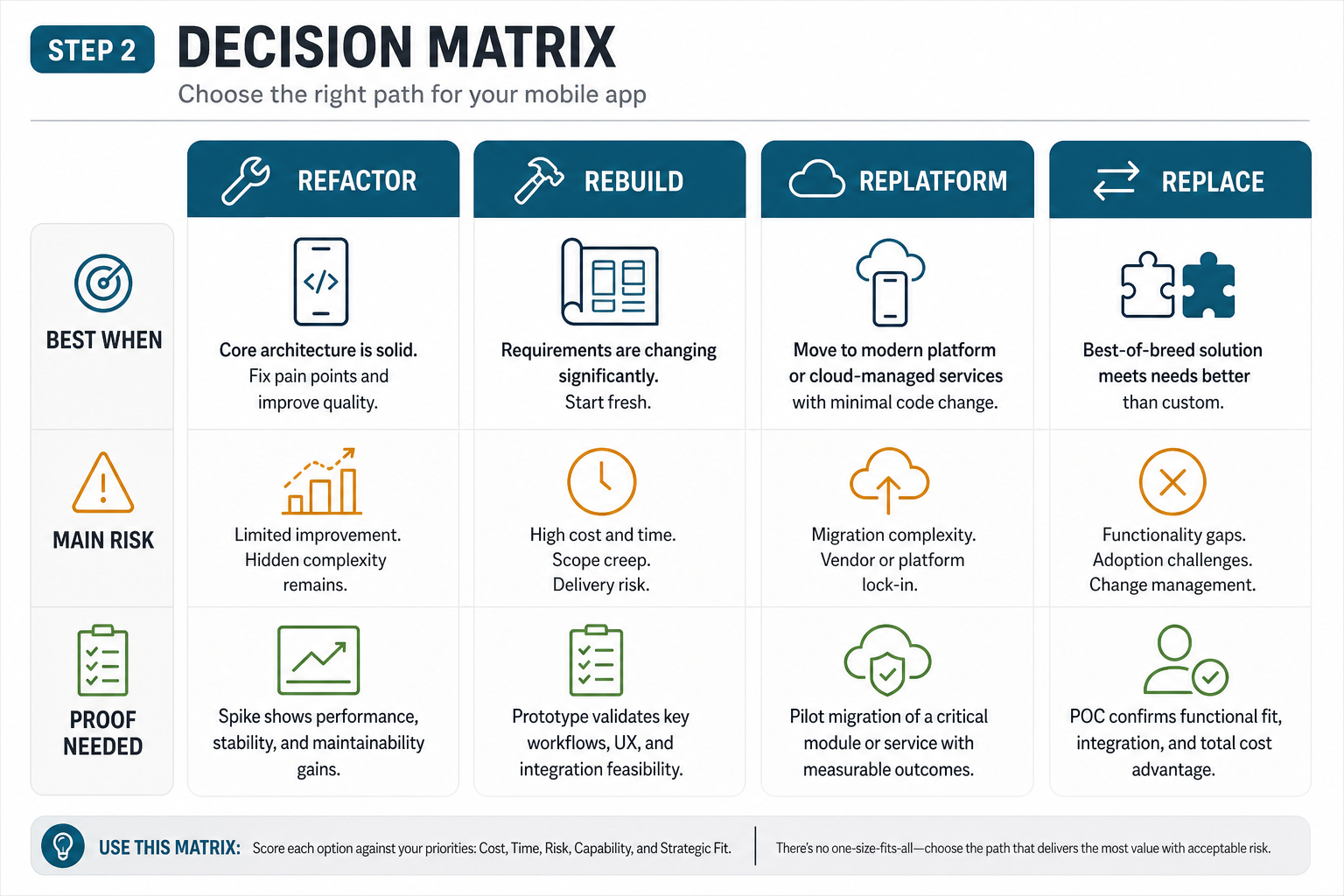
Most enterprise teams jump to the wrong option because they decide from frustration. Use a decision matrix instead.
| Option | Use When | Risk |
|---|---|---|
| Refactor | The UX is usable and workflows are valid, but code quality, dependencies, tests, or performance are weak. | Hidden architecture problems may surface slowly. |
| Rebuild | The app must keep the same business outcome, but the architecture, UX, data model, or framework no longer supports it. | Scope creep if the old app is not mapped carefully. |
| Replatform | The app is tied to obsolete tooling, unsupported OS targets, or an architecture that blocks hiring and release speed. | Integration and parity testing can be underestimated. |
| Replace | A commercial platform or internal shared platform can satisfy most workflows with lower ownership cost. | Business-specific edge cases may still need custom software. |
For many teams, the best plan is hybrid. Keep stable workflows, rebuild the risky modules, replace fragile integrations, and create a cleaner backend contract. NextPage's legacy software modernization work often starts this way because a full rewrite can create unnecessary operational risk. If the main uncertainty is platform choice, compare native, cross-platform, and hybrid tradeoffs with the native vs cross-platform mobile app development guide before locking the roadmap.
Step 3: Stabilize APIs, Data Contracts, And Backend Ownership
Enterprise mobile apps often age faster than their backend systems. The app may call undocumented endpoints, rely on response shapes nobody owns, duplicate business rules in the client, or send direct writes into systems that were never designed for mobile usage.
Modernization should create a clear backend-for-frontend, API gateway, or integration layer when the current mobile client is overexposed to backend complexity. The backend should own identity, authorization, sensitive business rules, idempotency, audit logs, and integration writes. The mobile app should own presentation, local state, input capture, user guidance, and offline queueing.
Version APIs before major app rollout. Enterprise users do not update instantly, and managed devices can lag by region, vendor, or business unit. If old and new app versions will coexist, the roadmap needs contract tests, deprecation windows, observability, and a rollback plan. Treat API compatibility as a release gate, not a technical note, because mobile version drift can keep old clients active for weeks.
For connected products with maps, payments, push notifications, chat, media, device pairing, or vendor SDKs, use a formal integration handoff. The mobile app integrations checklist is a useful supporting reference for deciding which vendors, APIs, webhooks, permissions, and test environments must be ready before modernization reaches release.
Step 4: Redesign Offline Workflows Around Local Data And Sync Rules
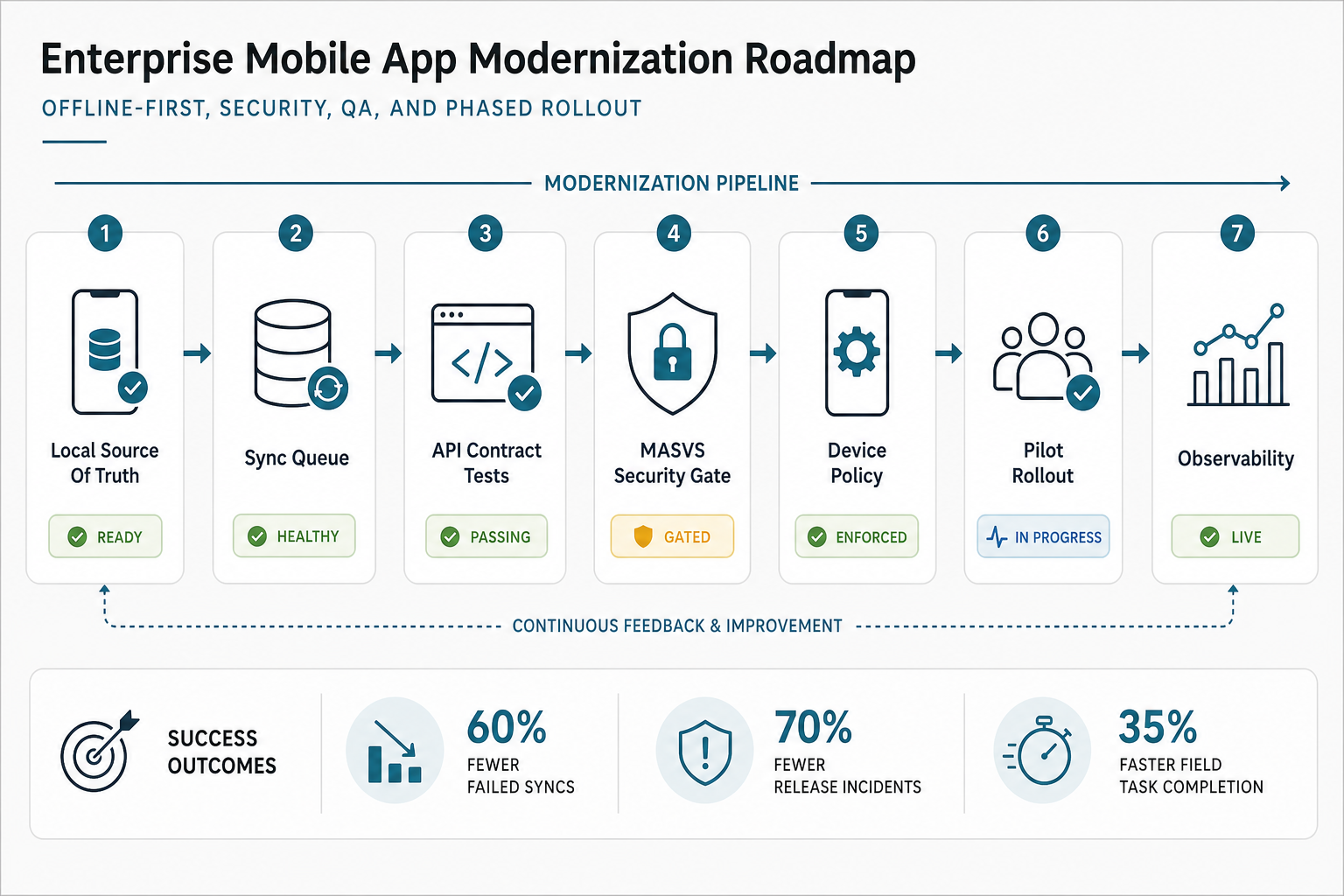
Offline support is not a cache setting. Android's official offline-first guidance frames the local data source as the source that higher app layers read from, with repositories coordinating local and network data. Flutter's guidance makes the same architectural point: repositories should combine local and remote data so features can work across connectivity states.
For enterprise mobile apps, offline design starts with the job. Can a technician complete an inspection in a basement? Can a warehouse worker scan items during Wi-Fi drops? Can a sales rep capture an order on the road? Can a clinician or field worker edit a record without corrupting the source system?
Define which reads must work offline, which writes can be queued, which media uploads can retry, which conflicts need human review, and which actions must be blocked when the app cannot verify fresh server state. Then design local storage, operation IDs, sync status, conflict resolution, retry queues, and user-visible recovery states.
Teams planning AI-enabled or API-heavy apps should also estimate ongoing support and usage cost. The mobile app maintenance cost guide explains why complex mobile apps need budget for API changes, model or vendor usage, monitoring, OS updates, and support after launch.
Step 5: Harden Security, Identity, And Device Policy
Enterprise mobile modernization should include a threat model before implementation. What does the app store locally? Which screens expose personal, financial, operational, or regulated data? Which devices are managed, shared, rooted, jailbroken, lost, or used outside corporate networks? Which APIs can modify inventory, money, approvals, employee records, or customer information?
Use OWASP MASVS as a practical mobile security baseline. The roadmap should cover secure storage, transport security, authentication, session handling, authorization, platform interaction, dependency risk, code integrity, logging, privacy, and testing evidence. For high-trust workflows, add penetration testing, secrets review, certificate pinning decisions, jailbreak/root detection policy, audit trails, and incident response paths.
Device management belongs in the modernization plan too. Apple documents declarative device management as a way for managed devices to independently apply configurations and keep status current. Whether your fleet uses Apple, Android Enterprise, kiosk devices, tablets, or rugged scanners, the app roadmap should align with MDM, app configuration, update rings, device restrictions, and support ownership.
NextPage's mobile app security hardening services can support teams that need a focused security baseline before release.
For regulated or financial workflows, review mobile identity and API modernization together. The mobile banking app modernization roadmap shows how security, compliance evidence, UX, and backend integration decisions interact when the mobile app controls high-trust transactions.
Device And Support Ownership Checklist
Modernization should assign ownership for device fleet policy before broad rollout. Decide who controls managed app configuration, update rings, OS support windows, certificate renewal, kiosk or shared-device mode, crash escalation, app-store operations, and urgent rollback communication.
| Ownership Area | Decision To Make | Why It Matters |
|---|---|---|
| Managed devices | Who owns MDM policy, app configuration, and update rings? | Mobile releases fail when engineering ships faster than IT can safely deploy. |
| Shared devices | How are sessions, cached data, and user switching handled? | Field, warehouse, retail, and healthcare teams often share rugged devices or tablets. |
| Certificates and secrets | Who tracks signing, push, API, and certificate expiry? | Expired credentials can break production apps without a code change. |
| Support triage | Which team handles crashes, sync failures, device issues, and integration incidents? | Modernization needs a live operating model, not only a shipped app. |
Step 6: Modernize UX Around Field Productivity, Not Only New Screens
Aging enterprise apps often carry product debt from internal politics. Screens mirror departments instead of user journeys. Forms collect every possible field. Error messages expose backend language. Dashboards show what was easy to query rather than what supervisors need to decide.
Modernization should compress the most common workflows, reduce duplicate entry, surface role-specific actions, and make network/sync status visible without adding anxiety. For field teams, the right UX may include large tap targets, barcode or camera shortcuts, draft recovery, resumable uploads, offline indicators, and a clear path for exceptions.
Do not redesign every screen equally. Focus on the moments that control productivity: login, first task selection, data capture, search, approval, sync recovery, media upload, and supervisor review. A clean design system is useful, but the business value comes from fewer failed workflows and faster task completion.
Step 7: Rebuild QA, Release Gates, And Observability
Modernization fails when release operations stay old. The app may look new but still ship through manual regression checks, unclear device coverage, fragile certificates, and no production health gates. Build the release system as part of the modernization scope.
Mobile QA should cover functional flows, regression automation, API contract tests, accessibility, device and OS matrix, network interruption, offline sync, permission changes, push notifications, performance, crash monitoring, and store release readiness. NextPage's mobile app testing services, mobile app testing checklist, and mobile app performance optimization checklist are relevant when the modernization goal includes safer releases, not only cleaner code.
Add observability before the pilot. Track crash-free sessions, slow screens, API errors, sync failures, failed uploads, search usage, task completion, user drop-off, app version adoption, and support tickets. These signals tell you whether modernization is improving operations or simply replacing one set of complaints with another.
Step 8: Roll Out In Phases With Business-Owned Success Metrics
Enterprise rollout should be staged by risk. Start with a thin vertical slice that proves authentication, one critical workflow, one integration, observability, and a rollback path. Then pilot with a controlled group before widening by region, role, department, or device class.
Success metrics should be operational: fewer failed syncs, shorter inspection time, lower support volume, faster approvals, higher task completion, reduced duplicate entry, better data freshness, fewer release incidents, and lower maintenance effort. Technical metrics matter, but business owners need evidence that the app is changing work.
Train users on the new workflow, not just the new interface. Update support scripts, admin dashboards, escalation paths, and device-management policies before broad rollout. If the app supports customers or partners, prepare communications and fallback channels so modernization does not become a trust issue.
Modernization Backlog By Release Wave
A useful roadmap separates stabilization work from larger architecture bets. This prevents every stakeholder request from landing in the first release and gives business owners a clearer migration story.
| Wave | Recommended Scope | Exit Criteria |
|---|---|---|
| Wave 0: Stabilize | Crash fixes, analytics, dependency upgrades, certificate checks, API error visibility, support triage. | The team can see failures, ship urgent fixes, and trust the baseline enough to modernize. |
| Wave 1: Prove | One critical workflow, one integration, offline queue rules, security baseline, device pilot. | A controlled cohort completes real work with fewer failures and a verified rollback path. |
| Wave 2: Expand | Role-based UX, additional workflows, backend contract cleanup, automated regression tests. | Business metrics improve across more users without increasing release incidents. |
| Wave 3: Platformize | Shared mobile services, admin tooling, observability dashboards, governance, roadmap funding model. | Mobile becomes a maintainable enterprise platform rather than a one-off rescue project. |
How To Estimate Enterprise Mobile App Modernization Cost
Cost depends on how much of the app is being repaired, rebuilt, integrated, secured, and tested. A narrow modernization may focus on dependency upgrades, crash fixes, API cleanup, and release automation. A larger program may include UX redesign, offline-first architecture, new backend services, integration rebuilds, analytics, QA automation, security hardening, and phased rollout.
| Scope Tier | Typical Work | Planning Note |
|---|---|---|
| Stabilization | Crash fixes, dependency upgrades, OS compatibility, analytics, release checks. | Useful when the app is structurally sound but operationally neglected. |
| Workflow Modernization | UX repair, role-based flows, offline improvements, API cleanup, QA automation. | Useful when users still need the app but current workflows slow them down. |
| Architecture Rebuild | New client architecture, backend-for-frontend, sync model, security baseline, data migration. | Useful when technical debt blocks reliable releases or integration changes. |
| Platform Program | Multiple apps, shared APIs, device fleet policy, admin tools, analytics, support model. | Useful when mobile is a long-term enterprise operating platform. |
For a grounded estimate, inventory screens, workflows, integrations, user roles, devices, offline cases, data sensitivity, and release constraints. Then pressure-test the scope with NextPage's Custom Software Cost Estimator or a modernization assessment.
How NextPage Can Help
NextPage helps teams modernize enterprise mobile apps without treating the app as a cosmetic redesign. We map workflows, APIs, devices, security, offline behavior, QA, and rollout risk before choosing the implementation path. That allows product, operations, and IT leaders to decide what to stabilize, what to rebuild, and what to sequence later.
If your mobile app is business-critical but hard to change, start with a modernization assessment. NextPage can review the current app, define the roadmap, estimate the cost, and support delivery through custom software development, mobile engineering, QA, and legacy modernization teams.