
Quick Answer: What Should A Product Discovery Sprint Decide Before Development?
A product discovery sprint should turn a promising software idea into build-ready evidence. Before custom software development starts, the team should know the target users, painful workflows, first-release outcome, must-have features, data model assumptions, integrations, non-functional requirements, risks, budget range, timeline range, and the decision criteria for moving into development.
The goal is not to write a heavy specification for every future feature. The goal is to prevent the first engineering sprint from becoming an expensive question-asking exercise. A useful discovery sprint gives founders, product leaders, and operations teams a clear answer to three questions: what should we build first, what should wait, and what could break the plan if we ignore it?
If you are still shaping a first release, start with the MVP Scope Builder. Then use this checklist to pressure-test the scope before you ask a vendor for a fixed estimate, dedicated team, or delivery roadmap.
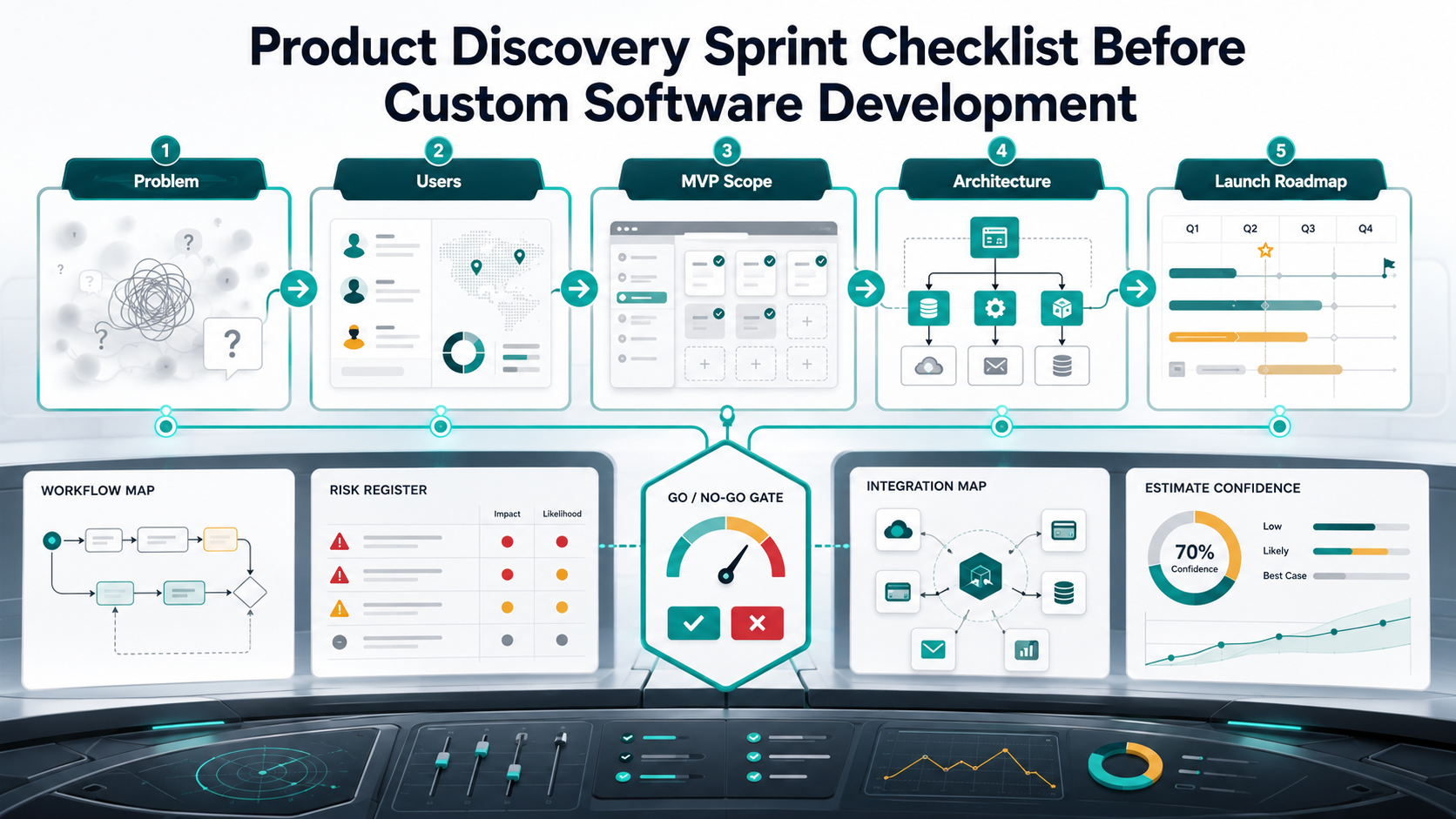
Why Product Discovery Should Happen Before Code
Most custom software waste begins before the first commit. A buyer approves a broad idea, a team starts sprint planning, and then basic decisions keep changing: which user role matters first, what the approval flow looks like, whether payments are required for launch, how much data must migrate, or which integration is actually business-critical.
When those questions are unresolved, engineering becomes the discovery method. That is the expensive version. A database relationship, permission model, API contract, reporting workflow, or onboarding flow can be cheap to change on a whiteboard and painful to change after implementation.
NextPage already covers the broader case for product discovery before development. This article narrows the idea into a practical sprint checklist you can use before approving a custom software build, MVP, SaaS product, customer portal, internal dashboard, or marketplace workflow.
The Discovery Sprint Output Checklist
By the end of discovery, the team should produce a compact set of decision artifacts. If one artifact is missing, that does not always mean the project should stop. It means the estimate or roadmap should show the assumption explicitly.
| Output | What It Should Clarify | Why It Matters Before Development |
|---|---|---|
| Problem Statement | The workflow pain, affected user, and measurable business outcome. | Prevents building features around a vague idea instead of an operating problem. |
| User And Role Map | Primary users, secondary users, admins, approvers, support roles, and permissions. | User roles drive screens, data access, audit trails, and testing scope. |
| Workflow Map | The current process, target process, exceptions, approvals, handoffs, and failure paths. | Custom software usually gets expensive at workflow edges, not static screens. |
| MVP Boundary | Build now, validate first, later phase, and do not build. | Keeps the first release narrow enough to launch and learn. |
| Data And Integration Map | Core entities, data sources, migration needs, APIs, webhooks, and ownership. | Integration uncertainty is a common source of budget and timeline drift. |
| Architecture Assumptions | Platform surface, tenancy, security, availability, analytics, and scale assumptions. | Lets developers estimate the real system, not only visible UI. |
| Risk Register | Business, UX, technical, compliance, delivery, and adoption risks. | Turns hidden assumptions into explicit decisions and contingencies. |
| Roadmap And Estimate Range | First release timeline, team shape, cost band, and confidence level. | Helps leadership decide whether to build, trim, validate, or pause. |
1. Define The Problem Before Listing Features
The first discovery checkpoint is a crisp problem statement. A weak statement sounds like "we need an app for vendors." A stronger statement names the operating pain: "regional managers cannot approve vendor onboarding fast enough because documents, pricing rules, compliance checks, and ERP records live in separate systems."
Use these prompts:
- Who experiences the problem most often?
- What do they do today to work around it?
- What metric should improve if the software works?
- What happens if the problem remains unsolved for six months?
- Which parts of the process are annoying but not worth automating yet?
This step matters because feature lists are often symptoms. A buyer may ask for dashboards, notifications, approval screens, and exports, but the actual problem might be delayed decisions, poor data quality, or unclear accountability. Discovery should separate workflow pain from requested UI.
2. Map Users, Roles, Permissions, And Buyer Expectations
Custom software scope changes quickly when user roles are vague. A simple internal tool with one admin and one operator is a different build from a portal with customers, vendors, reviewers, finance, support, and super admins. Role count affects onboarding, permissions, notifications, audit logs, reporting, QA, and support workflows.
Create a role map before estimating:
| Role Question | Build Impact | Discovery Evidence |
|---|---|---|
| Who creates records? | Forms, validation, drafts, attachments, imports. | Sample forms, current spreadsheet, CRM fields, or workflow screenshots. |
| Who approves or rejects work? | Status model, notifications, comments, audit trails. | Approval matrix and exception examples. |
| Who only views reports? | Dashboards, filters, exports, access limits. | Reporting questions and sample decisions. |
| Who administers the system? | Settings, roles, billing, user management, support tools. | Admin responsibilities and escalation paths. |
For SaaS products, this role map should also cover tenant owners, workspace admins, billing contacts, invited users, and support agents. NextPage's SaaS development services page shows how product discovery connects to tenant architecture, subscriptions, roles, admin panels, integrations, analytics, deployment, and support.
3. Convert Workflows Into Buildable User Journeys
A discovery sprint should document the main workflow and the uncomfortable edge cases. The main path tells the team what the product does when everything goes right. Edge cases tell the team where complexity hides.
For each major workflow, capture:
- Trigger: what starts the workflow?
- Actor: which role takes the first action?
- Required data: what information must exist before the action can happen?
- Decision points: what approvals, rules, or calculations change the path?
- Exceptions: what happens when data is missing, rejected, duplicated, expired, or disputed?
- Completion: what record, notification, payment, shipment, report, or downstream update proves the workflow is done?
This is where product discovery becomes practical. A wireframe without workflow rules can look finished while hiding important decisions. A workflow map with unresolved exceptions gives the development team honest risk signals.
4. Draw The MVP Boundary With Four Buckets
The MVP boundary is the most important discovery output for founders. Put every requested capability into one of four buckets:
| Bucket | Meaning | Example |
|---|---|---|
| Build Now | Required for the first release to deliver the core outcome. | Customer request intake, internal review, status updates, and admin edits. |
| Validate First | Potentially valuable, but the team needs proof before building. | AI recommendations, marketplace matching, premium analytics, or automated routing. |
| Later Phase | Useful after launch but not required to test the core workflow. | Advanced reporting, multi-language support, native mobile apps, or partner APIs. |
| Do Not Build | Low-value, redundant, or better handled manually for now. | Custom settings for rare exceptions or features copied from competitors without user evidence. |
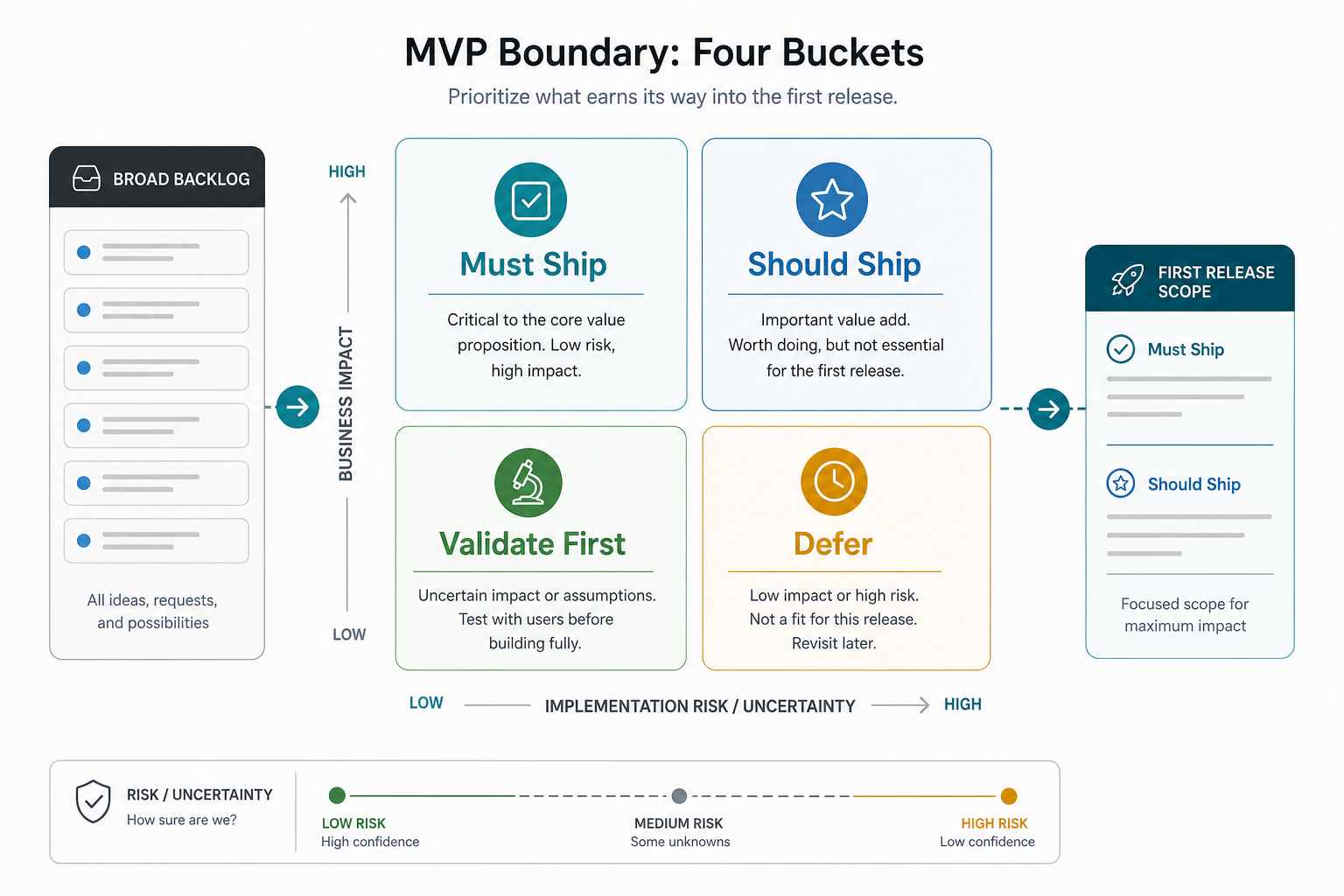
For AI-enabled products, this cut line matters even more. AI product discovery should identify which signals are strong enough for automation and which decisions still need human review, deterministic rules, or manual validation.
5. Choose The First Product Surface
Many teams jump into platform debates too early: native app, web app, PWA, admin portal, customer portal, internal dashboard, or marketplace. Discovery should choose the first surface based on the workflow, user context, and launch evidence needed.
Mobile app development may be right when the workflow is location-based, camera-heavy, offline, notification-driven, or consumer-facing. A responsive web app may be better when users work from desks, need dense data entry, use dashboards, or require quick iteration across roles; compare similar delivery patterns in NextPage's software portfolio examples when stakeholders need proof of workflow depth. A PWA can be a useful first step when install friction is high but mobile access still matters.
For many custom business workflows, web app development is the practical first release because it supports portals, dashboards, admin workflows, and integrations without duplicating native app scope too soon.
6. Map Data, Integrations, And Ownership Early
Integration scope can turn a clean estimate into a moving target, especially when discovery uncovers legacy systems that may need legacy software modernization before the new product can rely on clean data. Discovery should identify the systems that feed or receive product data, the owner of each system, the API or export method, and the risk if access is delayed.
| Integration Question | Why It Changes Scope | Evidence To Collect |
|---|---|---|
| Is there a documented API? | API quality affects backend effort, testing, and error handling. | API docs, sandbox access, sample payloads. |
| Who owns credentials and approval? | Procurement or IT delays can block development. | System owner, access process, security requirements. |
| Is data clean enough to use? | Bad data creates migration, deduplication, and validation work. | Sample export, field list, data-quality notes. |
| What happens when sync fails? | Reliability expectations drive retries, logs, alerts, and admin tools. | Error scenarios and support workflow. |
Before asking for a final budget, use the Custom Software Cost Estimator to pressure-test how roles, integrations, AI features, and complexity change the likely build range.
7. Capture Non-Functional Requirements Before They Become Rework
Non-functional requirements are easy to postpone because they do not look like features. They still shape architecture and cost. Discovery should capture enough expectations for security, performance, availability, accessibility, compliance, observability, and support to avoid surprise rebuilds.
Use this lightweight checklist:
- Security: sensitive data, authentication, permissions, audit trails, secret handling, and admin access.
- Performance: expected records, concurrent users, report size, upload size, response-time expectations, and background jobs.
- Availability: operating hours, downtime tolerance, backup requirements, and recovery expectations.
- Compliance: industry rules, data residency, consent, retention, deletion, and review requirements.
- Accessibility: keyboard usage, contrast, screen-reader expectations, and legal or procurement requirements.
- Support: logs, alerts, admin tools, issue ownership, and handover documentation.
These requirements do not need to become a fifty-page document. They do need to exist before architecture, estimate, and delivery plan are treated as reliable.
8. Build A Risk Register That Changes Decisions
A useful risk register is not a list of scary possibilities. It should change the plan. Every risk needs an owner, severity, likelihood, mitigation, and decision deadline.
| Risk | Likely Mitigation | Decision Impact |
|---|---|---|
| Users disagree on the core workflow. | Run short interviews and map one primary workflow first. | Delay full estimate until workflow is stable. |
| Third-party API access is uncertain. | Request sandbox credentials and build a proof-of-connection spike. | Separate integration spike from feature estimate. |
| AI feature has weak evidence. | Validate with sample data and human-review workflow. | Move AI automation to validate-first bucket. |
| Budget is lower than first-release scope. | Trim to one user segment, one workflow, and fewer integrations. | Use a phased roadmap instead of reducing quality gates. |
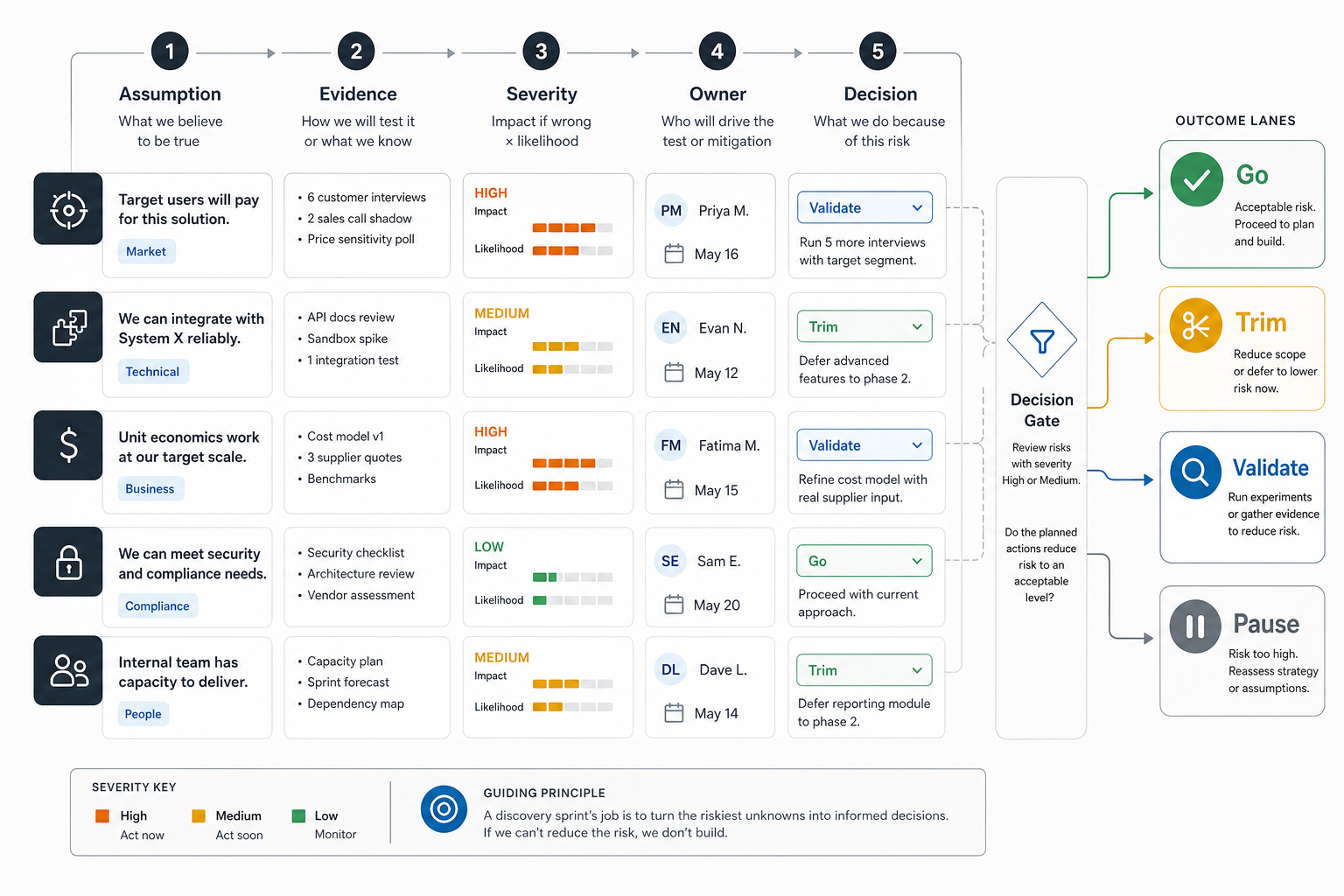
This is also where the engagement model becomes clearer. If scope is stable, a fixed-scope build may work. If the product will evolve quickly, time and material with guardrails or a dedicated team may be safer. If the goal is a startup MVP, NextPage's MVP development company work starts by narrowing the first release to the smallest product that can create useful market evidence.
9. Turn Discovery Into Estimate Confidence
A discovery sprint should not promise fake certainty. It should improve estimate confidence by naming assumptions. The final estimate should say which items are firm, which are directional, and which need a spike or decision before commitment.
Use three confidence bands:
- High confidence: workflow, user role, data source, and acceptance criteria are clear.
- Medium confidence: the feature is understood, but edge cases, integrations, or volume assumptions need validation.
- Low confidence: the feature depends on unknown user behavior, third-party access, AI quality, legacy data, compliance approval, or unresolved business rules.
This makes budget conversations more honest. A single total can hide risk. A range with confidence notes helps leaders decide whether to approve development, fund another discovery pass, cut scope, or run a prototype. It also connects to broader custom software development cost planning, where workflow complexity and integration uncertainty usually matter more than the number of screens.
11. Define Validation Metrics Before Development Starts
A discovery sprint should name the evidence that will prove whether the first release is ready for engineering. Without validation metrics, teams can leave discovery with attractive diagrams but no clear way to decide if the problem, workflow, integration plan, and budget are strong enough.
Keep the measurement plan practical. A founder may need five customer interviews with repeated pain. An internal workflow team may need task-completion evidence from operators. A technical lead may need API access, sample payloads, and data-quality checks. A sponsor may need a budget range with confidence bands and a release gate tied to business value.
| Validation Area | Evidence To Capture | Decision It Supports |
|---|---|---|
| User evidence | Interview patterns, frequency of pain, current workaround cost, buying or adoption signal. | Confirms whether the problem is worth solving now. |
| Workflow evidence | Task path, exceptions, approval rules, handoffs, and success criteria for the first release. | Shows whether the MVP boundary is operationally complete. |
| Technical evidence | API access, sample data, integration owner, security constraints, and unknown spikes. | Separates build-ready scope from validate-first scope. |
| Commercial evidence | Budget range, timeline tolerance, launch owner, support model, and value metric. | Helps leadership choose go, trim, validate, or pause. |
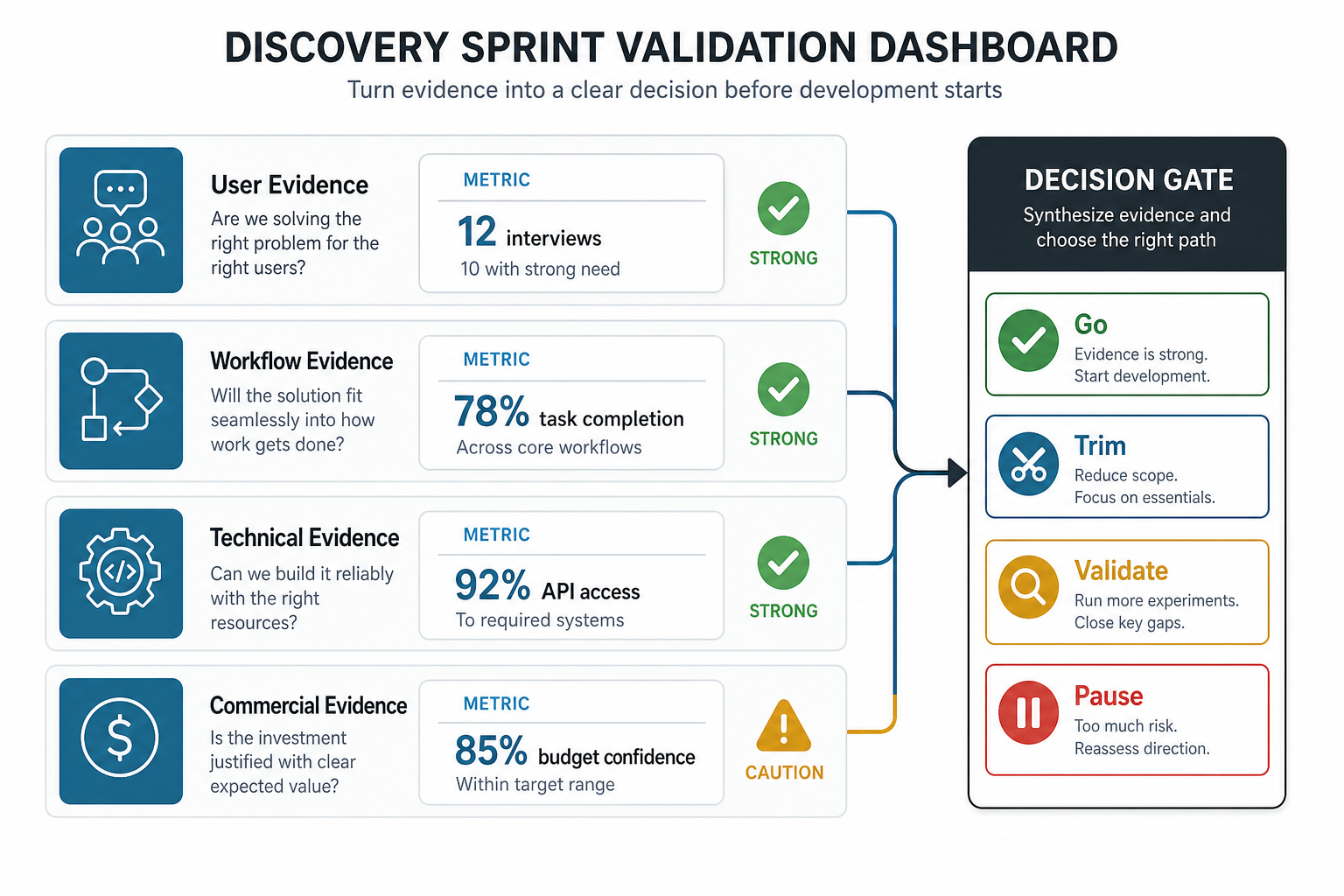
This is the point where discovery becomes an investment gate rather than a workshop. If the strongest evidence is user demand but the API path is weak, fund a technical spike. If workflows are clear but the budget is too low, trim scope. If the commercial case is strong and the evidence lanes are stable, move into development with acceptance criteria and release gates.
10. End With A Go, Trim, Validate, Or Pause Decision
Discovery should end with a decision, not a folder of artifacts. The team should choose one of four paths:
| Decision | When To Choose It | Next Step |
|---|---|---|
| Go | Problem, user, scope, architecture, integration, and budget assumptions are clear enough. | Start development with sprint plan, acceptance criteria, and release gates. |
| Trim | The product is worth building, but the first-release scope is too large. | Reduce roles, workflows, integrations, or advanced features. |
| Validate | The biggest assumption is user demand, workflow fit, AI quality, or integration feasibility. | Run interviews, prototype test, data test, or technical spike. |
| Pause | The business case, ownership, budget, or operating model is not ready. | Resolve the blocker before hiring a development team. |
This decision protects both sides. Buyers avoid funding an unclear build. Development teams avoid inheriting business uncertainty as engineering scope. For larger systems, NextPage's custom software development process uses discovery to align product, architecture, delivery, QA, and support before build execution begins.
Red Flags That Discovery Is Not Ready For Development
Do not move straight into development if several of these signals are present. If you are already comparing vendors, pair this list with the custom software development company checklist so discovery quality becomes part of partner evaluation:
- The team cannot name the primary user for the first release.
- The feature list is copied from competitors but not tied to a workflow.
- Every stakeholder has a different definition of MVP.
- Integrations are described by brand name only, without access or API evidence.
- The estimate assumes clean data without reviewing sample data.
- Security, roles, audit logs, and admin workflows are considered "later" despite sensitive data.
- The buyer wants a fixed price but keeps changing the problem, users, or launch goal.
- AI features are included without sample inputs, expected outputs, review rules, or fallback behavior.
These red flags do not mean the idea is bad. They mean the next paid step should be discovery, prototype validation, or technical spike, not full development.
How NextPage Runs A Practical Discovery Sprint
NextPage runs discovery as a short, decision-oriented process. We focus on the product outcome, workflow, user roles, technical constraints, and launch path that will actually affect development scope. The output is meant to be used by founders, operators, and engineers, not filed away as strategy theater.
A typical discovery engagement includes stakeholder sessions, workflow mapping, MVP boundary decisions, technical architecture assumptions, integration review, risk scoring, release roadmap, and a budget/timeline range. For SaaS, marketplace, internal tool, portal, and AI-enabled workflows, we also identify which assumptions should be validated before automation or scale.
If you already know the workflow, the next step may be a scoped build. If the idea is still broad, start with the MVP Scope Builder, then use a short discovery sprint to turn your selected scope into a build plan.