
Quick Answer: What Should SAP On Google Cloud Migration Include?
An SAP on Google Cloud migration should include landscape inventory, certified sizing, network and IAM foundation, SAP HANA or database migration planning, integration mapping, security evidence, HA/DR design, cost governance, cutover rehearsal, rollback criteria, and hypercare ownership. Treat it as an ERP risk program, not a generic lift-and-shift cloud move.
The decision is usually bigger than where virtual machines run. SAP workloads sit close to finance, procurement, inventory, manufacturing, logistics, reporting, and month-end close. A weak migration plan can create downtime, broken integrations, unreconciled data, compliance gaps, and support ambiguity. A strong plan proves the target architecture and the operating model before production cutover.
If Google Cloud is the target, start with Google Cloud migration services for workload assessment, landing zone design, migration waves, data movement, testing, and post-cutover support. If SAP is one workload inside a broader estate, pair it with wider cloud migration services planning so ERP, applications, data, identity, and support move as one roadmap.
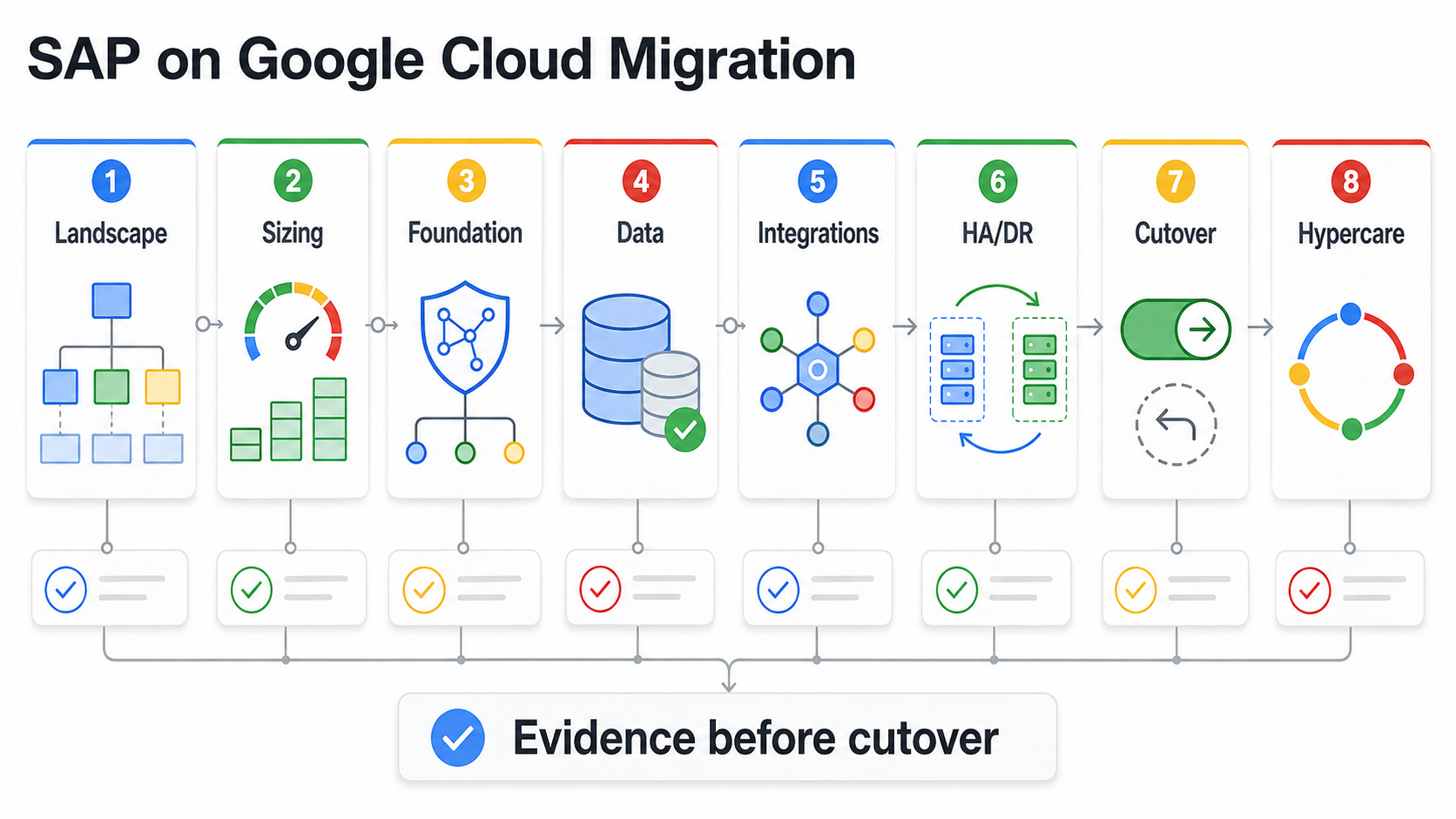
Why SAP Migration Is Different From A Standard Cloud Move
Generic cloud migration checklists often focus on servers, databases, networks, monitoring, and cost. SAP needs all of that, but it also needs ERP-specific evidence: SAP certification, HANA memory sizing, OS and database compatibility, transport routes, batch windows, interface dependencies, business calendar constraints, audit controls, backup restore proof, and support ownership between SAP, Google Cloud, internal teams, and implementation partners.
The OrangeMantra reference page validates market interest in GCP migration, including infrastructure, public cloud, private cloud, hybrid cloud, security, disaster recovery, monitoring, and SAP on Google Cloud migration. The gap for buyers is not another benefit list. The gap is a checklist that says what must be true before the SAP program manager signs off.
Google Cloud's SAP documentation reinforces that SAP on Google Cloud has its own planning surface: checklists for SAP landscapes, SAP HANA, SAP NetWeaver, high availability, sizing, cost estimation, Agent for SAP, security, backup, recovery, data integration, and support requirements. NextPage turns those technical surfaces into a buyer-ready migration sequence.
For 2026 planning, treat the documentation set as a control checklist rather than background reading. Certified infrastructure, support prerequisites, Agent for SAP, HA/DR, backup, monitoring, and data-integration decisions should each produce an owner, a test result, and a rollback or recovery note before a production wave is approved.
1. Inventory The SAP Landscape Before Architecture Decisions
Do not start with machine types. Start with the business landscape and dependency map. Identify every SAP system, client, database, interface, batch job, report, integration, add-on, custom ABAP object, middleware flow, file transfer, identity dependency, printer, monitoring tool, and support owner.
| Inventory area | Questions to answer | Evidence to collect |
|---|---|---|
| Systems and modules | Which SAP applications, modules, and environments are in scope? | System list, SID/client map, owners, environments, business criticality. |
| Database and storage | Is the workload on SAP HANA, AnyDB, or a transitional database pattern? | Database version, size, growth, retention, backup, restore history. |
| Integrations | Which systems exchange data with SAP before, during, and after cutover? | Interface catalog, protocols, message volumes, owners, failure handling. |
| Operations | How are transports, jobs, monitoring, incidents, and month-end processes run today? | Runbooks, calendars, batch schedules, dashboards, incident history. |
| Compliance | Which audit, data residency, access, encryption, and retention controls apply? | Control matrix, audit evidence, role map, data classification. |
If the existing landscape is already being modernized from ECC to S/4HANA, treat cloud migration and application modernization as separate but coordinated workstreams. The SAP ECC to S/4HANA migration checklist is useful when functional redesign, data cleanup, and process change are part of the same program.
2. Confirm Certified Sizing, Region, And Support Prerequisites
SAP sizing is not a rough VM estimate. Confirm certified machine families, memory requirements, CPU platform, operating system support, disk throughput, network throughput, region availability, maintenance behavior, and high-availability design before committing to a migration wave. For SAP HANA, memory, persistence, log volume, backup, and restore behavior shape the whole plan.
Use sizing outputs and SAPS estimates as planning inputs, then validate against actual workload behavior. The target should be approved by SAP Basis, infrastructure, security, finance, and business owners before execution. Google Cloud's SAP documentation also notes support prerequisites; do not assume SAP and cloud support will be available if required support plans, agents, configuration, or documentation are missing.
| Decision | Why it matters | Sign-off evidence |
|---|---|---|
| Certified compute | SAP workloads must run on supported infrastructure patterns. | Certified machine selection, SAPS/memory sizing, region availability. |
| Storage design | HANA persistence, logs, backups, and snapshots depend on reliable throughput. | Disk layout, throughput estimate, backup/restore test plan. |
| Support model | Incident routing breaks when ownership is vague. | Support plan, RACI, escalation contacts, monitoring ownership. |
| Cost model | Oversized ERP infrastructure can create long-term waste. | Baseline cost, committed-use assumptions, labels, budgets, review cadence. |
3. Build The Google Cloud Foundation Around SAP Constraints
SAP environments are sensitive to network, identity, DNS, routing, and firewall decisions. Reworking those foundations after migration can be expensive and risky. Before moving workloads, define the Google Cloud organization, folders, projects, VPC or Shared VPC structure, subnets, firewall policy, Cloud Interconnect or VPN design, DNS, private access, service accounts, IAM roles, key management, logging, and monitoring.
Do not let every SAP environment create its own project model. Production, non-production, sandbox, DR, and shared services need a consistent foundation with clear guardrails. If the SAP move depends on non-SAP applications, use an application migration readiness checklist to confirm dependencies, environments, QA evidence, cutover steps, and rollback decisions across the surrounding application estate.
4. Treat SAP Data Migration As Its Own Workstream
ERP data risk is rarely limited to database copy time. Master data quality, open transactions, historical data retention, reporting extracts, custom tables, attachments, archived data, and reconciliation rules can all affect business sign-off. Decide what will move, what will be cleaned, what will be archived, what will remain read-only, and what will be validated before the cutover window.
For SAP HANA or database migration, rehearse the data movement and validation path before the production weekend. Use control totals, sample records, posting simulations, report comparisons, interface replay, and business-owner sign-off. The ERP data migration checklist gives a more detailed sequence for object mapping, data cleansing, reconciliation, failed-record handling, rollback evidence, and sign-off.
When the data workstream is large, use ERP data migration services to separate migration engineering from business validation. The technical move can only be accepted when finance, procurement, inventory, sales, and operations owners trust the records they will use on day one.
5. Build The SAP Migration Evidence Pack
A strong SAP on Google Cloud migration plan should leave behind a practical evidence pack, not just architecture diagrams. The evidence pack becomes the source of truth for steering committees, technical leads, business process owners, auditors, and support teams during cutover decisions.
| Evidence artifact | Why it matters | Owner |
|---|---|---|
| Landscape and dependency map | Prevents missed interfaces, jobs, files, and reporting dependencies. | SAP program manager |
| Certified sizing decision | Connects SAPS, HANA memory, storage throughput, and region choice to supportable infrastructure. | SAP Basis and cloud architect |
| Data reconciliation pack | Gives business owners proof that records, balances, open items, and reports still match. | Data migration lead |
| Integration test log | Shows that middleware, APIs, EDI, banks, warehouses, CRM, tax, and analytics feeds still work. | Integration lead |
| Cutover and rollback record | Defines go/no-go gates before users create new production transactions. | Migration lead |
| Operations handoff | Confirms monitoring, alert routing, backup restore cadence, incident ownership, and cost review. | Service manager |
This pack also helps when SAP migration is part of a larger modernization roadmap. If surrounding applications, interfaces, or reporting systems are changing at the same time, coordinate the evidence pack with broader cloud migration services governance so ERP risk is not isolated from the rest of the estate.
6. Map Integrations, Reporting, And AI-Ready Data Separately
SAP migration can break silently through integrations. A purchase order interface, warehouse update, EDI flow, bank file, tax system, Salesforce sync, data warehouse feed, or custom middleware process may fail even when SAP itself is healthy. Build an integration test plan that covers connectivity, authentication, message format, retries, monitoring, ownership, and failure recovery.
Google Cloud's SAP ecosystem includes data integration patterns such as BigQuery Connector for SAP, ABAP SDK for Google Cloud, eventing, Pub/Sub, BigQuery, Vertex AI, and Cortex-related analytics patterns. Those tools can create value after the migration, but they should not be mixed casually into the cutover path unless owners, controls, performance expectations, and data semantics are already proven.
A practical rule: migrate the core safely first, then sequence analytics and AI modernization into controlled follow-on waves unless business value or compliance needs require earlier integration.
7. Prove Security, Compliance, Backup, And Recovery
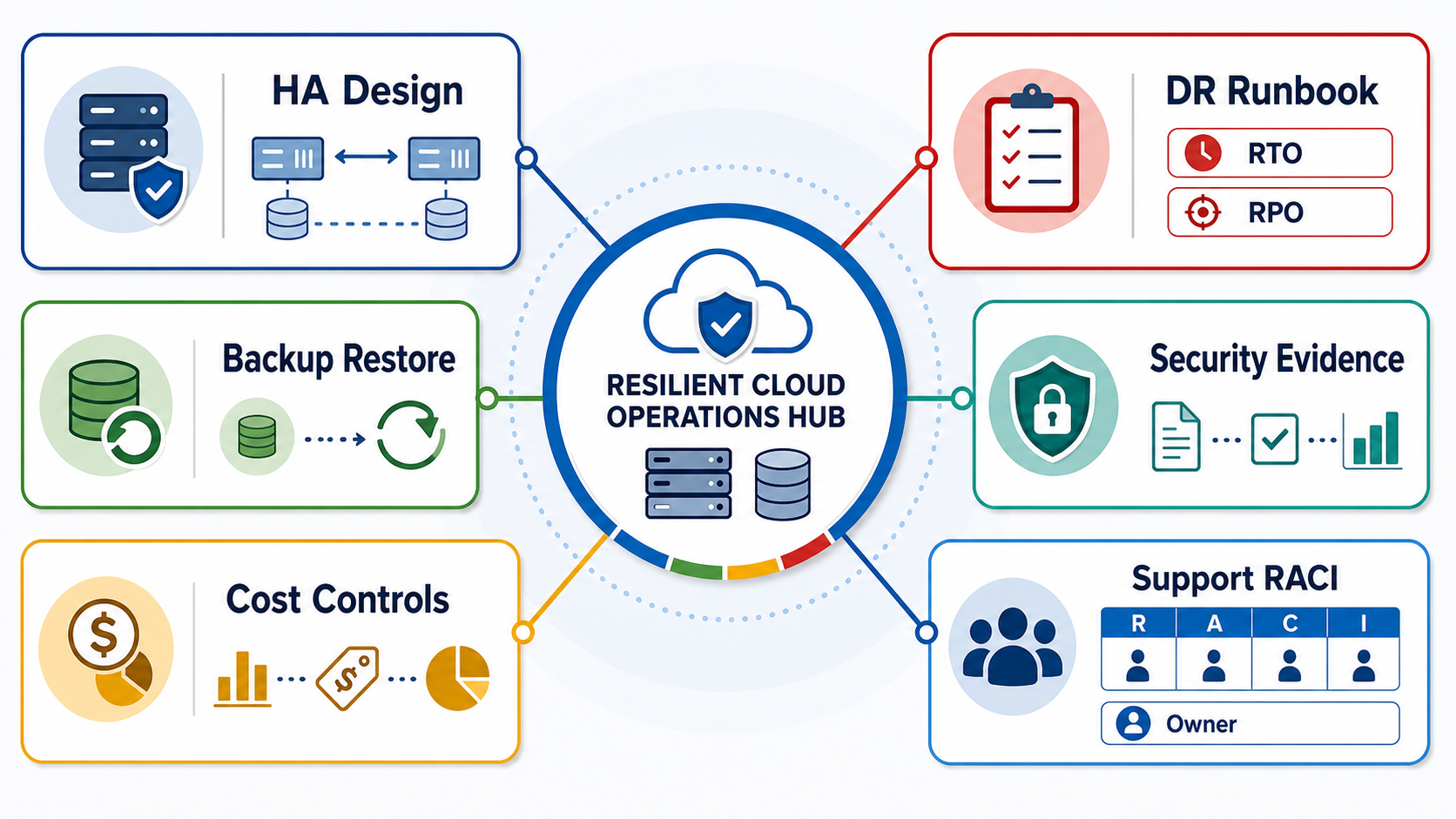
Security approval should not be a late-stage meeting. SAP on Google Cloud needs evidence for IAM, privileged access, service accounts, network exposure, encryption, key management, OS hardening, vulnerability management, audit logs, backup policy, restore testing, data residency, and incident response.
For high-availability and disaster-recovery design, define RTO, RPO, zone or region strategy, database replication, application-server placement, enqueue behavior, failover ownership, DNS or load-balancer changes, backup isolation, and recovery testing. The key question is not whether the architecture diagram looks resilient. The key question is whether the team has tested failover and restore in a way the business will accept.
8. Plan Migration Waves, Cutover, And Rollback Around Business Calendars
SAP cutover windows are constrained by month-end close, production planning, payroll, procurement cycles, warehouse activity, customer orders, tax reporting, and regional support coverage. Build migration waves around business risk, not only technical convenience.
| Cutover item | Owner | Pass/fail evidence |
|---|---|---|
| Freeze window | SAP program manager | Change freeze, transport freeze, data freeze, stakeholder approval. |
| Final data sync | Data lead | Control totals, reconciliation, failed-record log, sign-off notes. |
| Connectivity checks | Platform lead | DNS, routes, firewalls, certificates, interfaces, partner access. |
| Business smoke tests | Process owners | Order-to-cash, procure-to-pay, inventory, finance, reporting checks. |
| Rollback decision | Migration lead | Rollback trigger, deadline, data implications, communication plan. |
| Hypercare bridge | Support owner | War room, dashboards, alert routing, incident queue, escalation path. |
Rollback for SAP is not always symmetrical. Once users post transactions in the new environment, reversing may require data decisions, reconciliation, and business approvals. Define the rollback deadline before cutover begins, not during the incident.
9. Manage Cost, Performance, And Hypercare After Go-Live
The first stable cutover is the start of real optimization. Review CPU, memory, storage, HANA behavior, batch runtime, interface latency, backup duration, failed jobs, support tickets, user experience, and cost against the baseline. Then right-size, tune, automate, and hand over operations with evidence.
Cost governance should include labels, budgets, committed-use assumptions, storage lifecycle policy, backup retention, non-production schedules, cost anomaly alerts, and monthly owner review. Use the custom software cost estimator as a planning aid when SAP migration also includes integration rebuilds, workflow automation, custom portals, or reporting modernization. Post-cutover operations should include monitoring dashboards, runbooks, incident ownership, access review, patch cadence, backup restore cadence, and capacity planning. The managed cloud services checklist helps evaluate whether an operating partner can support production cloud workloads after the migration team leaves.
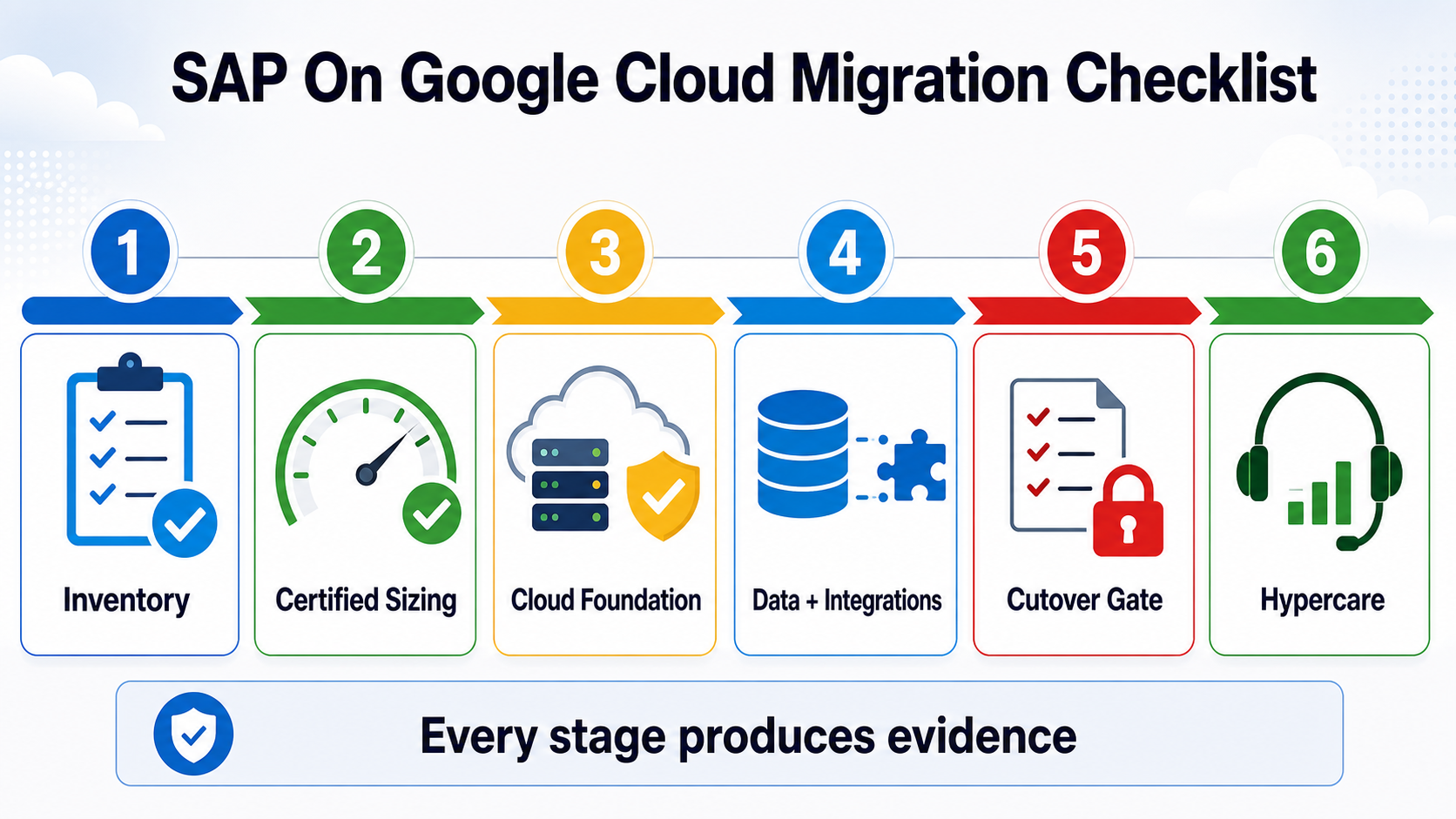
NextPage's SAP On Google Cloud Migration Checklist
Use this checklist before approving a production SAP migration wave:
- Inventory SAP systems, clients, modules, databases, integrations, jobs, reports, owners, and business calendars.
- Confirm certified machine types, sizing, memory, storage, OS, database, region, support, and cost assumptions.
- Design the Google Cloud foundation around SAP network, IAM, DNS, firewall, logging, monitoring, and support constraints.
- Separate database copy, data cleanup, historical retention, reconciliation, and business sign-off from hosting migration.
- Map every integration and reporting path, including middleware, partners, files, APIs, data warehouse feeds, and monitoring.
- Prove security, audit, backup, restore, high availability, disaster recovery, and incident-response evidence.
- Plan migration waves around business criticality and calendar risk.
- Rehearse cutover, smoke tests, rollback decision windows, communications, and hypercare ownership.
- Track cost, performance, support tickets, and optimization opportunities after go-live.
How NextPage Can Help With SAP On Google Cloud Migration
NextPage helps teams turn SAP-on-Google-Cloud intent into a migration roadmap, technical architecture, data plan, integration test plan, cutover runbook, and support model. Start with Google Cloud migration services when the target is GCP, or use broader cloud migration services when SAP is one part of a larger cloud transformation.
If the SAP program also needs app modernization, custom integrations, dashboards, or operational workflows, review the NextPage portfolio for examples of systems where cloud architecture, data movement, workflow automation, and business operations had to ship together.