
Quick Answer: What Does Customer Portal Development Cost?
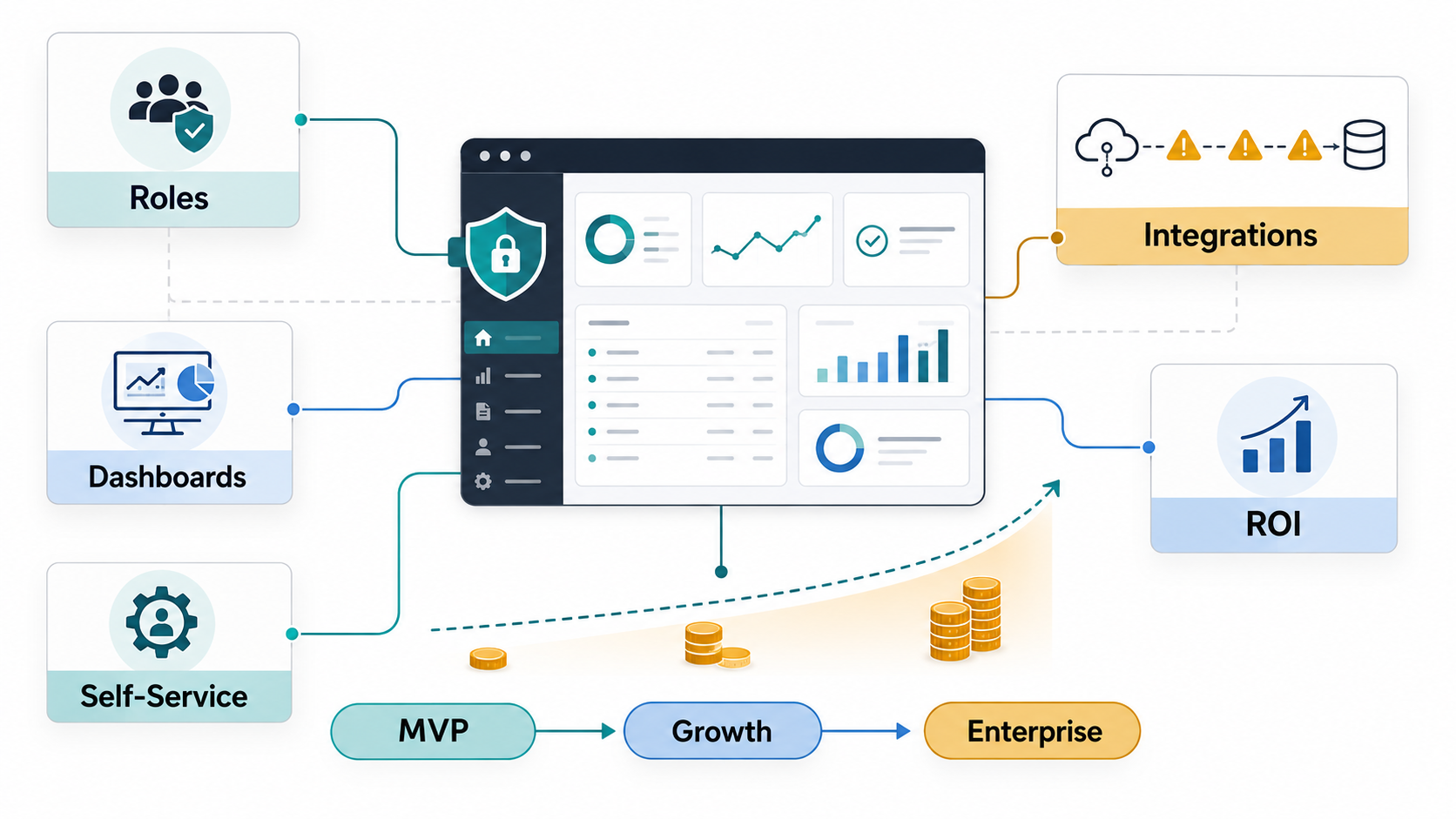
Customer portal development usually costs less or more based on workflow depth, integration risk, user-role complexity, security needs, and dashboard expectations. A lean self-service MVP can often be planned around a focused role model, a few core account workflows, and one or two integrations. A larger portal with CRM, ERP, payments, documents, support tickets, analytics dashboards, multi-tenant permissions, and compliance controls needs a broader custom software budget.
For planning, treat customer portal cost as three practical bands: $25,000-$60,000 for an MVP that proves login, account data, requests, documents, and support deflection; $60,000-$150,000 for a growth portal with custom dashboards, workflow automation, CRM/helpdesk/ERP sync, payments, notifications, and admin tools; and $150,000-$350,000+ for enterprise portals with complex roles, multi-tenant data, real-time integrations, audit trails, compliance, analytics, and high-volume performance requirements.
The useful question is not "how many screens do we need?" It is "which customer jobs should move from email, spreadsheets, calls, and manual admin work into a secure portal?" NextPage usually scopes this through web app development, custom software development, and a first-pass Custom Software Cost Estimator model before committing to a build plan.
Why Customer Portal Cost Ranges Vary So Much
The SparxIT reference page is a broad web portal guide. It usefully separates portals from websites, lists B2B, B2C, enterprise, patient, insurance, real estate, education, and other portal types, and frames web portal cost around features, integrations, business logic, design, compliance, and team model. That is directionally right, but customer portal buyers need a more specific model.
Current 2026 competitor pages show why the ranges are wide. SpotDev publishes a fixed-price B2B customer portal offer from about GBP 15,000 for mid-market teams, FreedomDev frames simple customer portals around $25,000-$60,000 and integrated dashboards/payment/ERP portals at $100,000-$250,000+, SoftTeco lists basic custom web portals around $30,000-$80,000+, OSKI frames broader web portal tiers from $10,000 to $500,000, and WeWeb notes that complex enterprise portals with many integrations can move into the hundreds of thousands. Those ranges are not contradictory; they describe different operating models, build-vs-platform choices, and integration depth.
A customer portal is expensive when it must understand the business, not because it has a login screen. The budget rises when the portal must decide what each customer can see, which system owns the data, how requests move through internal teams, how dashboards prove outcomes, and what happens when integrations fail.
The Six Customer Portal Cost Drivers
Use these cost drivers before asking for a quote. They make discovery sharper and prevent a vague "portal" idea from becoming an under-scoped build.
| Cost driver | Lower-cost version | Higher-cost version |
|---|---|---|
| User roles and permissions | Customer user, customer admin, internal admin. | Company hierarchies, locations, departments, sales/support roles, granular permissions, delegated admins. |
| Self-service workflows | Submit request, view status, download documents, update profile. | Approvals, quotes, claims, renewals, onboarding, escalations, service-level timers, exception queues. |
| Integrations | One CRM, helpdesk, or billing integration with scheduled sync. | CRM, ERP, payment, identity, document, warehouse, analytics, and notification systems with monitoring and retries. |
| Dashboards and reporting | Basic account activity and request status. | Role-specific dashboards, KPI drilldowns, export controls, customer health, usage analytics, and admin operations views. |
| Security and compliance | Secure login, role checks, basic audit logs. | SSO, MFA, tenant isolation, detailed audit trails, data retention, HIPAA, PCI DSS, GDPR, or industry-specific controls. |
| Admin operations | Simple content and user management. | Bulk imports, approval queues, failed-sync recovery, support impersonation controls, audit review, and workflow configuration. |
This is why a portal estimate should be connected to a broader custom software development cost model. Feature count matters, but workflow ownership, data ownership, and integration reliability usually explain the real budget.
Start With User Roles Before Screens
A portal role model controls nearly every cost decision. A B2C support portal may need a simple customer profile, support requester, and internal support admin. A B2B customer portal may need company admins, buyers, finance users, branch managers, field operators, customer success managers, sales owners, and support agents. Each role changes navigation, permissions, notifications, dashboard data, and test coverage.
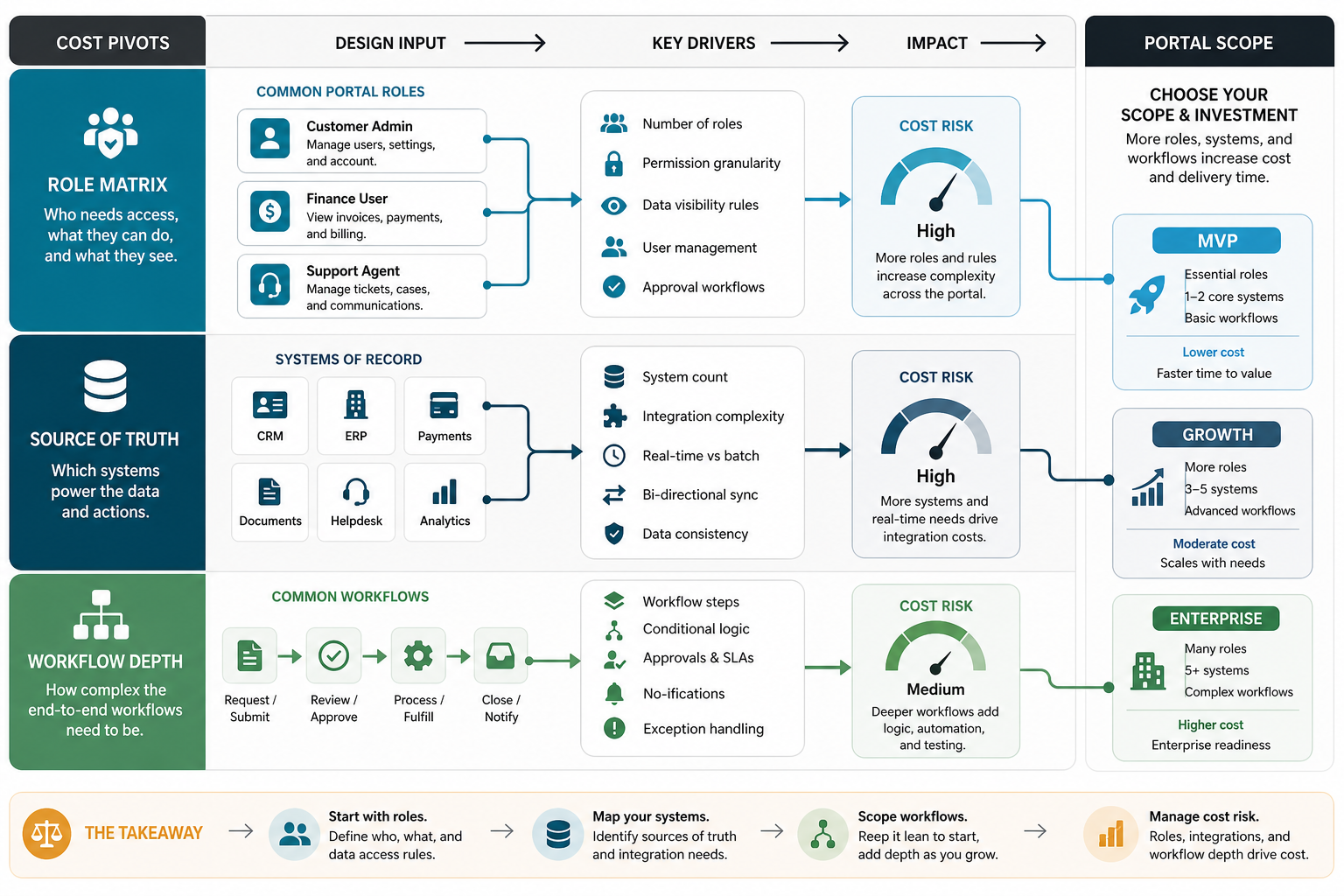
Build a role matrix before wireframes. For each role, define what the user can view, create, edit, approve, export, pay, invite, and escalate. Then decide which data is account-specific, location-specific, department-specific, or global. If a customer admin can invite users, decide whether invitations are automatic, sales-approved, domain-restricted, or synced from CRM. If finance users can view invoices, decide whether they can also pay, download statements, dispute charges, or see service history.
For teams that already have a general portal idea, NextPage's customer portal development guide is a useful companion because it separates features, cost drivers, and integration checkpoints. This post goes deeper into budget and ROI decisions.
Integration Scope Is Usually The Budget Pivot
Customer portals rarely live alone. They often need customer records from CRM, orders and invoices from ERP, tickets from a helpdesk, files from cloud storage, payments from Stripe or another gateway, notifications from email/SMS providers, usage from the product database, and analytics from a warehouse or BI layer. Every integration needs a source-of-truth decision.
Use this integration checklist during discovery:
- Customer and account data: CRM, ERP, identity provider, or portal database?
- Orders, invoices, and payments: ERP/accounting ownership, payment gateway behavior, retries, refunds, and failed-payment states.
- Support and service requests: helpdesk sync, SLA timers, comments, attachments, status changes, and escalation rules.
- Documents: storage location, version control, permissions, virus scanning, retention, and customer-visible status.
- Notifications: email, SMS, in-app alerts, webhook events, unsubscribe rules, and audit trail.
- Analytics: event tracking, customer adoption, support deflection, workflow cycle time, and operational exceptions.
When multiple systems are involved, use an API roadmap before implementation. The API development roadmap for SaaS, portals, and internal tools explains the decisions that should be settled before engineers start writing integration code. For heavier operational systems, enterprise software integration services and ERP integration cost planning help expose hidden recovery, reconciliation, and monitoring work.
Dashboard Scope Should Follow The Decision, Not The Chart
Dashboards can make a portal feel useful, but they also expand scope quickly. A customer dashboard may show open tickets, invoices, subscriptions, orders, documents, usage, renewals, project milestones, onboarding status, or SLA performance. An internal dashboard may show stalled requests, failed sync jobs, high-risk accounts, overdue approvals, customer adoption, and support deflection.
Start with the decision each dashboard should improve. A customer success dashboard may help a CSM decide which account needs outreach. A customer admin dashboard may help a client see unresolved items and upcoming renewals. A support dashboard may help managers rebalance workload. Once the decision is clear, define the data source, refresh frequency, access rules, filters, drilldowns, exports, and empty/error states.
NextPage's custom dashboard development services and operational dashboard requirements checklist are relevant when the portal includes KPI, BI, or operations views. Dashboard cost is rarely just chart design; it includes data modeling, validation, access control, and post-launch trust.
What Should Be In A Customer Portal MVP?
A useful MVP should move one painful customer workflow into a secure self-service path and prove that customers will use it. Avoid launching with every role, integration, dashboard, and admin configuration in the first release. Start with the workflow that creates the clearest ROI.
| MVP area | Include first | Defer unless critical |
|---|---|---|
| Access | Secure login, customer admin, invited users, role checks. | Complex company hierarchies, many departments, custom SSO for every client. |
| Self-service | Account profile, request creation, status tracking, document download. | Advanced approvals, complex renewals, automated exception resolution. |
| Integrations | One or two high-value systems with clear ownership and retry behavior. | Every CRM, ERP, helpdesk, billing, analytics, and document edge case. |
| Dashboards | Customer status overview and internal admin queue. | Deep BI, forecasting, customer health scoring, and multi-level exports. |
| Admin | User management, request review, content/document control, audit basics. | Full no-code workflow builder, bulk pricing rules, advanced automation. |
A focused MVP helps the budget stay tied to proof. If the first release reduces support calls, shortens request cycle time, improves payment visibility, or increases customer adoption, later phases become easier to justify.
How To Estimate Customer Portal ROI
Customer portal ROI should be measured in operational terms, not vanity usage alone. Page views do not prove value if customers still call support, invoices are still unclear, and internal teams still retype data between systems. Pick a baseline before launch.
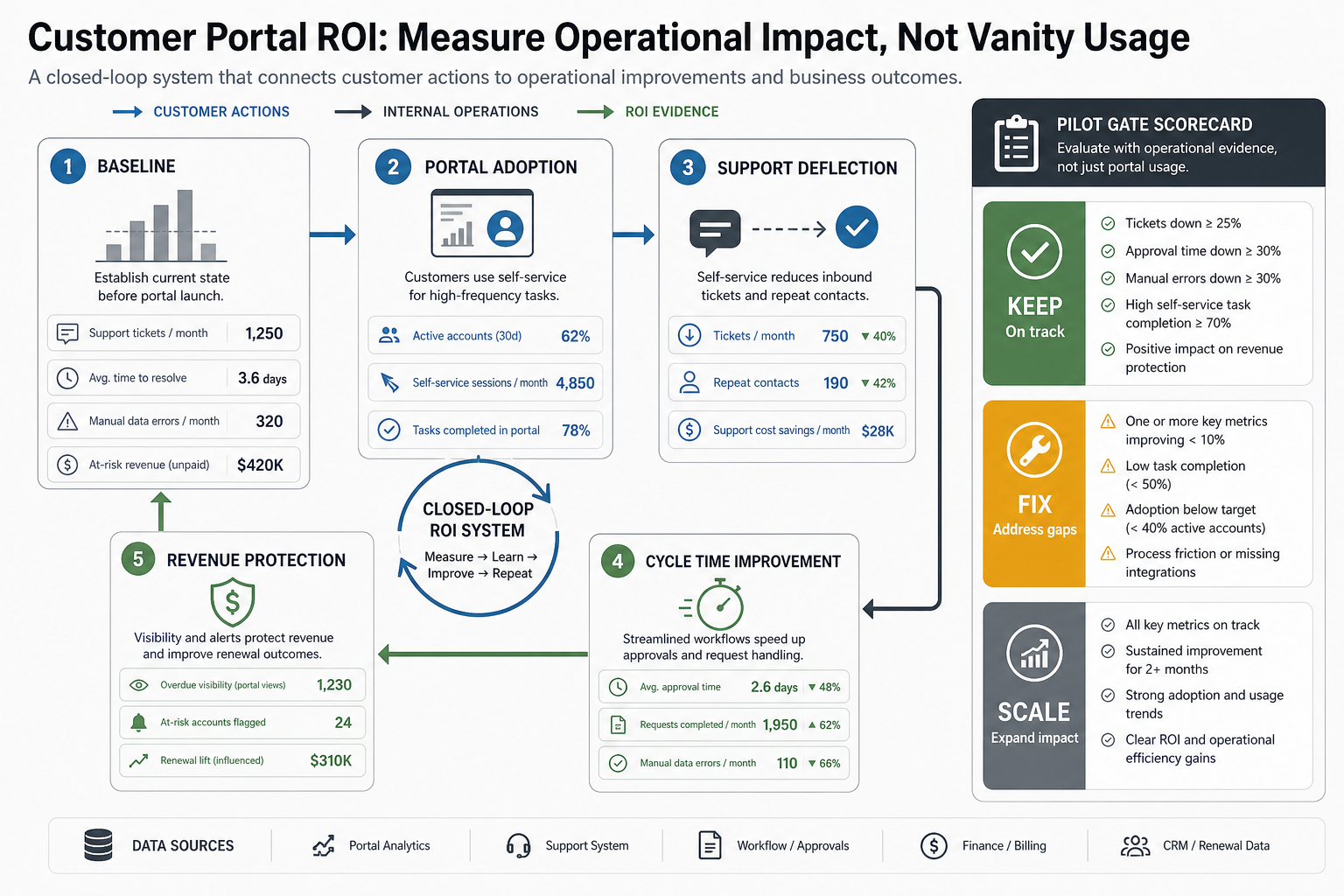
- Support deflection: fewer status-check calls, repeated document requests, password resets, and routine account questions.
- Cycle time: faster quote requests, onboarding tasks, support updates, approvals, claims, payments, or document reviews.
- Data quality: fewer duplicate records, fewer manual copy-paste errors, cleaner customer profiles, and better account ownership.
- Revenue protection: improved renewal visibility, faster invoice payment, better upsell signals, or fewer stalled requests.
- Customer experience: adoption by active accounts, repeat usage, satisfaction feedback, and reduced "where is this?" friction.
Use these metrics to decide whether a $50,000 MVP is enough or whether a $150,000+ integrated portal is justified. A custom portal is worth more when the workflow is frequent, expensive when manual, and visible to customers.
Timeline And Team Shape
A narrow MVP usually needs discovery, UX, frontend, backend, QA, and part-time DevOps/product ownership. A larger portal adds solution architecture, integration engineering, security review, data migration, analytics, and support-runbook work. Timeline depends on decision speed as much as development capacity.
| Portal tier | Typical timeline | Likely team |
|---|---|---|
| MVP | 8-14 weeks | Product lead, UX/UI, frontend, backend, QA, part-time DevOps. |
| Growth | 14-28 weeks | Product, UX, frontend, backend, integration engineer, QA automation, DevOps. |
| Enterprise | 6-12+ months | Solution architect, product, UX, frontend, backend, integration, data, security, QA, DevOps, support owner. |
Scope risk drops when discovery produces a role matrix, workflow map, integration inventory, data ownership map, dashboard requirements, security checklist, acceptance criteria, and pilot-account plan before the main build starts.
Questions To Ask Before Hiring A Customer Portal Development Team
Use vendor conversations to test implementation judgment, not only hourly rates.
- How will you map customer roles, account hierarchy, and permissions before design?
- Which system owns each data object, and how will the portal handle sync failures?
- What should be in the MVP if we want support deflection within 90 days?
- How will dashboard numbers be validated so customers and internal teams trust them?
- What security, audit, and tenant-isolation controls are included in the estimate?
- How will pilot accounts, QA data, rollback, monitoring, and support handoff work?
A strong team should be able to turn those answers into a buildable release plan. If the estimate only lists screens, it is probably missing the work that makes a customer portal reliable.
Next Steps
If you are planning a customer portal, start with the workflow and data model. Name the customer roles, internal owners, self-service jobs, integrations, dashboard decisions, security constraints, and ROI measures before choosing a tech stack or requesting a fixed quote.
NextPage can help scope and build customer portals through web portal development services, web app development, custom software development, and integration planning. For a first budget range, run the Custom Software Cost Estimator, then use the result to plan a discovery call around the roles, workflows, and systems that drive real cost.