
Legacy POS modernization cost depends less on the POS subscription and more on the path you choose: replace, replatform, or wrap the system while you retire risk in waves. A small single-location replacement can stay mostly in vendor setup, hardware, menu migration, and training. A multi-location restaurant group with kitchen display systems, delivery marketplaces, loyalty, gift cards, inventory, accounting, payroll, and custom reporting should budget modernization as a software program, not a register swap.
For planning purposes, restaurant teams should separate three budgets: the visible POS budget, the integration and data budget, and the operational change budget. Hardware and subscriptions are easy to compare. The hidden spend usually appears in data cleanup, menu/modifier mapping, payment exceptions, third-party delivery routing, offline procedures, staff retraining, reporting continuity, and support during rollout.
If you are still sizing the work, start with NextPage's Custom Software Cost Estimator. Use it to model the custom parts around the POS: migration scripts, integration middleware, dashboards, admin workflows, and rollout support.
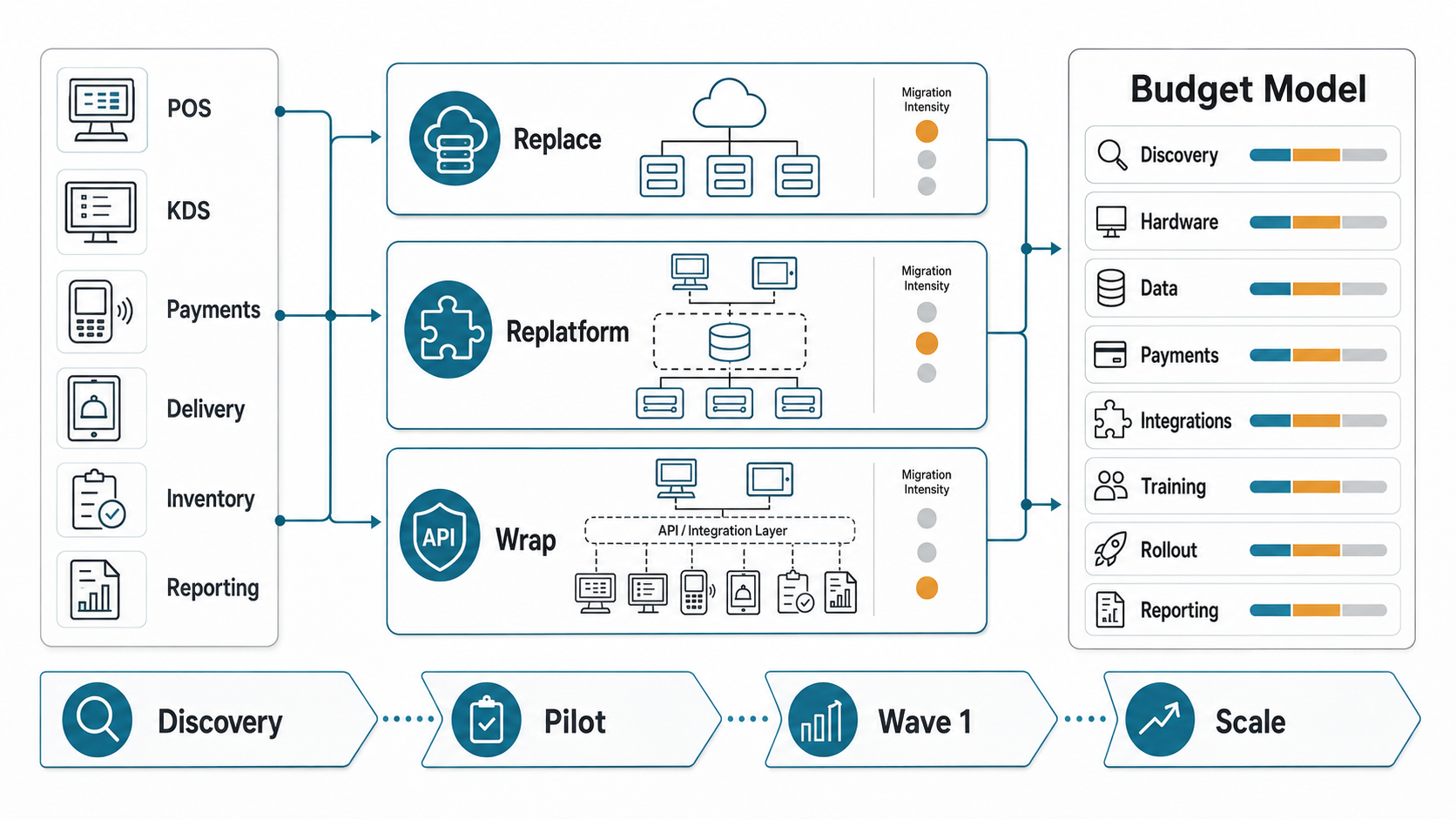
Quick Answer: Legacy POS Modernization Cost
Legacy POS modernization cost usually falls into one of three paths. A replacement path pays for new hardware, vendor configuration, migration, training, and cutover. A replatforming path keeps parts of the workflow but rebuilds the data, integration, reporting, or cloud layer around it. A wrap path keeps the current POS in place temporarily and adds APIs, middleware, dashboards, or automation to reduce operational pain before a later replacement.
| Modernization Path | Best Fit | Main Cost Drivers | Budget Risk |
|---|---|---|---|
| Replace | Simple estate, vendor lock-in is acceptable, old system is near end-of-life. | Terminals, payment devices, setup, menu migration, staff training, pilot and cutover. | Underestimating downtime, data mapping, and integration gaps. |
| Replatform | Existing workflows still matter, but architecture, integrations, or reporting need modernization. | Cloud migration, database redesign, APIs, integration services, observability, test automation. | Finding undocumented dependencies late. |
| Wrap | Replacement is risky now, but operators need better delivery, inventory, loyalty, or reporting. | Middleware, API adapters, data sync, dashboards, exception handling, support tooling. | Building a bridge that becomes permanent technical debt. |
Why Subscription Price Is Not The Real Cost
Most cloud POS comparisons lead with monthly fees, terminals, payment processing, and optional modules. Those numbers matter, but they rarely explain the full modernization budget. Restaurants run through operational chains: menu changes affect ordering channels, orders affect kitchen routing, payments affect closeout, closeout affects finance, and item-level sales affect inventory and reporting.
The real cost appears when those chains have to keep working during migration. A low-cost POS can become expensive if it cannot support your delivery mix, franchise reporting, modifier logic, accounting export, inventory units, or payment reconciliation model. A higher subscription can still be cheaper if it removes custom work and support load.
Use the same modernization logic from NextPage's enterprise application modernization roadmap: define the operating risk first, then choose the path that reduces that risk in waves. If your team is specifically comparing cloud POS migration stages, pair this estimate with the cloud POS modernization roadmap for restaurants.
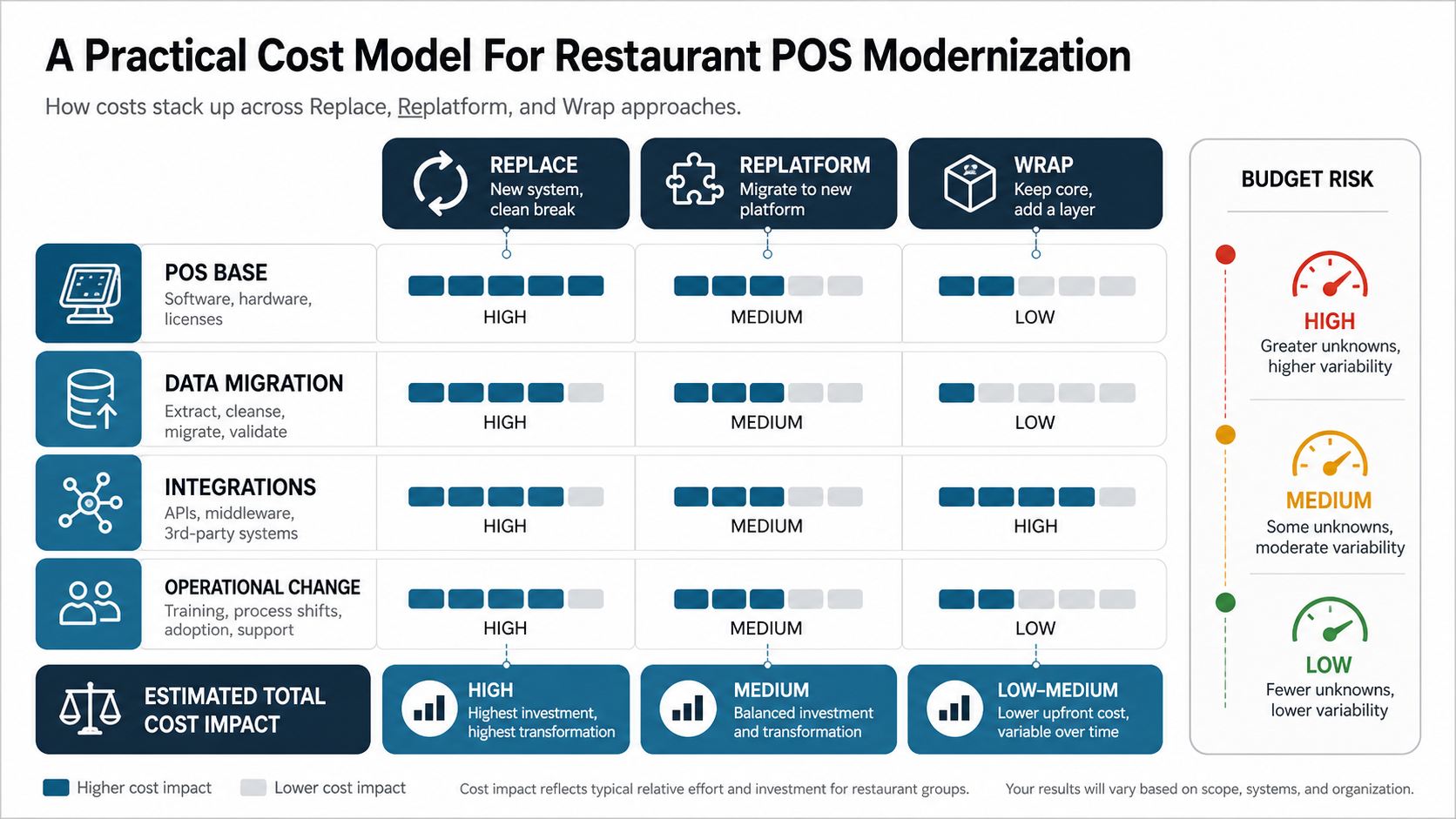
A Practical Cost Model For Restaurant POS Modernization
Build the budget in layers instead of asking for one blended estimate. The base POS layer includes hardware, licenses, payment devices, vendor configuration, and support. The migration layer covers menu items, modifiers, prices, taxes, employees, customers, loyalty balances, gift cards, historical sales, and reporting dimensions. The integration layer covers kitchen displays, delivery marketplaces, direct ordering, inventory, accounting, payroll, CRM, marketing, data warehouses, and BI tools.
The final layer is operational change: pilot planning, live-service support, training, manager playbooks, exception handling, backup procedures, and post-launch fixes. This is where many teams lose control. They pay for the new system but forget the work required to make staff, vendors, finance, and leadership trust it.
If the POS project exposes adjacent operational software needs, compare the scope against NextPage's restaurant management software development cost guide. POS replacement often creates requirements for dashboards, vendor ordering, kitchen production views, owner reports, or delivery orchestration.
Replace: When A Clean Switch Is The Cheapest Real Option
Replacement is usually the clearest path when the legacy POS is brittle, unsupported, hard to secure, expensive to maintain, or unable to support the restaurant's current operating model. It works best when locations are similar, data is clean enough to migrate, the vendor covers most workflows, and custom reporting needs are limited.
The replacement budget should include hardware refresh, payment-device changes, menu and modifier setup, tax and service-charge rules, employee roles, loyalty and gift-card migration, test orders, staff training, pilot support, and rollout waves. Include a contingency for dual-running reports while finance validates the new system.
The danger is treating replacement as a weekend cutover. Even when the vendor manages setup, your team still owns business rules, data validation, integrations, staff readiness, payment risk, and closeout confidence.
Replatform: When The POS Workflow Is Bigger Than One Vendor
Replatforming makes sense when the restaurant needs to modernize architecture without throwing away every operational rule. The POS might remain a transaction core while the surrounding platform moves to cleaner databases, APIs, dashboards, data pipelines, or cloud infrastructure. This path is common when multi-location brands have custom workflows, franchise controls, internal reporting, or historical systems that cannot simply move into a vendor module.
Costs come from discovery, data modeling, API design, migration scripts, integration services, testing, observability, security, and rollout. NextPage's application replatforming services are relevant when the work is less about buying a POS and more about changing the software layer that surrounds it.
The main risk is hidden dependency discovery. Old reports, accounting exports, delivery workarounds, or store-specific menu rules can quietly control daily operations. Replatforming budgets should include a discovery sprint and a technical spike before full implementation.
Wrap: When You Need Relief Before Replacement
A wrap strategy adds a controlled layer around the legacy POS. It can connect delivery orders, normalize item data, feed dashboards, automate exports, or give managers a better interface without replacing every terminal immediately. This is often the right interim path when a big-bang replacement would disrupt peak service or franchise operations.
Wrapping is not automatically cheaper. It reduces near-term change risk, but it adds middleware, monitoring, support, and eventual retirement work. The budget should include adapter development, sync rules, duplicate detection, reconciliation reports, alerting, manual fallback, and a sunset plan.
The wrap path is strongest when it is explicitly temporary or when the POS vendor provides stable APIs. It is weakest when the team builds around fragile exports, screen-level workarounds, or undocumented database access.
Integration Costs That Change The Budget
Restaurant POS integrations are not all equal. A simple accounting export is different from real-time delivery routing. A loyalty lookup is different from bidirectional customer identity sync. Inventory may need recipes, units, vendor items, transfers, waste, and item-level sales. Payroll may need time clocks, tips, roles, and location rules.
Delivery is a common budget multiplier because it touches menu availability, prices, modifiers, order injection, KDS routing, driver status, refunds, and customer communication. If direct ordering or dispatch is part of the roadmap, NextPage's restaurant delivery management software work is a useful adjacent reference.
| Integration | Questions To Price | Modernization Control |
|---|---|---|
| KDS and kitchen routing | Which stations, modifiers, rush rules, and retries matter? | Run peak-service simulations before rollout. |
| Delivery marketplaces | Who owns menu sync, pricing, order injection, refunds, and throttling? | Document failure modes and manual fallback. |
| Inventory | Do item sales map to recipes, units, vendor SKUs, and transfers? | Validate with real item-level data. |
| Accounting and payroll | What closes by location, tender, tax, tips, role, and settlement batch? | Dual-run reports until finance signs off. |
| Dashboards and AI reporting | Which decisions need reconciled data, not raw POS exports? | Start with trusted dashboards before automation. |
Offline And Payment Risk Belong In The Estimate
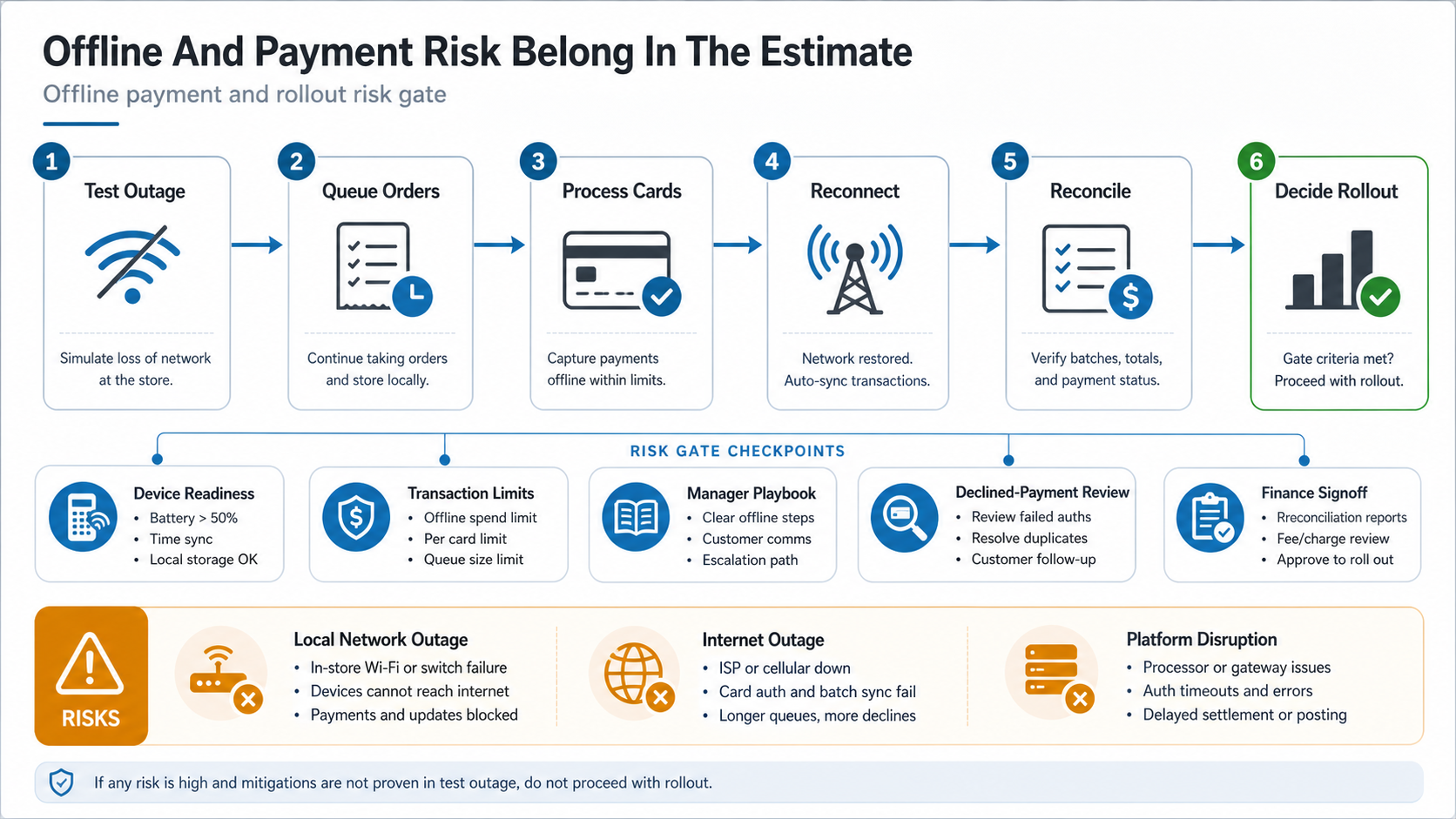
Modern cloud POS products often support offline operation, but official documentation shows that offline behavior depends on the failure type, device, payment method, settings, and recovery process. Toast distinguishes local network, internet, and cloud service disruption scenarios. Square requires offline payments to be enabled and queues transactions locally until reconnection, where payments can later complete or decline.
That means offline mode is not just a feature checkbox. The modernization budget should include procedure design, manager training, test outages, transaction limits, reconciliation reports, device readiness, network backup, and support scripts. For high-volume restaurants, the cost of a failed offline-payment process can exceed the cost of building the control properly.
Budget Checklist Before You Commit
- Inventory every location, terminal, handheld, printer, KDS screen, payment device, tablet, and network dependency.
- Document menu items, modifiers, tax rules, discounts, comps, staff roles, loyalty, gift cards, customer data, and historical reports.
- Choose replace, replatform, or wrap based on operational risk, not vendor preference. Use the Legacy Software Modernization Scorecard when leadership needs a shared way to compare urgency, risk, and modernization path.
- Price integrations by business workflow, sync direction, retry behavior, owner, and support model.
- Run real migration samples instead of hand-cleaned exports.
- Test offline procedures for orders, card payments, open checks, tips, refunds, closeout, and reporting.
- Plan a pilot location with real peak-service conditions and decision authority to pause rollout.
- Include post-launch support, report validation, training refreshers, and backlog cleanup.
- Use the Custom Software Cost Estimator for middleware, dashboards, integrations, and migration work outside the POS vendor scope.
How NextPage Can Help
NextPage helps restaurant operators and hospitality technology teams plan the software work around POS modernization: discovery, modernization scoring, data migration, application replatforming, integration architecture, custom dashboards, restaurant delivery workflows, and rollout support.
For teams comparing replace, replatform, and wrap paths, NextPage can start with a short discovery sprint, map system dependencies, estimate custom software scope, and turn the chosen path into a pilot-ready plan. If the work extends beyond POS, our custom software development team can build the integration, dashboard, and workflow layer around the new operating model.