
Mental wellness app UI design has to do more than look calm. A user may arrive while anxious, tired, skeptical, ashamed, or unsure whether the app is safe. The interface should quickly explain what the product can help with, what it cannot replace, what data it collects, and which next step is safest.
The short answer: effective mental wellness app UI combines an answer-first onboarding flow, transparent privacy controls, accessible interaction patterns, gentle engagement, explainable personalization, and visible handoff paths to professional or crisis support. If you are planning a care-adjacent product, connect the UX plan to a broader mobile app development roadmap early so design, backend, security, QA, and launch evidence move together.
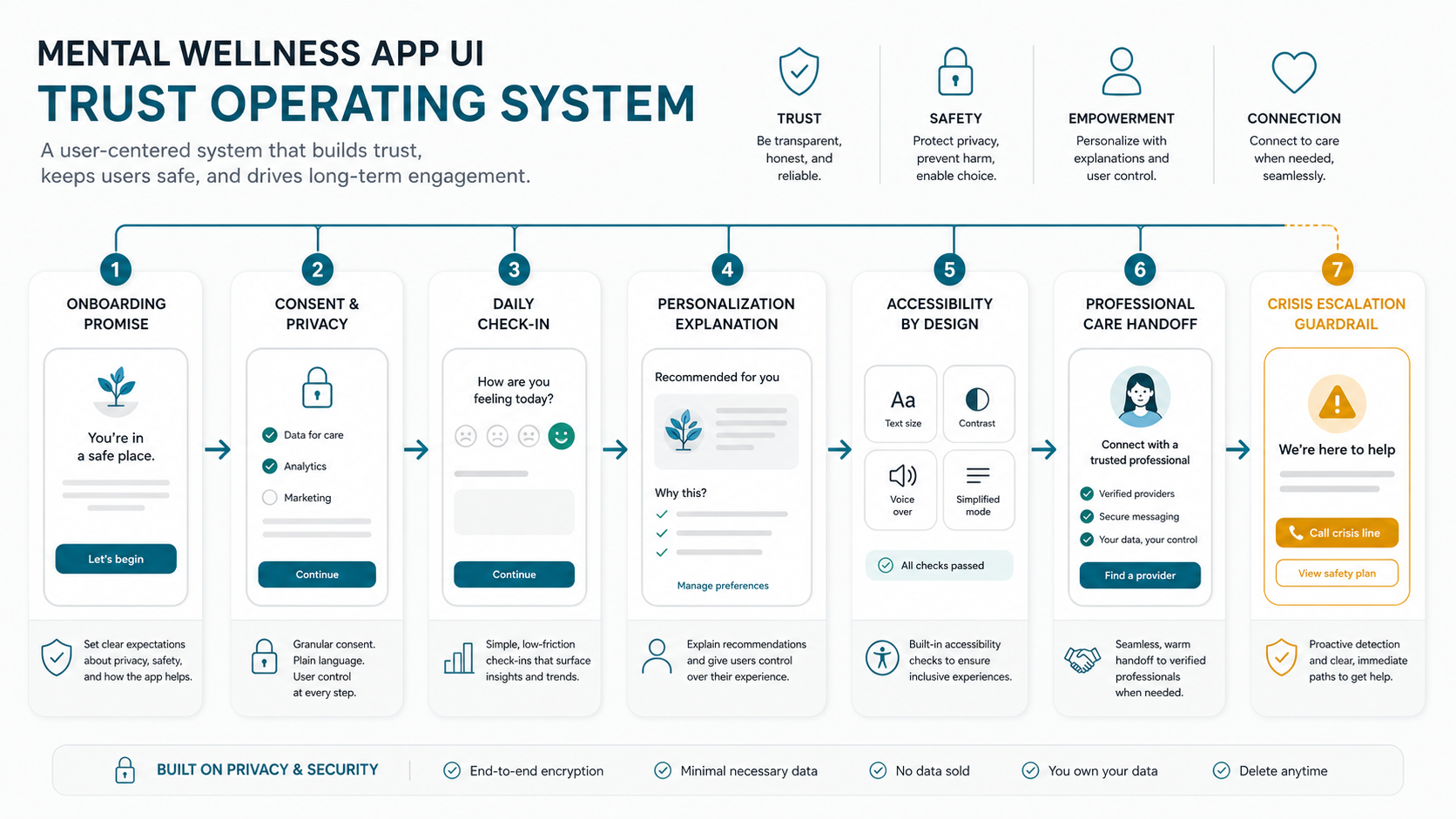
Quick Answer: What Makes Mental Wellness App UI Effective?
An effective mental wellness app interface makes support feel reachable while keeping boundaries clear. It should help users start with one low-friction action, understand privacy choices, adjust recommendations, pause pressure, access human help, and leave or delete data without confusion.
- Trust: explain value, limits, data use, and ownership before asking for sensitive input.
- Safety: keep crisis, emergency, professional-care, and support paths visible where risk may appear.
- Engagement: use flexible routines and gentle re-entry instead of shame-based streak pressure.
- Accessibility: design for stress, low mood, neurodiversity, low vision, limited attention, and assistive technologies.
- Evidence: avoid clinical promises unless the product, content review, and operating model can support them.
Why Mental Wellness UI Carries More Product Risk
A food ordering app can recover from a confusing empty state. A mental wellness app may lose trust permanently if it asks invasive questions too early, hides data-sharing controls, pushes the wrong reminder tone, or makes urgent help difficult to find. The user experience is part of the product's safety posture.
The risk increases when the app includes mood tracking, journaling, CBT-style exercises, AI recommendations, community support, teletherapy, wearable data, or coach/provider workflows. These features can be useful, but they create sensitive data, expectation, moderation, escalation, and quality-review responsibilities. A consumer wellness app may not be a medical device, but users still experience its guidance as personal support.
For products that move closer to patient records, provider workflows, diagnostics, or care coordination, use a deeper healthcare software development approach rather than treating the interface as a generic lifestyle app.
Design The First Session Around Trust, Not Data Capture
The first session should reduce uncertainty before it collects much information. Users need to know whether the product is private, whether it is evidence-aware, whether recommendations are adjustable, and whether the app has a path for moments that self-guided content cannot handle.
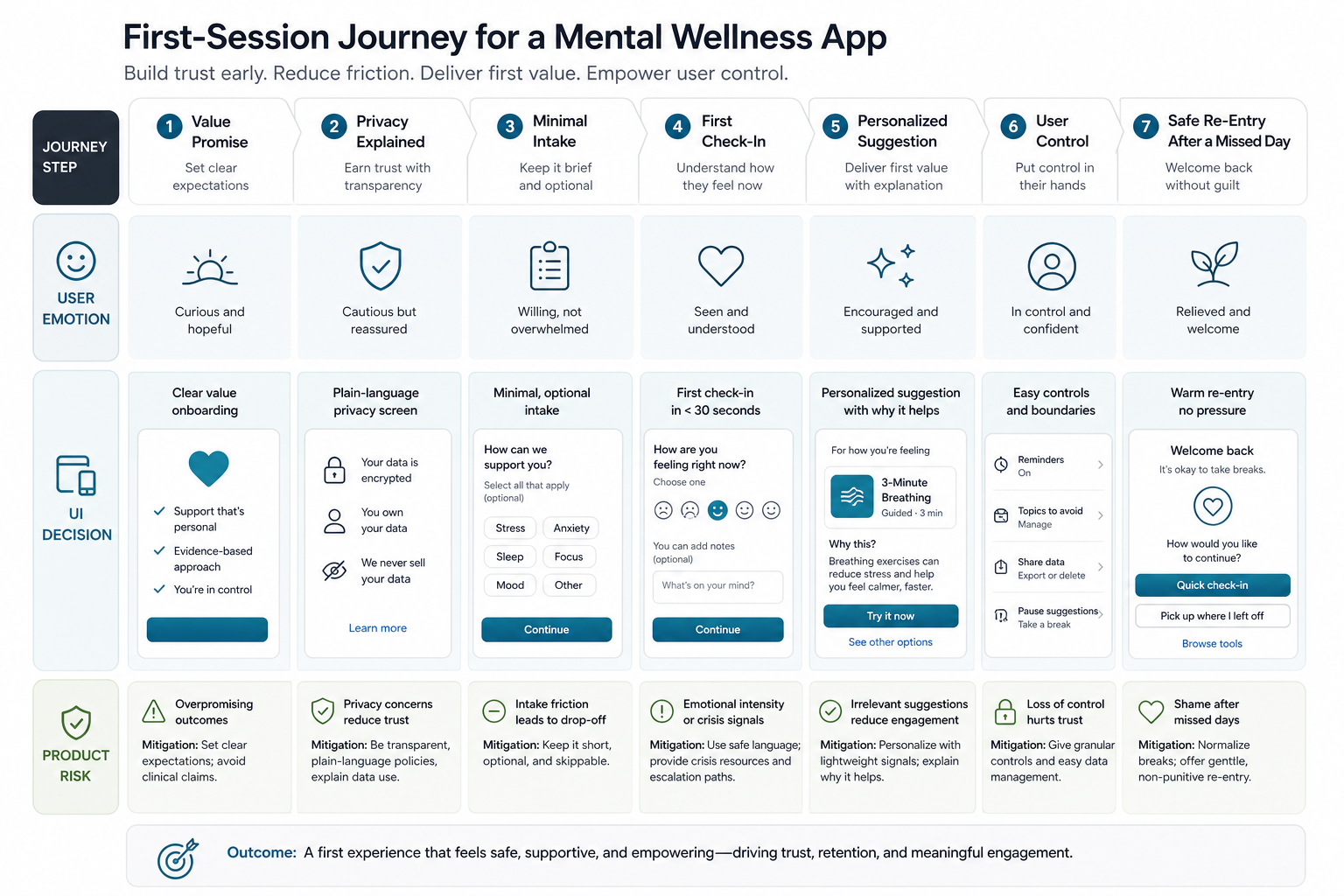
A Practical First-Session Flow
- Set expectations: say what the app helps with and avoid diagnostic language unless clinically reviewed.
- Explain privacy: show the minimum data needed for the first useful action and why it matters.
- Collect less: ask for a goal, preference, or short check-in before long profile forms.
- Deliver value: offer a short exercise, journal prompt, education card, or support path within the first minute.
- Give control: let users pause reminders, edit goals, hide topics, export data, and delete the account from obvious locations.
This first-session discipline also helps scope the MVP. Use NextPage's Wellness App Development Guide For iOS And Android when the product still needs a broader feature, stack, and launch roadmap.
Core Screens Every Mental Wellness App UI Should Plan
Most mental wellness apps need a compact set of screens that handle trust, repeated use, and escalation. The exact feature set changes by business model, but the same UX questions keep appearing.
| Screen Or Flow | User Question | UI Goal | Risk To Avoid |
|---|---|---|---|
| Onboarding | Can I trust this app? | Explain value, privacy, limits, and first action. | Overpromising clinical outcomes. |
| Mood check-in | How am I doing today? | Make logging fast, non-judgmental, skippable, and editable. | Turning a hard day into a failed score. |
| Recommendations | Why is this suggested? | Show reasoning and allow preference changes. | Opaque personalization that feels intrusive. |
| Progress view | Is anything improving? | Show trends gently with context and uncertainty. | False certainty from thin data. |
| Professional support | When do I need human help? | Offer therapist, coach, referral, or support paths clearly. | Hiding escalation behind settings. |
| Privacy settings | Who can see my data? | Make consent, sharing, export, and deletion easy to find. | Only explaining privacy in a long policy. |
Use Privacy, Accessibility, And Safety As Release Gates
Privacy, accessibility, and escalation should be checked before launch, not cleaned up after analytics show drop-off. A mental wellness app often collects sensitive reflections, symptoms, routines, or care preferences. The UI should make those controls understandable near the moment of use.
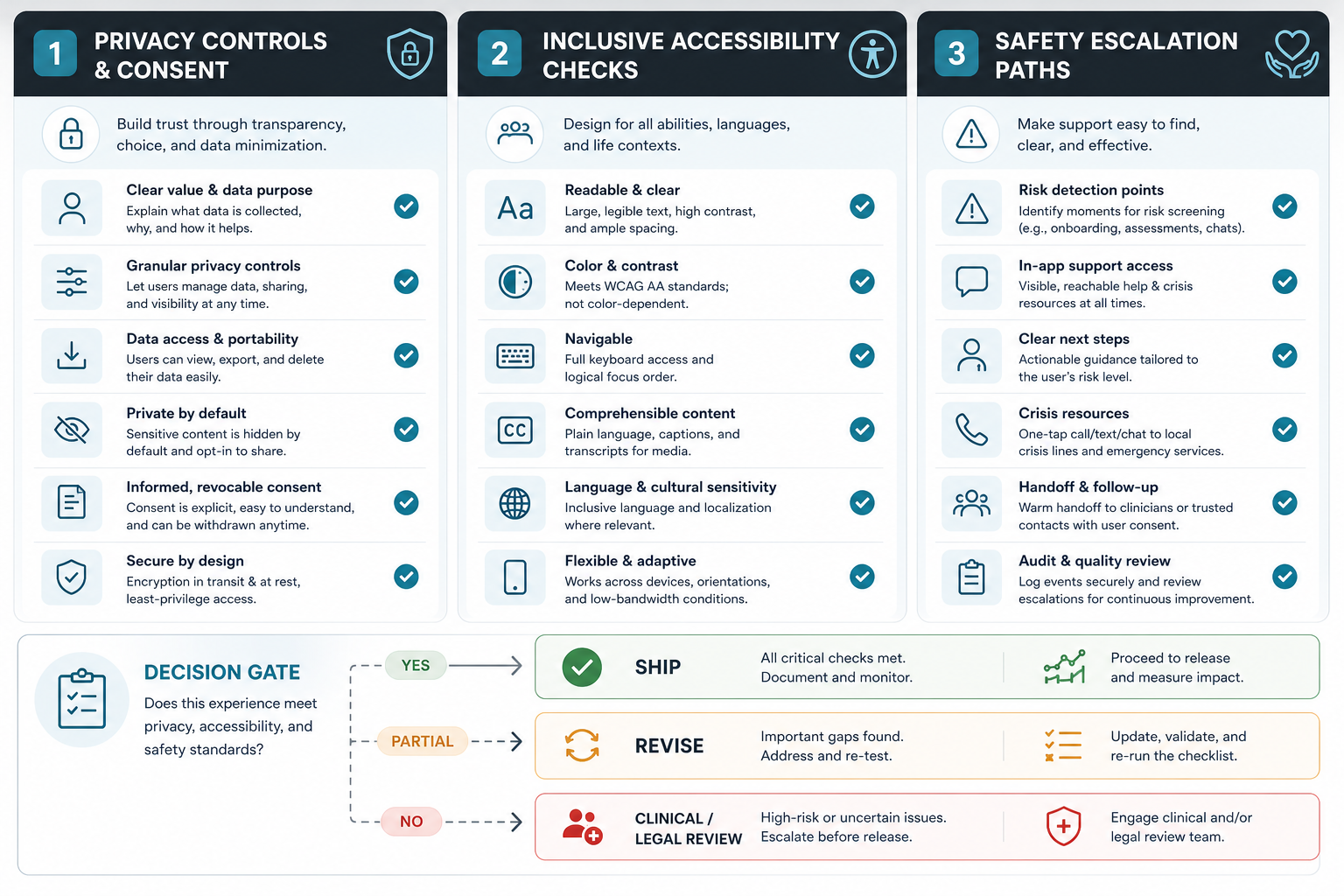
Privacy-First Interface Patterns
Use specific consent choices instead of a single vague acceptance screen. Explain why mood, journal, wearable, location, or notification data is requested. Separate data sharing for analytics, therapist review, community participation, and marketing. Make export and deletion easy to locate.
If the app uses AI, explain what signals inform suggestions and which signals are excluded. Sensitive recommendations should be adjustable, reversible, and presented as supportive prompts rather than certainty.
Accessibility Patterns For Wellness Contexts
A soothing palette is not accessibility. Check contrast, scalable text, labels, screen-reader order, touch target size, keyboard and switch access where relevant, reduced-motion behavior, captions, and error recovery. Mental wellness users may be under stress or cognitive load, so forms should be short, readable, and forgiving.
When launch risk is high, pair product UX review with mobile app testing services so real device behavior, permissions, accessibility, privacy disclosures, and app-store readiness are tested together.
Escalation And Professional-Care Patterns
Self-guided support has limits. If the app detects crisis language, repeated high-risk signals, or requests for urgent help, the UI needs clear next steps. Those steps may include local crisis resources, emergency instructions, trusted contacts, provider messaging, appointment booking, or warm handoff to a clinician, depending on the product model and region.
Teletherapy products need even stronger expectation management. The companion guide on Teletherapy App Development is useful when the experience includes secure messaging, video sessions, provider availability, or continuity of care.
Design Engagement Without Pressure
Retention mechanics that work in fitness or language learning can backfire in mental wellness. Streaks, badges, and aggressive reminders can create shame when users miss days. The interface should normalize breaks and make re-entry easy.
- Use gentle reminders: let users choose timing, tone, quiet hours, and pause windows.
- Support short sessions: offer one-minute, three-minute, and deeper options instead of only long routines.
- Avoid failure framing: replace broken streak messaging with "pick up where you left off" paths.
- Explain progress carefully: show patterns and reflections without implying diagnosis or guaranteed improvement.
- Moderate community spaces: peer support needs reporting, safety language, content boundaries, and visible moderation.
For wellness products with sensors or neurofeedback, engagement should also explain data uncertainty. The neurofeedback apps for mental wellness article shows why sensor-led experiences need careful evidence and UX controls.
Use AI Personalization Carefully
AI can help mental wellness products sort content, summarize journal themes, personalize reminders, or route users to relevant exercises. It should not quietly become a diagnosis engine. The UI must show why a suggestion appears, what data influenced it, and how the user can adjust or disable it.
Good AI-assisted UI patterns include lightweight explanations, editable preferences, "show me something else" controls, safety filters, review queues for risky outputs, and fallback paths to human support. If AI becomes central to the product, connect the roadmap to AI development services early so retrieval, evaluation, guardrails, monitoring, and incident review are planned with the interface.
Choosing A Mental Wellness App Development Partner
A mental wellness app needs more than generic mobile screens. Look for a team that can combine product discovery, healthcare-aware UX, secure backend engineering, accessibility testing, analytics, moderation planning, and collaboration with clinical or wellness experts.
NextPage helps teams plan mobile products around clear journeys, secure integrations, privacy controls, and production readiness. If you are budgeting the first build, use the Custom Software Cost Estimator to frame scope, then review relevant delivery proof such as Chairlink, where user trust, operational workflows, and mobile-first behavior shaped the product experience.
Mental Wellness App UI Checklist
- Write onboarding copy that explains value, limits, data use, and the first useful action.
- Keep daily check-ins short, editable, optional, and non-judgmental.
- Design privacy controls for consent, sharing, export, deletion, and therapist or community visibility.
- Use accessible color, typography, labels, touch targets, assistive-technology support, and reduced-motion options.
- Add escalation paths for crisis resources, professional support, urgent help, and region-specific support content.
- Use personalization carefully and explain why recommendations appear.
- Moderate community features and give users clear reporting tools.
- Test the experience with real users, real devices, accessibility checks, and qualified mental health review before launch.
Final Recommendation
Build the interface around trust before growth. A mental wellness app should answer the user's immediate question, protect sensitive data, avoid pressure, keep human help reachable, and make control obvious. The best UI is calm because it is clear, not because it hides important decisions behind soft colors.