
A cloud POS modernization roadmap should protect store operations before it chases new POS features. Retailers, restaurant groups, and multi-location operators are not only replacing tills or terminals. They are changing how orders, payments, inventory, loyalty, delivery channels, staff permissions, closeout, reporting, and support move through the business while stores stay open.
The safest path is a staged modernization program: assess the legacy estate, define the target operating model, migrate data with evidence, map integrations, prove offline and payment controls, pilot a complete service flow, and scale only after reports and support are trusted. The roadmap below is written for operators and technology leaders who need fewer cutover surprises and a clearer way to budget the custom software around a cloud POS move.
If the current POS estate is brittle, start with NextPage's Legacy Software Modernization Scorecard. It helps leadership separate visible UI pain from deeper risks in data ownership, integrations, security, support, and migration complexity.
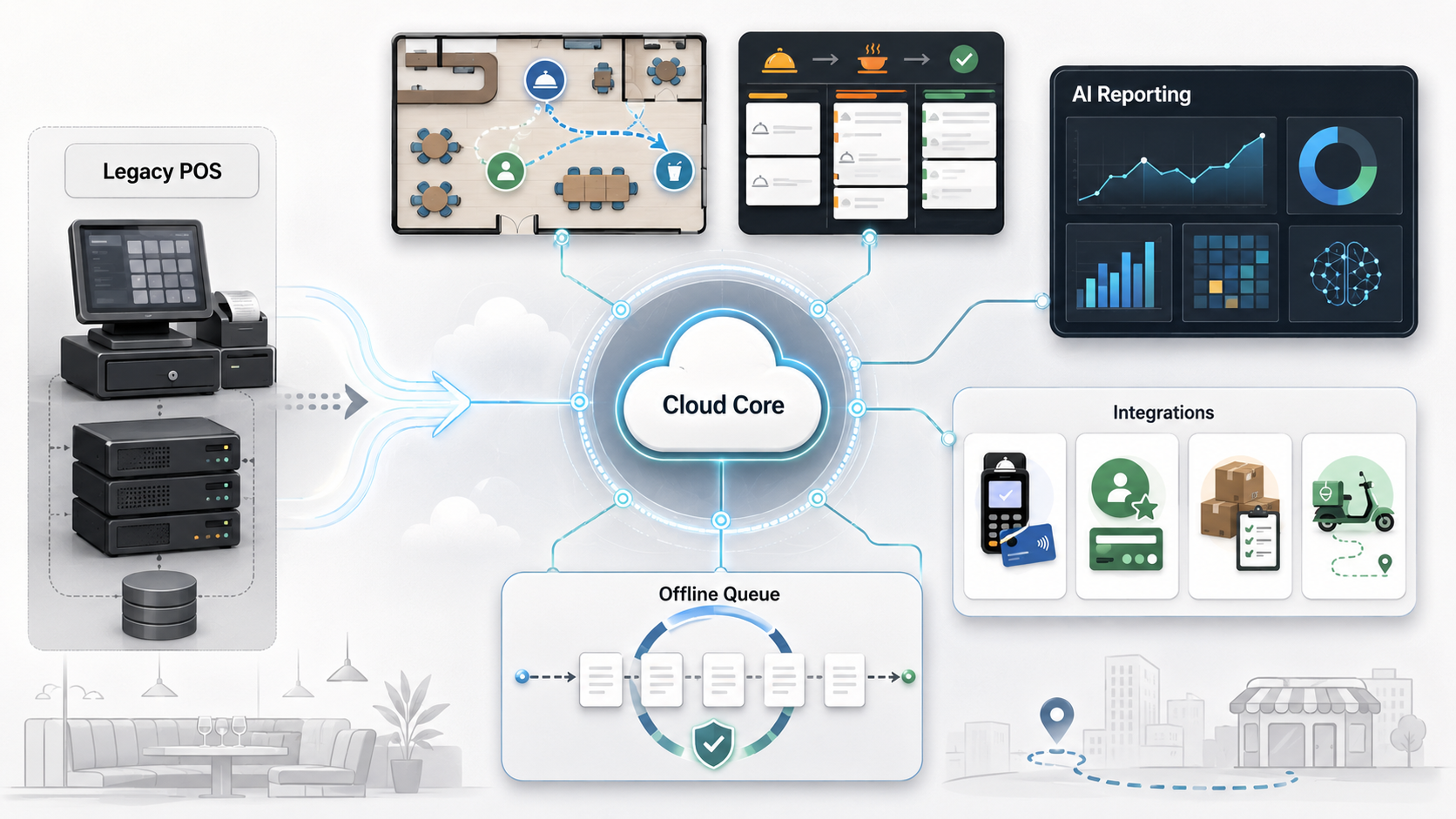
Quick Answer: Cloud POS Modernization Roadmap
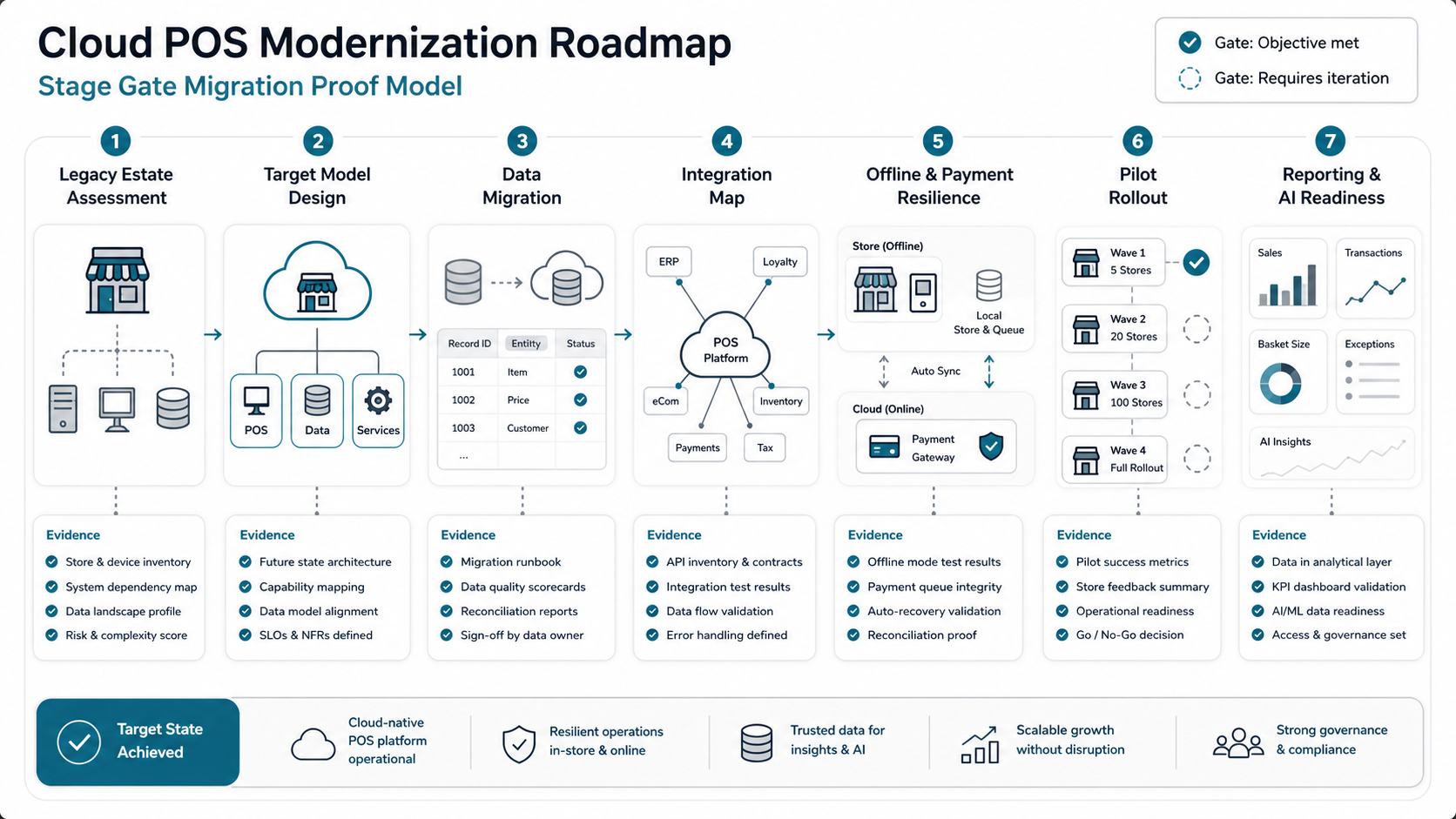
A practical cloud POS modernization roadmap has seven stages: legacy estate assessment, target operating model, data migration, integration mapping, offline and payment resilience, pilot rollout, and reporting scale-up. The goal is not simply to move POS screens to a cloud vendor. The goal is to keep revenue flowing while creating cleaner operational data, easier integrations, multi-location visibility, and a more flexible platform for automation.
| Stage | Key Decision | Proof Before Scaling |
|---|---|---|
| Assessment | Which locations, devices, reports, and workflows are in scope? | Inventory covers all store-critical dependencies. |
| Target Model | Cloud, hybrid, or cloud with local fallback? | Peak service and outage procedures are realistic. |
| Data Migration | Who owns products, prices, taxes, staff, customers, loyalty, and history? | Real records reconcile against finance and operations. |
| Integrations | Which systems sync in real time, batch, or event streams? | Retries, ownership, alerts, and audit logs are tested. |
| Resilience | What happens when internet, cloud service, or device flows fail? | Offline payments, queues, and recovery are documented. |
| Pilot | Which store or service model validates the risk? | Staff can run live service and trust closeout. |
| Scale | How will reporting, support, and optimization mature? | Dashboards, training, support, and backlog ownership are stable. |
Why Modernization Is More Than A POS Switch
A POS sits at the center of daily operations. In retail, it touches product catalogs, promotions, returns, loyalty, inventory, store pickup, payments, tax rules, employee permissions, receipts, and customer data. In restaurants, it also touches kitchen display systems, modifiers, table service, delivery marketplaces, tips, shifts, and closeout. A failure is immediately visible to customers and staff.
Most cloud-versus-legacy comparisons focus on SaaS pricing, remote access, updates, and feature lists. Those matter, but they are not the hard part. The hard part is moving a working store operating model into a cleaner architecture without losing transactions, confusing staff, breaking integrations, or destroying reporting continuity.
Use the same discipline from NextPage's enterprise application modernization roadmap: reduce risk in waves, document dependencies, prove the smallest valuable path, and avoid a big-bang replacement unless the estate is simple enough to justify it.
Stage 1: Assess The Legacy Estate
Start with a factual inventory. List locations, registers, handhelds, payment devices, printers, scanners, cash drawers, kitchen screens, network dependencies, product catalogs, menu rules, taxes, promotions, discounts, staff roles, inventory tools, accounting exports, loyalty, gift cards, delivery channels, e-commerce, data warehouses, and dashboards.
Then separate inconvenience from operating risk. A slow report export may be tolerable for another quarter. A payment workflow that cannot reconcile offline transactions is a launch blocker. Manual delivery order re-entry may look like a labor issue, but it can also create kitchen accuracy problems, refunds, and margin leakage.
If the estate includes undocumented systems or old database exports, pair the inventory with a data migration checklist so owners, fields, validation rules, rollback paths, and reconciliation evidence are defined before vendor configuration begins.
Stage 2: Define The Target Operating Model
Do not start with vendor demos. Start with how the business should operate after modernization. Will product and price changes publish centrally? Will stores keep working during internet outages? Will online orders and marketplace orders enter the same operational queue? Will managers see live inventory and labor signals? Will finance reconcile by store, channel, tender, tax, and settlement batch?
The answer may be pure cloud for a simpler estate, hybrid cloud with local fallback for high-volume stores, or a cloud POS plus custom integration layer for organizations with complex inventory, delivery, loyalty, or reporting needs. This is where NextPage's cloud migration services discipline becomes useful: uptime, data integrity, rollback, observability, and cutover planning matter as much as the software subscription.
Stage 3: Plan Data Migration Around Real Records
Data migration is not just importing products or menu items. A useful migration plan covers product hierarchies, SKUs, barcodes, modifiers, prices, taxes, service charges, discounts, staff roles, customer records, loyalty balances, gift cards, historical orders, returns, inventory units, vendor items, reporting dimensions, and location metadata.
Run test imports with real messy data. A hand-cleaned sample hides the problems that slow launch: duplicate SKUs, inconsistent modifiers, missing tax categories, inactive staff permissions, closed stores still appearing in reports, and historical data that cannot map cleanly to the new reporting structure.
| Data Area | Migration Risk | Control |
|---|---|---|
| Catalog/Menu | Wrong prices, unavailable items, or fulfillment confusion. | Validate by location, channel, and promotion rule. |
| Payments | Settlement and reconciliation mismatches. | Test refunds, tips, partial payments, offline payments, and batch reports. |
| Customers/Loyalty | Lost balances, duplicate profiles, or broken offers. | Validate identity matching, opt-ins, rewards, gift cards, and promotion rules. |
| Inventory | Bad units, wrong availability, and unreliable replenishment signals. | Map units, vendors, transfers, waste, substitutions, and counts. |
| Reporting | Leadership loses trend continuity after launch. | Preserve enough history for year-over-year and location comparisons. |
Stage 4: Build The Integration Map Before The Pilot
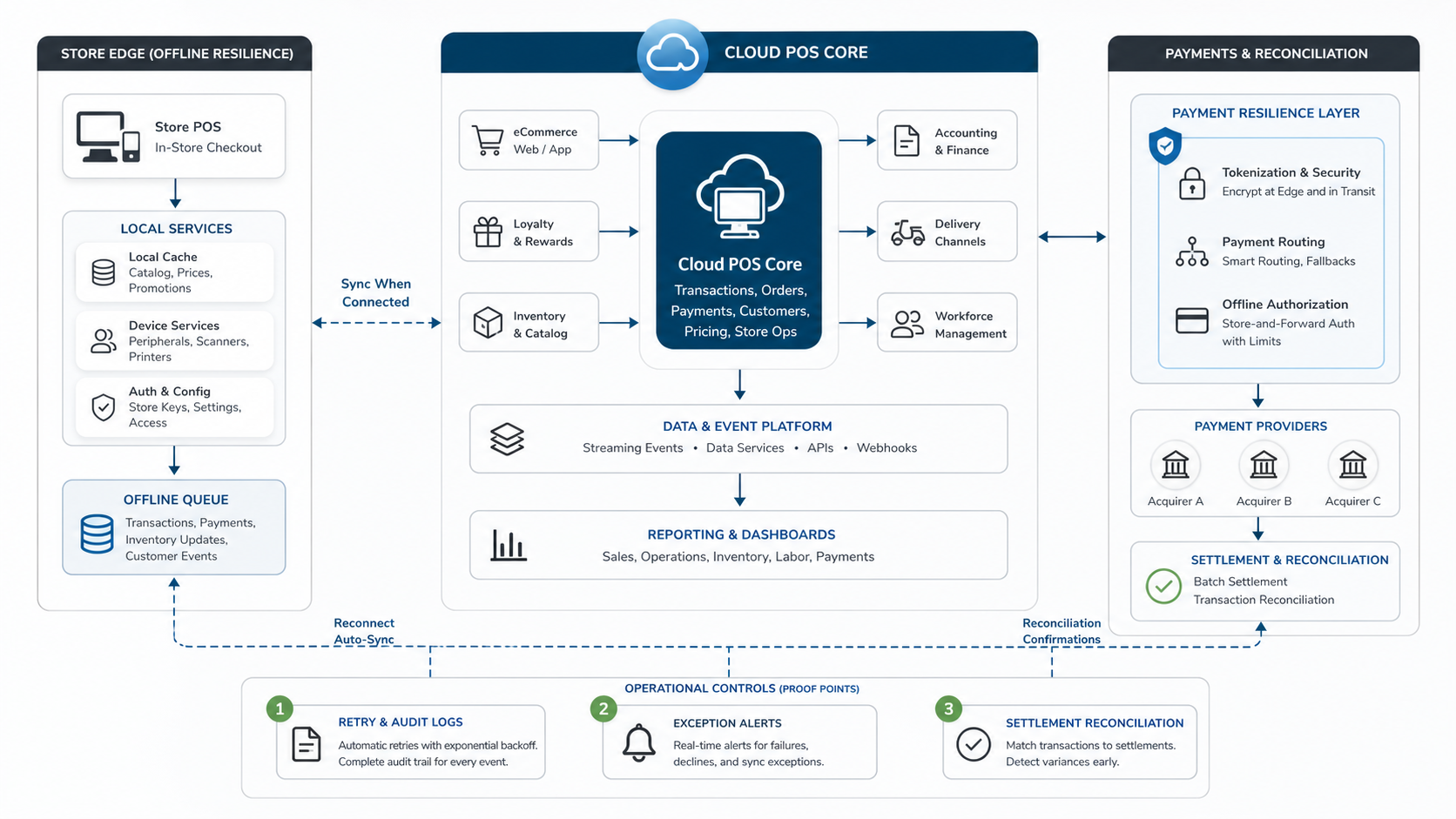
Modern store operations rarely live inside one POS. E-commerce, marketplaces, loyalty, CRM, marketing automation, delivery dispatch, inventory, labor scheduling, accounting, payroll, data warehouses, BI dashboards, and support tools may all depend on POS data.
For each integration, define owner, sync direction, timing, failure behavior, retry rules, auditability, and support path. Product data may publish from POS to online channels. Orders may flow back into POS and then to fulfillment or kitchen displays. Sales data may feed dashboards, accounting, demand planning, and replenishment. Inventory may need item-level sales data, not end-of-day totals. For store groups modernizing customer-facing portals, internal order tools, or operations dashboards around the POS layer, NextPage's web app development team can help turn the integration map into usable workflow software.
A backend/API layer is often safer than point-to-point scripts for retries, webhooks, audit logs, and reconciliation rules. NextPage can support that pattern through backend and API development services and broader custom software development work around POS vendors.
Stage 5: Design Offline And Payment Resilience
Offline mode is not a magic guarantee. Official provider documentation shows behavior varies by device, payment method, outage type, settings, and recovery process. Toast documentation describes offline behavior during connectivity or service disruption, including stored card data that is sent for authorization after devices reconnect. Square support and 2026 offline-payment guidance similarly emphasize that offline payments are queued and uploaded later, which means declined, expired, or unreconciled transactions remain an operator risk rather than a vendor checkbox.
That means offline readiness belongs in the roadmap, not in a footnote. Define what staff can still do, which payment methods are allowed, what limits apply, how transactions queue, how failed payments are handled, how open checks recover, and how finance reconciles after service returns. For high-volume stores, the cost of a failed offline-payment process can exceed the cost of building the control properly.
The existing NextPage cloud POS modernization roadmap for restaurants goes deeper on restaurant-specific kitchen, payment, and AI-reporting considerations; use it when the estate is heavily food-service oriented.
Stage 6: Pilot One Complete Operating Flow
A pilot should prove a complete workflow, not a screen demo. Pick one representative store, location cluster, concept, or service model. Run realistic scenarios across opening, peak service, discounts, refunds, returns, delivery or pickup, fulfillment, shift changes, closeout, inventory updates, and reporting.
Train staff on normal operation and exception handling. Track order errors, payment issues, inventory mismatches, manager overrides, integration failures, support tickets, report differences, and staff confusion. The pilot should produce a go/no-go list for rollout and a backlog for configuration, data cleanup, integration fixes, training changes, and support scripts.
Stage 7: Stabilize Reporting Before AI
AI reporting, demand forecasting, anomaly detection, and automated replenishment only help when the underlying POS data is trustworthy. Start with dashboards operators can verify: sales by location, channel mix, tender types, returns, discounts, stockouts, labor ratio, average ticket, payment exceptions, and inventory variance.
NextPage's custom dashboard development services are relevant when canned POS reports do not match the decisions leadership needs. If forecasting or margin recommendations are part of the roadmap, treat them as a staged analytics program with monitoring and human review, not as a one-off dashboard add-on.
Modernization Proof Gates For 2026
Before a rollout wave expands, ask for evidence rather than status updates. The proof package should include a signed estate inventory, a future-state operating model, migration reconciliation reports, API contract tests, offline-payment test results, pilot incident logs, support scripts, and dashboard validation. This keeps vendor configuration, custom integrations, and store training tied to measurable launch readiness.
Modern cloud POS programs are also increasingly judged by omnichannel data quality. Shopify's 2026 cloud POS guidance stresses centralized visibility across inventory, orders, and customer information, while restaurant POS trend coverage points to cloud exchanges, inventory analytics, online ordering, and offline continuity as board-level buying criteria. Those trends are useful only when the modernization roadmap proves data ownership, integration reliability, and store recovery procedures before scale.
Implementation Checklist
- Inventory every POS-dependent workflow, device, integration, report, and payment path.
- Define the target operating model before comparing vendors.
- Run real catalog, price, tax, staff, loyalty, gift-card, order-history, and inventory imports.
- Map every integration by owner, sync direction, timing, retry behavior, alerting, and audit log.
- Write offline operating procedures for payments, open orders, shifts, fulfillment, recovery, and reconciliation.
- Pilot one complete operating flow under realistic peak conditions.
- Measure support tickets, payment exceptions, data mismatches, report differences, and staff training gaps.
- Scale by location wave only after critical operational risks are closed.
- Build reporting and AI on reconciled data, not on raw exports nobody trusts.
How NextPage Can Help
NextPage helps retail, restaurant, and multi-location operators plan the software work around POS modernization: legacy system assessment, migration planning, API integration, cloud architecture, custom dashboards, data pipelines, rollout support, and support tooling.
A practical engagement starts with discovery and modernization scoring, then moves into data and integration mapping, MVP architecture, pilot planning, and implementation. That keeps the work grounded in store continuity while still moving the business toward cleaner systems, better reporting, and more automation.