
A RAG knowledge assistant usually costs $25,000-$60,000 for a focused prototype, $60,000-$140,000 for a controlled internal pilot, and $140,000-$300,000+ for a production assistant with multiple sources, document permissions, evaluation, monitoring, and workflow integrations. The cost is not driven by the chat interface alone. It is driven by whether the assistant can find approved knowledge, respect access rules, cite sources, refuse weak answers, and stay useful as documents, tickets, policies, and product data change.
For internal teams, the best first version is rarely a company-wide AI search box. It is usually a narrow assistant for one workflow: support policy lookup, sales security answers, product documentation search, operations SOP guidance, onboarding help, or leadership reporting context. That focus keeps the source audit small enough to evaluate, makes rollout easier, and gives the team a measurable reason to keep investing.
If you are still deciding whether the workflow is ready, start with the AI Agent Readiness Assessment. It checks workflow clarity, data readiness, integration access, and governance before you fund a private knowledge assistant or agent workflow.
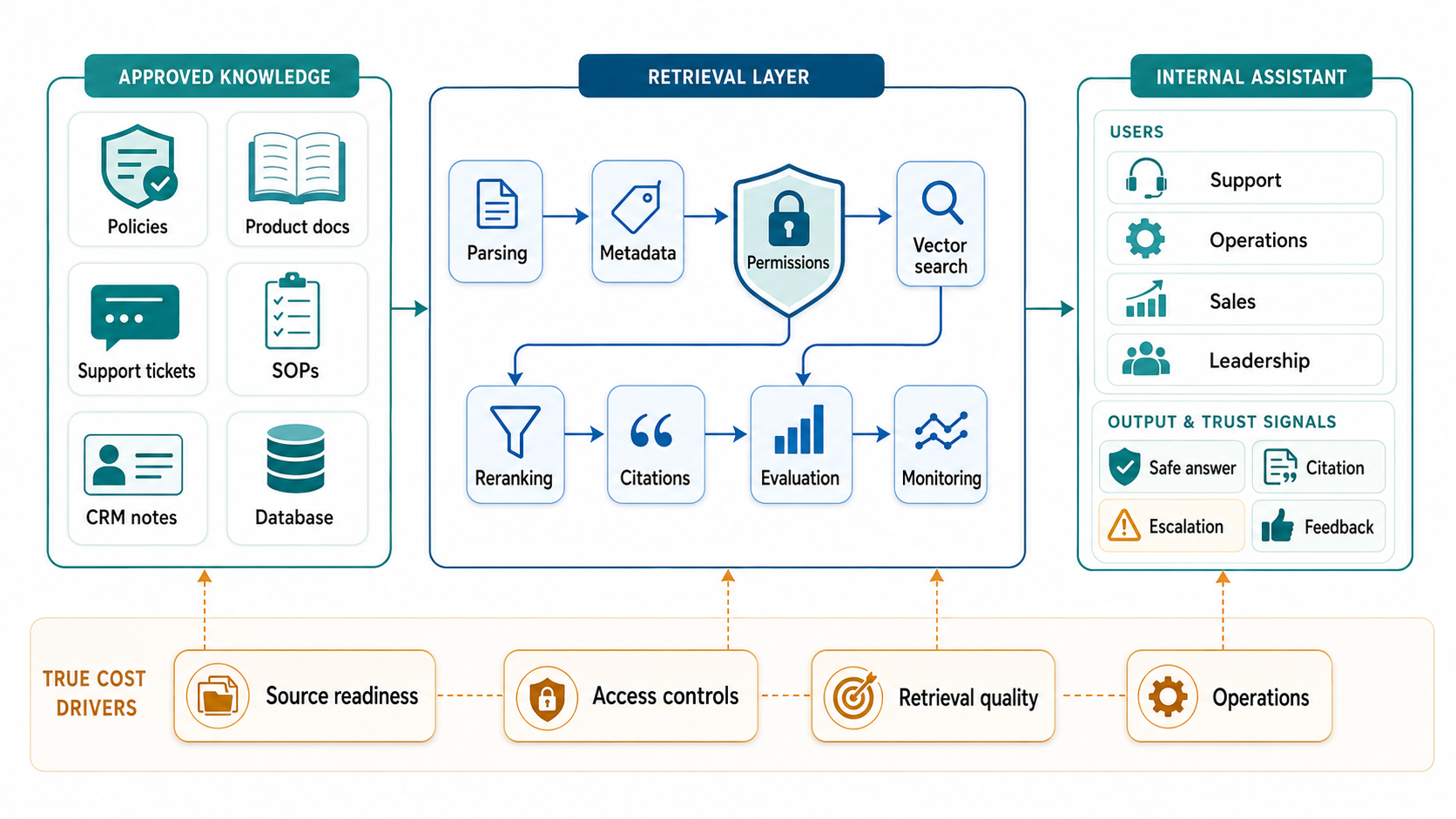
Quick Answer: RAG Knowledge Assistant Cost
Plan the budget around the promise the assistant must keep. A prototype can prove whether retrieval works on a small document set. A pilot has to support real users and limited permissions. A production internal assistant needs repeatable ingestion, source ownership, citations, feedback, evaluation, admin tools, and monitoring. A workflow-connected assistant also needs API integrations, approvals, and human escalation.
| Scope | Typical Build Range | Best Fit | What Usually Adds Cost |
|---|---|---|---|
| Focused prototype | $25,000-$60,000 | One workflow, one or two source groups, limited users, manual uploads, basic citations. | Messy PDFs, weak source ownership, unclear questions, and no expected-answer set. |
| Controlled internal pilot | $60,000-$140,000 | Support, sales, operations, HR, or product teams testing real assistant use with selected sources. | Connector setup, metadata, role filters, feedback capture, and retrieval tuning. |
| Production knowledge assistant | $140,000-$300,000 | Multiple departments, scheduled ingestion, SSO, permission filtering, admin review, monitoring, and support runbooks. | Document-level access, sync failures, evaluation dashboards, and source lifecycle operations. |
| Workflow-connected assistant | $250,000+ | Assistant answers also trigger CRM, ticketing, ERP, approval, or reporting workflows. | API actions, audit logs, approval paths, rollback, compliance, and human-in-the-loop design. |
These ranges are planning bands, not a fixed quote. The same chat UI can sit on top of a simple folder, a governed enterprise knowledge base, or a deeply integrated business application. That is why a credible estimate must include data readiness, access controls, retrieval quality, integrations, and operations.
What A RAG Knowledge Assistant Includes
A RAG knowledge assistant is an internal AI product that answers questions using approved company knowledge instead of relying only on model memory. It may retrieve policies, product docs, support tickets, SOPs, CRM notes, sales enablement material, engineering docs, contracts, or structured records. The assistant then uses an LLM to turn the retrieved evidence into a useful answer with citations and next steps.
The visible experience may look like a chatbot, but the delivery work is closer to LLM development than simple prompt writing. The system needs ingestion pipelines, chunking, metadata, retrieval, reranking, model orchestration, permissions, evaluation, analytics, and admin workflows. If it serves customers or support agents, it also overlaps with AI chatbot development.
Most teams should avoid a broad first release. Pick one assistant job and make it dependable. A support team may need accurate policy and product answers. A sales team may need approved security, integration, and pricing context. An operations team may need SOP lookup and exception guidance. Each workflow has different source, permission, quality, and escalation needs.
RAG Knowledge Assistant Architecture Blueprint
The architecture has seven practical layers. The first is the source layer: documents, tickets, databases, knowledge bases, product pages, SOPs, CRM notes, and warehouse records. Each source needs an owner, freshness rule, sensitivity label, and access model before it becomes assistant knowledge.
The second layer is ingestion. This includes connectors, file parsing, OCR when needed, table extraction, deduplication, chunking, metadata, and scheduled sync. This is where many projects slow down because internal content was never prepared for retrieval.
The third layer is retrieval. A typical assistant uses embeddings, vector search, metadata filters, hybrid search, and sometimes reranking. The retrieval layer should return the few sources most likely to answer the question, not simply fill a large context window with loosely related text.
The fourth layer is permissions. Internal assistants must filter results before generation when users have different access rights. For sensitive HR, finance, legal, healthcare, or customer data, document-level permissions and audit trails may be non-negotiable.
The fifth layer is LLM orchestration. The application decides when to retrieve, which model to call, how much context to pass, what system instructions apply, when to ask a clarifying question, and when to refuse or escalate. This is also where cost, latency, and answer-quality tradeoffs become visible.
The sixth layer is the assistant experience. Users need citations, confidence signals, feedback, history, saved answers, escalation paths, and clear boundaries. A private assistant should make it obvious when it is answering from source evidence and when it does not know enough.
The seventh layer is operations. Evaluation runs, failed-answer review, source freshness checks, usage analytics, incident response, and access audits decide whether the assistant improves after launch. NextPage's Enterprise RAG Services focus on these production layers, not only the initial demo.
The Main Cost Drivers
The most important cost driver is source readiness. Clean product docs, owned policies, and structured SOPs are cheaper to index than scanned PDFs, duplicate folders, stale slide decks, and contradictory answers across teams. A source audit should identify what content matters, who owns it, how often it changes, and which users may access it.
Access control is the next major driver. A small internal pilot may use simple department roles. A production assistant may need SSO, group sync, document-level ACLs, tenant separation, query-time metadata filters, audit logs, and retention rules. AWS permission-aware RAG guidance and managed knowledge-base patterns both point to the same principle: access should be enforced before retrieved content is used in an answer.
Evaluation adds scope because the team needs evidence that retrieval and generation are improving. Basic testing with a handful of prompts is not enough. Build a question set with expected sources, acceptable answers, refusal cases, and escalation examples. Retrieval metrics such as precision, recall, MRR, and NDCG are useful for judging whether the system finds the right evidence. Answer-level checks should look at faithfulness, citation quality, usefulness, and risk.
Integrations can turn a knowledge assistant into a workflow product. Reading a support policy is one thing. Drafting a ticket response, updating a CRM record, escalating a case, or creating an operations task adds API contracts, permissions, approvals, logging, and rollback design. If the assistant will take action, compare the plan with broader AI Development Services rather than estimating it as a standalone chat tool.
Source Readiness Checklist
Before estimating the build, score each source group. Start with the knowledge that supports the highest-value workflow. Avoid indexing every shared drive simply because it exists.
| Readiness Area | Question To Ask | Cost Signal |
|---|---|---|
| Ownership | Who can approve, update, or remove this source? | Unowned knowledge creates review and cleanup work. |
| Freshness | How often does the content change, and how will deletes sync? | Frequent changes need scheduled ingestion and stale-index checks. |
| Format | Are files structured, scanned, duplicated, or table-heavy? | Complex documents add parsing and QA effort. |
| Permissions | Do all users have the same access rights? | Granular permissions add metadata, filters, and audit scope. |
| Answerability | Can this source answer real user questions without tribal context? | Weak sources need content improvement before retrieval tuning. |
| Evaluation | Can the team label expected sources and correct answers? | No evaluation set makes quality harder to prove. |
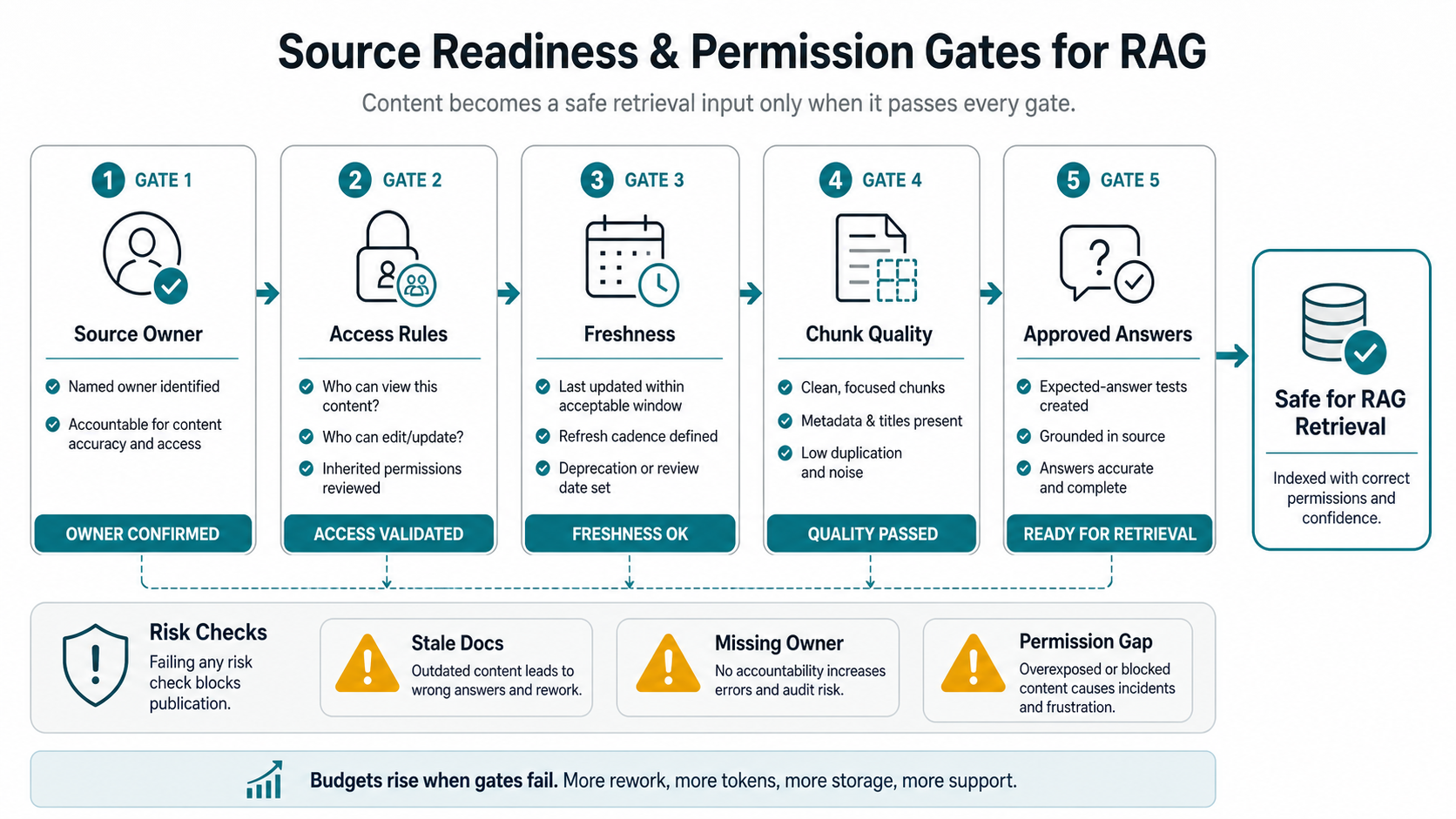
This checklist connects directly to NextPage's AI Data Readiness Checklist and the supporting knowledge representation checklist for RAG systems. RAG fails when teams treat knowledge as a pile of files instead of a governed product input.
Build Vs Buy Decisions
Managed knowledge-base platforms are useful when the source connectors, permission model, deployment constraints, and assistant UX fit your needs. They can reduce infrastructure work for ingestion, embeddings, vector storage, retrieval, and observability. They are less ideal when the assistant needs custom workflows, unusual permissions, customer-facing product UX, or deep business-system actions.
An assembled stack gives engineering teams more control. A common architecture may combine source connectors, object storage, parsing jobs, embeddings, a vector database, metadata filters, reranking, an LLM gateway, evaluation tooling, and a custom assistant interface. This offers flexibility but increases operations responsibility.
A custom application layer is often the real differentiator. Even when retrieval infrastructure is managed, teams still need workflow-specific UX, role-aware experiences, feedback review, admin controls, usage analytics, escalation logic, and integrations. For product teams building a private assistant inside a SaaS or internal platform, Generative AI Development should include that application layer from the start.
Evaluation And Governance
Governance should show up in product behavior. The assistant should cite sources, flag uncertainty, refuse unsupported answers, avoid restricted content, and route high-risk cases to a human. NIST's AI risk guidance is useful here because it frames risk management across the AI lifecycle rather than as a one-time policy document.
Evaluation should test both retrieval and answer behavior. Retrieval checks whether the right source chunks were found. Generation checks whether the answer is faithful, complete, useful, and appropriately cautious. User feedback checks whether the assistant actually helps the workflow. Operations checks whether source syncs, model changes, access changes, and prompt updates are controlled.
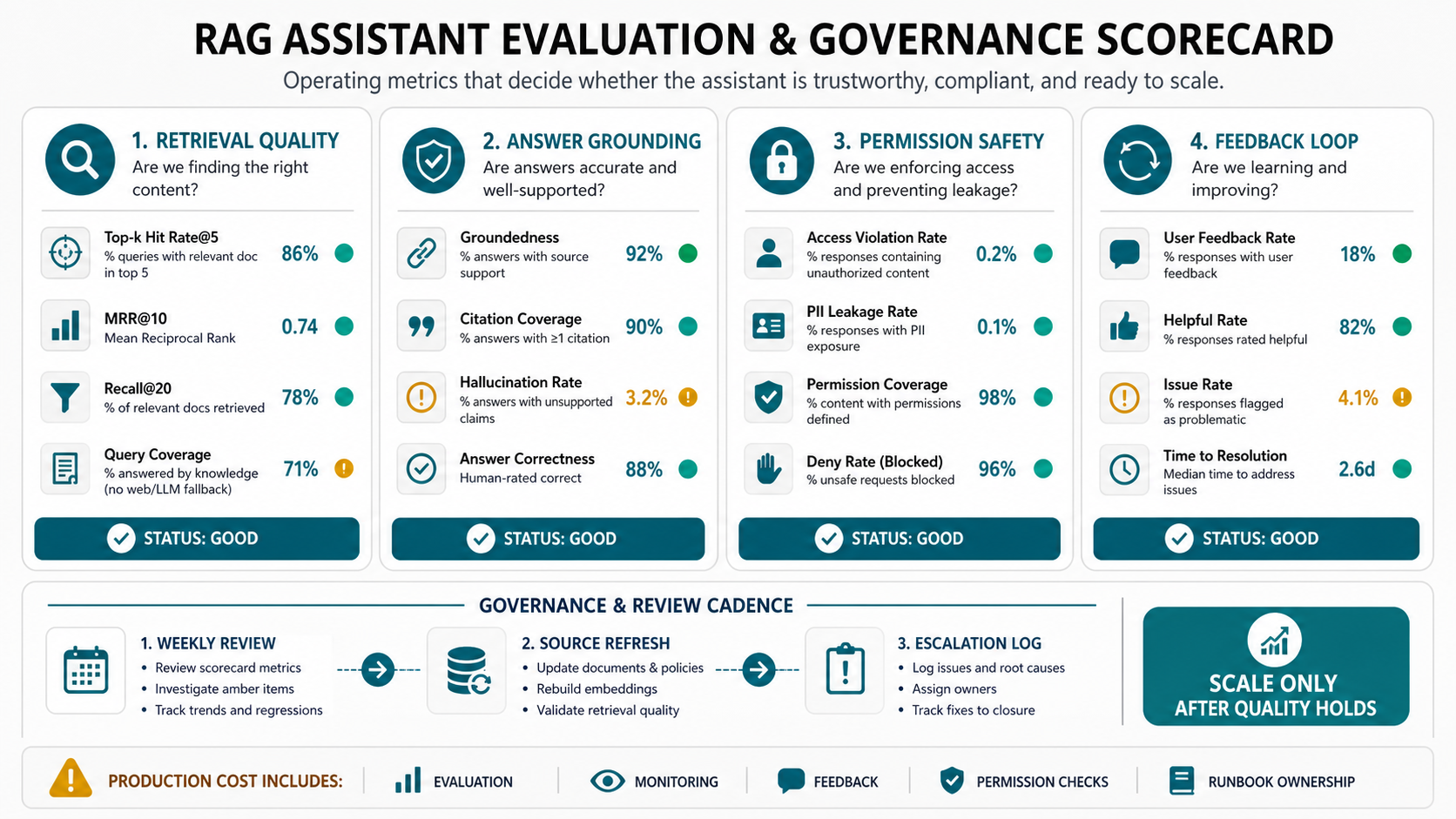
The governance model does not have to be heavy for a low-risk pilot. It does need to be explicit. Decide who reviews bad answers, who approves new sources, who owns access changes, how incidents are handled, and what evidence is required before expanding to another department. The Enterprise AI Readiness Checklist is a useful companion for those operating questions.
Rollout Roadmap For Internal Teams
Phase 1: workflow selection. Pick one internal assistant job with high question volume, measurable value, and manageable risk. Define the users, source systems, expected questions, answer boundaries, and success metrics.
Phase 2: source audit. Inventory the approved sources, owners, access rules, freshness expectations, sensitive fields, and known content gaps. Do not skip this phase. It is cheaper to fix a source boundary early than debug unreliable answers after launch.
Phase 3: prototype. Build a narrow assistant with representative sources, citations, basic feedback, and a starter evaluation set. The goal is to learn whether users trust the answers and whether retrieval finds the right evidence.
Phase 4: pilot hardening. Add SSO, role filters, scheduled sync, admin review, failure categories, analytics, and support handoff. Expand only after the assistant performs well on real questions.
Phase 5: production operations. Add monitoring, regression evaluations, source-owner workflows, access audits, cost tracking, incident response, and a roadmap for additional departments or workflow actions.
ROI Model For A Knowledge Assistant
ROI should be measured against the workflow, not the novelty of the AI interface. Useful metrics include time saved per question, reduction in repeated internal requests, support deflection, faster onboarding, shorter sales-response cycles, fewer escalations, better policy consistency, and improved audit evidence.
Include ongoing costs in the model. LLM calls, embeddings, vector storage, reranking, logs, monitoring, connector maintenance, content review, and evaluation refreshes all continue after launch. A knowledge assistant without ownership tends to degrade as documents change and users discover new edge cases.
The right first investment is often a readiness and scope review, not a full build. NextPage can help define the workflow, score source readiness, design the retrieval architecture, and decide whether the assistant should remain an answer tool or become part of a larger automation roadmap.
How NextPage Can Help
NextPage helps teams design and build private knowledge assistants around real workflows. That can include source discovery, data-readiness review, RAG architecture, permission-aware retrieval, LLM orchestration, assistant UX, evaluation sets, admin tools, monitoring, and integration with CRM, support, operations, or product systems.
If your team is planning an internal knowledge assistant, use the AI Agent Readiness Assessment first. It gives a practical view of workflow, data, integrations, and governance. If the workflow is ready, NextPage can turn that scope into a prototype, pilot, or production implementation with the right level of control.