
Quick Answer: Product Launch Social Media Calendar
A social media content calendar for a product launch is a weekly operating plan that turns launch goals into platform-specific posts, creative assets, paid boosts, landing-page handoffs, and measurement routines. It should tell the team what to publish, why it matters, where each asset sends people, which audience stage it serves, and what metric decides the next action.
The best launch calendars do not start with captions. They start with the conversion path. Before building the posting schedule, define the launch offer, the landing page or app store destination, the proof assets, the tracking events, and the follow-up workflow. For app teams, this should connect to product readiness, QA, analytics, and release controls; NextPage's mobile app development work often includes the launch support needed to make that handoff reliable. If the campaign is still shaping the first release, pair the calendar with an MVP development plan so marketing does not promise scope the product cannot support.
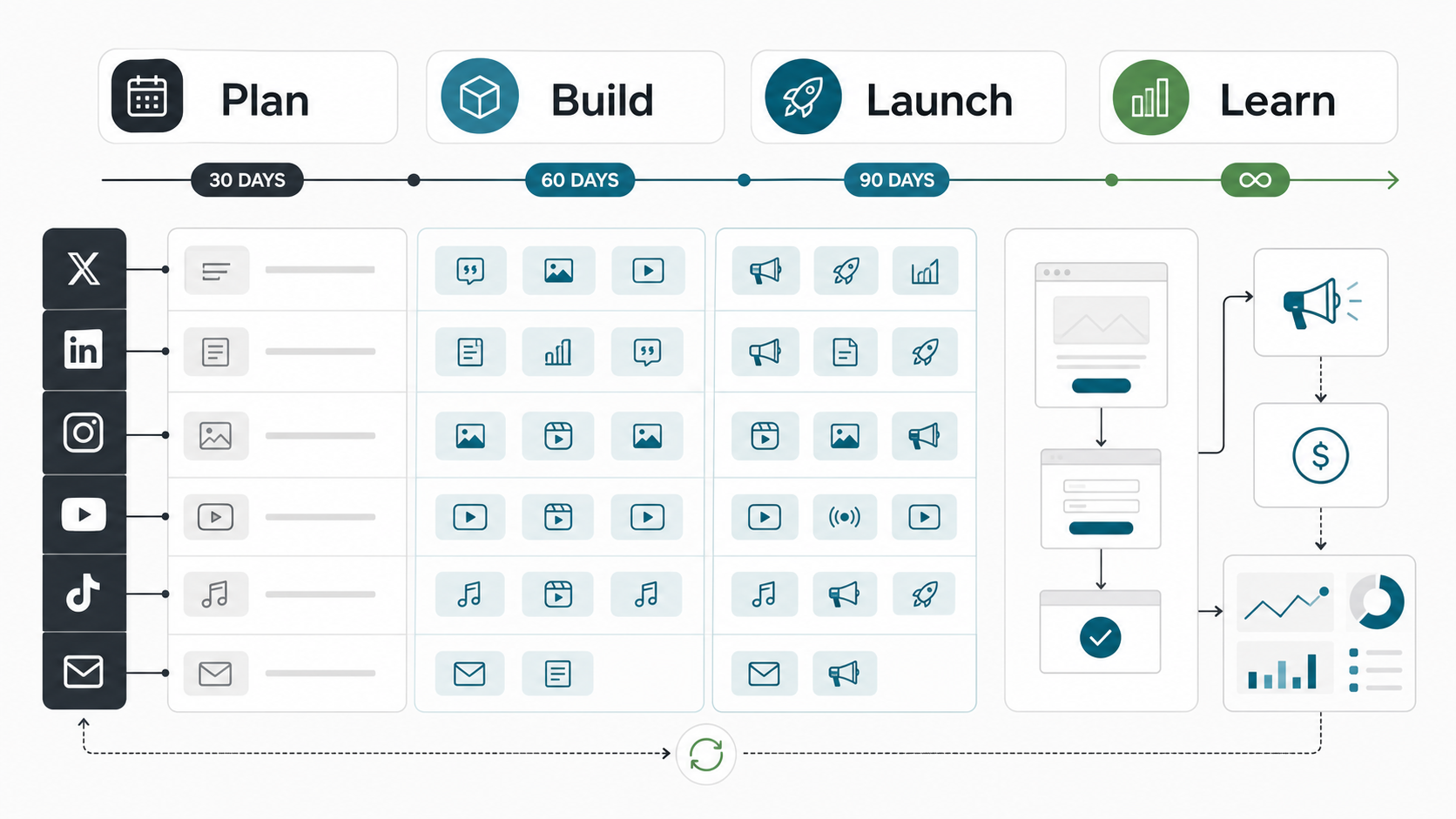
Why Product Launch Social Media Calendars Fail
Most failed launch calendars have the same pattern: the team has many posts but no clear sequence. One day announces a feature, the next shares a founder quote, the next runs a discount, and the next asks people to book a demo. The assets may look active, but the audience is not being moved through a deliberate path.
A stronger calendar separates the launch into stages. Pre-launch content builds context and collects signals. Launch-week content makes the offer obvious and reduces friction. Post-launch content uses objections, testimonials, demos, and usage proof to keep momentum after the announcement spike fades.
The calendar also needs a product-readiness checkpoint. If the app, checkout, demo flow, or lead form is not stable, social traffic exposes the problem faster. Mobile products should run release checks before campaign traffic starts; use a practical guide like the mobile app QA and launch checklist to confirm analytics, rollback, crash reporting, permissions, and release controls before the launch calendar sends users into the product.
The Launch Calendar Framework
Build the calendar around five lanes: audience, assets, channels, conversion, and feedback. Each lane should be visible every week, even when the exact post formats change.
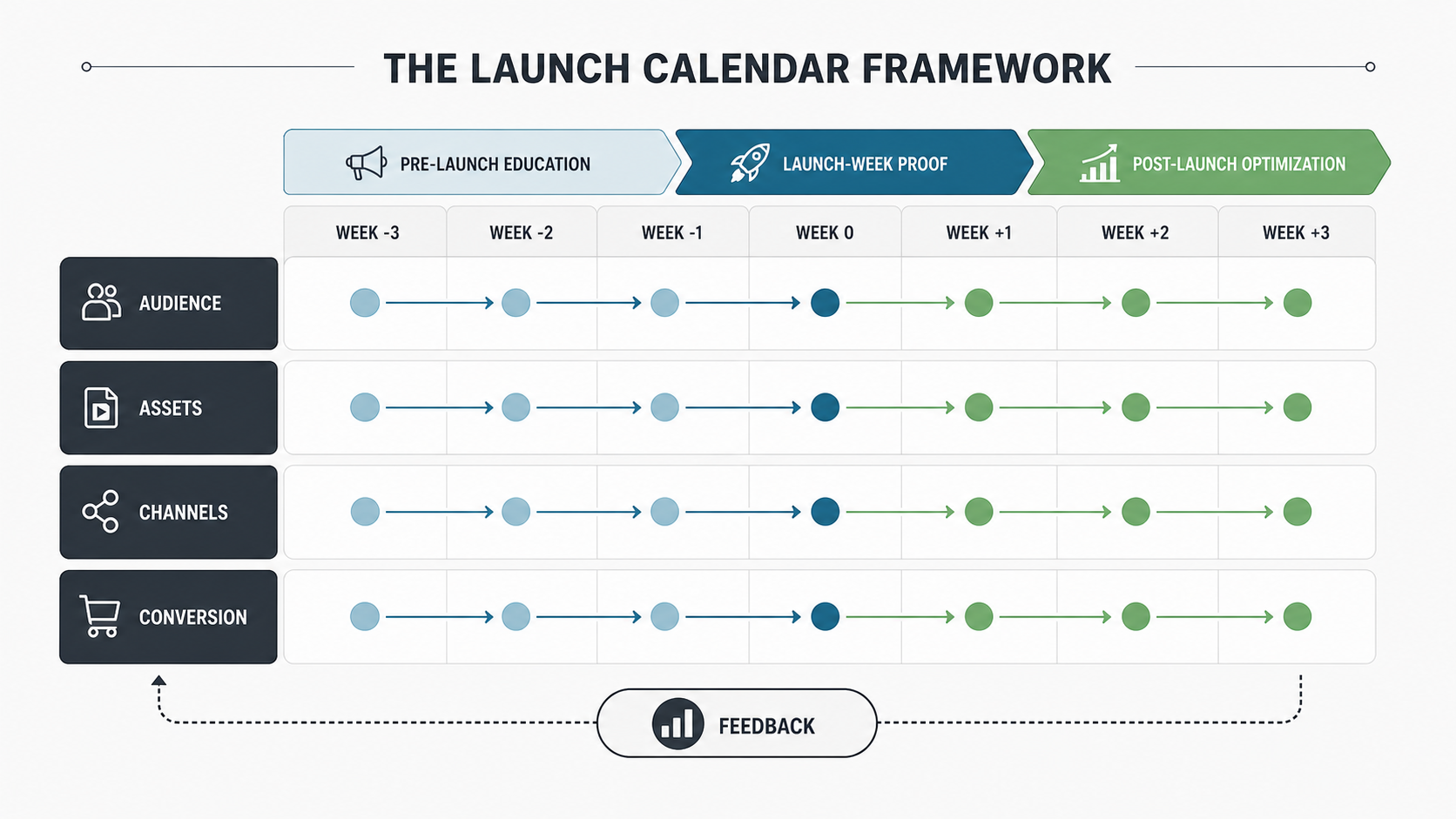
Audience Lane
Define who needs to hear from you this week and what they already believe. Early posts may target unaware prospects with pain-point education. Mid-launch posts may target problem-aware buyers with comparisons, walkthroughs, or objection handling. Launch-week posts should target high-intent users with clear calls to action and proof.
Asset Lane
List the creative asset behind each post before writing captions. Useful launch assets include teaser clips, product walkthroughs, founder notes, customer quotes, comparison images, launch offer pages, short demos, FAQs, onboarding screenshots, and proof posts. If a post cannot point to a useful asset or page, it may be noise.
Channel Lane
Do not paste the same post everywhere. LinkedIn may need founder context and customer pain. Instagram may need visual product moments and short proof. X can support short release notes, launch threads, and frequent updates. YouTube Shorts or Reels can show micro-demos. Email and communities can carry deeper explanations. The calendar should adapt the idea to the channel instead of duplicating text.
Conversion Lane
Every launch post should have one destination: waitlist, app store, landing page, booking form, demo page, checkout, case study, or feature documentation. If the campaign needs new pages, dashboards, integrations, or tracking events, estimate that implementation work early. NextPage's web app development cost guide is useful when the launch path requires more than a simple marketing page.
Feedback Lane
A calendar without feedback becomes a content treadmill. Track post saves, clicks, form starts, completed signups, demo bookings, activation events, objections in comments, and support questions. The goal is not to chase vanity engagement; it is to learn which message gets the right user to take the next step.
A 30-60-90 Day Launch Calendar
Use a 30-60-90 structure when the product has a meaningful launch moment. The timeline can be compressed for smaller releases, but the sequence should stay intact.
60 to 30 Days Before Launch: Build Context
Start with the buyer's problem, not the product. Publish educational posts, short research insights, founder lessons, behind-the-scenes decisions, and problem framing. The call to action can be soft: join the waitlist, answer a survey, follow the build, or download a checklist.
This stage is also when the team should confirm landing-page copy, conversion tracking, analytics events, lead routing, app-store requirements, demo access, and support ownership. A launch calendar cannot fix a broken conversion path after traffic arrives.
30 to 7 Days Before Launch: Create Proof and Specificity
Move from broad education to specific assets. Show what the product does, who it is for, how onboarding works, which workflows it improves, and what changed because of beta feedback. Publish FAQs, objection posts, short demos, comparison tables, and customer or pilot quotes where available.
If the team is unsure whether to build a launch microsite, analytics dashboard, referral flow, or onboarding tool, use the MVP Scope Builder to separate release-one launch needs from nice-to-have campaign infrastructure before turning the calendar into an engineering surprise.
Launch Week: Reduce Friction
Launch week needs clarity. Pin the main announcement. Repeat the offer in different formats. Share proof, product clips, FAQs, founder context, and social validation. Make the next action obvious. If you are running paid boosts, amplify the best-performing message after organic testing instead of boosting unproven copy on day one.
Keep operational owners visible. Someone should watch analytics, comments, support tickets, crash reports, payment errors, booking flow failures, and form completion. Launch content should create demand, but launch operations must protect the buyer experience.
Days 7 to 90: Turn Reactions Into Better Content
After the first spike, the calendar should shift to learning. Turn sales objections into posts. Turn demo questions into short videos. Turn product analytics into onboarding improvements. Turn customer wins into proof assets. Turn confused comments into clearer positioning.
For products with built-in sharing or referral mechanics, social content and product experience should reinforce each other. The same principle appears in focused app examples such as social media integration in a pizza delivery app: users are more likely to share when the product gives them a natural moment and a low-friction sharing path.
Platform Cadence by Channel
A practical launch cadence balances consistency with quality. For many small teams, a realistic baseline is three to five LinkedIn posts per week, three to five short-form visual posts per week, one deeper email or blog update per week, daily launch-week community engagement, and paid boosts only after the message is validated.
For B2B software and SaaS launches, the calendar should also match the product surface: demo pages, onboarding states, pricing or trial flows, lifecycle emails, and support handoffs. If those pieces are still being built, connect the launch calendar to the broader SaaS development services roadmap instead of treating social posts as a separate marketing layer.
Do not treat cadence as a universal rule. A B2B SaaS launch may prioritize LinkedIn, founder posts, email, and demo pages. A consumer app may need Reels, TikTok-style demos, creator collaborations, app-store assets, and referral loops. A service relaunch may need proof posts, before-after stories, case studies, and lead-form offers.
Platform Choices by Launch Goal
Choose platforms by launch job, not by habit. The same launch can need founder credibility on LinkedIn, short proof clips on Instagram or TikTok-style channels, community replies in niche groups, and email for high-intent follow-up. A calendar should make those jobs explicit so the team is not measuring every channel with the same KPI.
| Launch Goal | Best-Fit Content | Primary Channels | Decision Metric |
|---|---|---|---|
| Build early awareness | Problem framing, founder notes, short research insights | LinkedIn, email, community posts | Qualified replies, waitlist clicks, saves |
| Explain product fit | Workflow demos, comparison posts, beta lessons | LinkedIn, YouTube Shorts, Reels, product communities | Demo views, landing-page scroll depth, form starts |
| Drive launch action | Offer posts, proof clips, launch announcement, objection answers | Primary social channel, email, paid retargeting | Signups, installs, bookings, checkout completion |
| Extend post-launch demand | Customer wins, support FAQs, use-case threads, onboarding tips | LinkedIn, blog, email, customer community | Activation, lead quality, objection reduction |
AI, Approval, and Asset Rights Checks for 2026 Launch Calendars
In 2026, a launch calendar should track more than the date, channel, and caption. Teams are now using AI-assisted scheduling, creator content, regional variants, and short-form paid tests inside the same campaign window. That makes the calendar a control surface: each launch post needs a human owner, an approved source asset, a clear usage-rights note, a platform-specific variant, and a measurement field that can be reconciled after publishing.
Use AI to speed up draft variants, timing suggestions, and repurposing ideas, but keep approval, legal review, customer claims, and launch-risk decisions with named people. A social post can create product, support, or compliance pressure within minutes; the calendar should show who can pause a queued post, replace an offer, answer product questions, or update the landing page when signals change.
| Calendar Field | Why It Matters In 2026 | Owner To Name |
|---|---|---|
| AI-assisted publish window | Benchmark timing is useful, but audience-specific timing and launch-week reply coverage decide whether early engagement turns into qualified action. | Social or growth lead |
| Asset provenance and rights | Creator, UGC, AI-assisted, and product-shot assets need usage rights, alt text, approval status, and expiry notes before they enter paid or regional variants. | Brand or content operations owner |
| Platform-specific cut | LinkedIn proof, Instagram/Reels visuals, TikTok-style hooks, YouTube Shorts, email, and community posts need different openings and CTAs, not copy-pasted captions. | Channel owner |
| Pause or replace trigger | Launch calendars should define what happens when product defects, support spikes, negative comments, or low-quality traffic show up during the campaign. | Launch command owner |
| Revenue or activation metric | Reach and likes are directional. The calendar should also reconcile installs, demo bookings, checkout starts, activation, support questions, and CRM quality. | Analytics or revenue owner |
Assets to Prepare Before Writing Captions
Prepare the asset library before the calendar goes live. At minimum, include a launch landing page, one product walkthrough, three short demo clips, five problem-solution posts, customer or beta proof, a FAQ page or post, founder story assets, comparison or alternative messaging, and a post-launch offer.
Also prepare tracking: UTM naming, event definitions, CRM source fields, booking-form routing, app analytics, and dashboard views. Add asset-rights, AI-assistance, approval-state, and pause-trigger fields when the campaign uses creator assets, paid variants, regional posts, or scheduled content that may need to change during launch week. If the marketing team cannot tell which post created which lead or activation, the calendar will be hard to improve.
Launch Measurement and Ownership Checklist
The calendar should include an owner for every operational handoff. Assign who publishes, who replies, who checks analytics, who watches product errors, who handles sales follow-up, and who decides whether a message deserves paid budget. This is especially important when launch traffic depends on new product surfaces, dashboards, or CRM workflows.
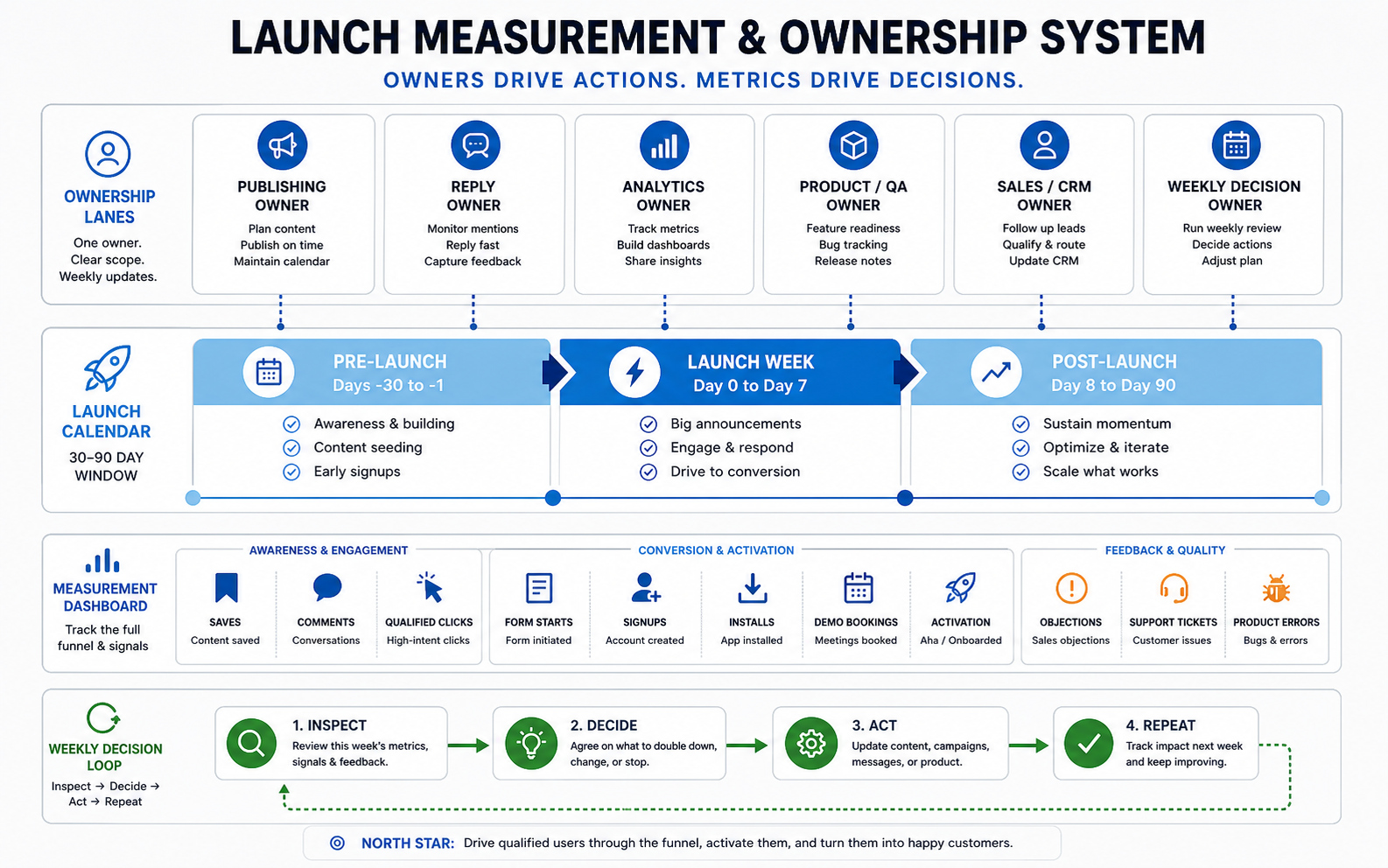
| Launch System | Owner to Name | Readiness Check | Internal Link |
|---|---|---|---|
| Product or app experience | Product or QA lead | Release evidence, device coverage, rollback path | mobile app testing checklist |
| Conversion path | Growth or web owner | Landing page, form routing, analytics events, thank-you flow | custom software development cost |
| Budget and scope decisions | Founder or delivery owner | Campaign infrastructure scoped before launch week | custom software cost estimator |
| Post-launch learning loop | Marketing and support lead | Objections, support questions, demo notes, activation drop-offs reviewed weekly | mobile app maintenance checklist |
Paid and Organic Handoff
Organic content should test the message before paid spend scales it. Look for saves, meaningful comments, high click-through rates, qualified replies, demo bookings, and strong conversion from the landing page. Then use paid boosts to extend the specific asset that created qualified action.
For product launches that depend on social traffic becoming owned revenue, the campaign may also need shoppable collections, checkout, offer codes, CRM capture, and reporting; NextPage's social commerce app development services cover that software layer. Teams without internal execution capacity can still keep strategy ownership while outsourcing production or paid operations. The decision depends on speed, expertise, and internal bandwidth; the older NextPage guide on outsourcing digital marketing is a useful supporting read when the bottleneck is execution capacity rather than product strategy.
Product Launch Content Calendar Template
| Week | Audience Goal | Primary Assets | Social Cadence | Conversion Path | Metric to Review |
|---|---|---|---|---|---|
| Week -6 to -4 | Build problem awareness | Problem posts, research notes, founder context | 3-4 posts per week | Waitlist or survey | Qualified clicks and replies |
| Week -3 to -2 | Show product fit | Demos, workflow clips, beta lessons, FAQs | 4-5 posts per week | Landing page or demo request | Form starts and bookings |
| Launch week | Drive action | Announcement, proof, offer, walkthrough, objection posts | Daily posts plus active replies | Signup, app install, checkout, booking | Conversion rate and activation |
| Week +1 to +4 | Convert remaining demand | Testimonials, use cases, comparison posts, support FAQs | 3-5 posts per week | Demo, trial, onboarding, consultation | Lead quality and objections |
Common Mistakes to Avoid
- Publishing too late: If the first real post happens on launch day, the audience has no context.
- Skipping the conversion path: A strong post cannot rescue a confusing landing page or broken form.
- Using one caption everywhere: Each platform has different proof formats, attention patterns, and buyer expectations.
- Boosting weak creative: Paid spend should amplify validated messaging, not compensate for unclear positioning.
- Ignoring post-launch questions: Comments, support tickets, and demo objections are the best source of the next calendar cycle.
How NextPage Can Help
NextPage helps launch teams connect marketing plans to the product, website, app, analytics, and conversion systems that make the launch measurable. That can include launch landing pages, app readiness, web flows, tracking, CRM routing, dashboards, QA, and campaign implementation support. The GlowCart campaign funnel case study shows the same pattern applied to product landing pages, offer configuration, checkout, upsells, payment routing, analytics, and thank-you flows.
If your launch calendar depends on a new app, web app, product workflow, dashboard, or conversion path, start by mapping the user journey and the assets required for each stage. NextPage's web app development work can turn those campaign requirements into a reliable launch flow when a simple landing page is not enough. Then build only the campaign infrastructure that helps the right user take the next step.